Clint Stringfellow
Forum Replies Created
-

Clint Stringfellow
March 16, 2015 at 8:19 pm in reply to: Avid round-trip MXF files out of sync when sent from Resolve to AvidSorry for late reply, I’ve been on a hectic shoot/edit schedule since I posted the question. I did not transcode when doing the consolidation. Do you recommend transcoding to DNX when consolidating the sequence before going to Resolve? I did notice by the end of the project that the 5D and GoPro footage was all frame accurate. That footage was imported as DNX clips.
Thanks
-
Clint Stringfellow
April 19, 2012 at 9:55 pm in reply to: XDCAM EX Browser/XDCAM EX Clip Browser NO Preview Window*replaced
-
Clint Stringfellow
April 19, 2012 at 9:54 pm in reply to: XDCAM EX Browser/XDCAM EX Clip Browser NO Preview WindowFiles are up to date. I know clip browser was replaces with Browser, but the Browser download was trial only and the trial period rand out. That being said, the problem existed with the current version of Browser during the trial period.
-
Clint Stringfellow
April 17, 2012 at 7:05 pm in reply to: XDCAM EX Browser/XDCAM EX Clip Browser NO Preview WindowWas there ever a resolution to this? I am experiencing the same problem on about half of the systems here at work. All of us are running on identical 2×2.66 GHz 6-core Mac Pros on OSX 10.6.8, yet half of the computers run XDCAM Browser and Clip Browser fine, while the other half have no preview window and cannot playback clips until we export them for NLE. I can’t find anything different on the machines that would cause half of them to not work properly. Any help would be appreciated. Thanks.
-
Noah: budget is SPENT! Gotta work with what I’ve got for now. Thanks for the heads up on the 3rd party software. I’ve heard of that software but never tried it out.
Stephen: the FCP keyer is better than Motion?? I haven’t had much luck w/ the FCP chroma keyer. Maybe I haven’t played around with it enough. I was under the impression that the keying options in Motion were superior.
I’m all for keeping it solely in FCP if I can produce good results.
-
My settings are NTSC DV 720×480 29.97fps in FCP and Motion. As stated in the original post, I am using an external monitor for viewing. It’s an NTSC monitor.
The blur from the motion project just doesn’t look all that nice. Looking closer at the example that I used in FCP, I realized that I did the movement by adjusting the “scale” property in the filter “Basic 3D”. This, in combination with turning on “motion blur” looks nicer than the movement and blur from the Motion project when viewed on the external monitor.
-
Beautiful, thanks! I’ve used Adobe products that let you do this with the eye dropper and was wondering if Motion had a similar function
-
Clint Stringfellow
April 20, 2009 at 11:07 pm in reply to: Unreliable rendering with nested sequencesThanks for the responses. One thing I noticed today is that errors happened during export to quicktime movie, even where there was no need for rendering. ~>=| So, certain clips of audio are dropping out and levels are jumping around during the export process. (Yes, I’m using “current settings” and “make movie self contained”).
So, after re-rendering to fix some errors, I get *other* errors during the export to quicktime process. Seriously, this means I have to QC a 30 min piece IN FCP, again after the export, and one more time after making a DVD. ~>=O NOT the best use of my time.
Yes, I did end up mixing data rates in this particular piece b/c, well, long story. I have always avoided doing this, but I was dealing w/ a sequence that someone else had started, and there was too much material and too little time to export all the audio to the same sample rates. I was assuming FCP could handle it…so I went ahead and used what I had. In hindsight it probably would have been worth the time to batch export it all to 48k. I do believe that this contributed to the “export” issue. The render issue has happened in spots where all the sample rates were 48k.
After experiencing all this, I’m just going to avoid nesting unless I absolutely have to. It ended up costing me more time than it saved me. It’s a nifty feature, but it just doesn’t seem reliable, especially when there’s a lot of rendering involved.
-
Clint Stringfellow
February 11, 2009 at 7:25 pm in reply to: Compressor is slower when using QmasterAhhh, thanks Colin, that makes sense. Yes, I was attempting to set up a virtual cluster on my machine. I spent all my time looking up how to setup Qmaster and I never looked into the RAM requirements.
Eric – this link may help you:
https://fcproducer.com/2008/09/how-to-encode-faster-in-compressor-with-apple-qmaster/ -
Clint Stringfellow
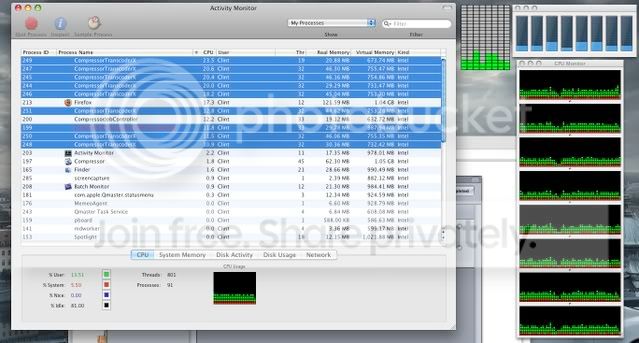
February 10, 2009 at 10:35 pm in reply to: Compressor is slower when using QmasterUpdate: it seems that I had “use unmanaged services” checked when I submitted the compression to “this computer”. This opens 8 instances of compressor to use the 8 processors, but in activity monitor those instances are peaking at about 22%! Heck, half the time they’re using less CPU power than Firefox is. =P I’m I interpreting this correctly? Can anyone tell me what I’m doing wrong?
Here’s what activity monitor looks like: