Clement Dubois
Forum Replies Created
-

Could I use clamp() ? I tried but it not worked.
🤔
-
Thanks again Dan !
-
Hi !
I am still working on the project and I’m having issues with the code.
As you said, the fact that we use random() don’t always generate a different color than the previous one. And it is the case on my project, I tried to “cheat” by adding keyframes and it worked BUT for the rest of my project I have to do it without “cheating” otherwise everything will be broken 😅.
Have you any idea how to do it ? I guess it would be a whole different code
Thanks in advance, Clément.
-
Again, thank you Filip !
Here’s my code !
c = thisComp.layer("Shape layer 1").content("Rectangle 1").content("Fill 1").color;yellow = [0.9961, 0.8941, 0.251, 1];
purple = [0.498, 0.2902, 0.8, 1];
//colorsif (length(c, yellow)<0.001){
purple
}else{
yellow
} -
EDIT :
While we are on the color subject, I wondering how can I compare colors to each others.
For exemple I tried this code :
EDIT :
c = thisComp.layer("Shape layer 1").content("Rectangle 1").content("Fill 1").color;purple = [0.498, 0.2902, 0.8, 1];
yellow = [0.9961, 0.8941, 0.251, 1];if (c[0] == 0.489 && c[1] == 0.2902 && c[2] == 0.8 && c[3] == 1){
[0.9961, 0.8941, 0.251, 1]
}else{
[0.498, 0.2902, 0.8, 1]
}The color don’t change I tried to apply RgbToHsl() but I surely did it wrong.
-
It is pure magic !
This blow my mind ! It work as I wanted !
Thanks you Filip and Tomas for your help ! 🤓
-
Hi Tomas,
To be more specific, I have 5 colors that I want to be random on music beat.
The problem is that the random() expression do it every frame, and the music will be changed in the project, that is is why I thoughts about keyframes, wich I could easily edit on the beat.
-
Clement Dubois
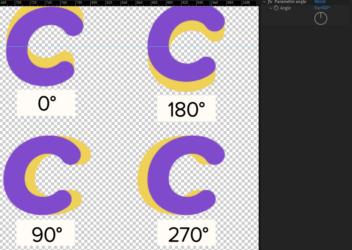
February 3, 2022 at 4:35 pm in reply to: Searching a way to "rotate" position with a angle controllerThanks Filip ! After few tweaks I found this code and it worked fine !
b = thisComp.layer("Null 1").effect("Angle Control")("Angle");
a=degreesToRadians(b);
pos = [Math.cos(a) , Math.sin(a)]; -
Clement Dubois
February 3, 2022 at 4:42 am in reply to: Searching a way to "rotate" position with a angle controllerHi Filip,
Yes the image is missing…
<div>I think it is the kind of code I am looking for, maybe the image will help you.</div>
-
Clement Dubois
November 22, 2021 at 12:45 pm in reply to: Create / Modify key frames positions values with expressionHi, thank you, Andrei and Dan for your replies.
I tried what you sent, and the second expression of Andrei work fine !