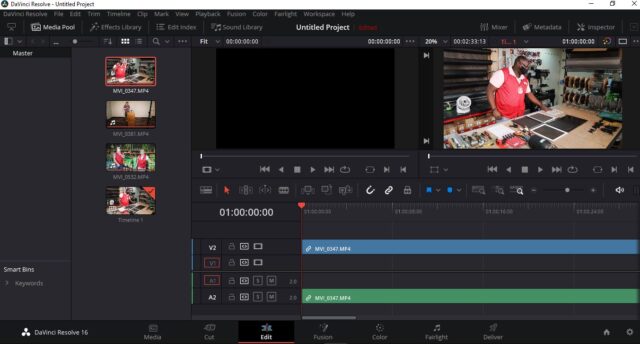
You shared “click the Icon on the left” – which icon? Name? Location? I clicked the View tab and there is no Single Pane/Window view to eliminate the 2<sup>nd</sup> window.
Also, when I drag an MP4 file from the Viewer down to the Timeline it does NOT display what’s in the video in the Viewer; it only displays the name of the video file (e.g. MP4 0135476) not the actual video.
All the YT tutorials I’ve watched (several now) none explain how to display the video in the Timeline and not the file name. Billy Rybka says there’s an Append button but never states where/how you locate that Append.
I’ve Right Clicked, as advised, in a number of places on screen but none have any drop-down menu for Append (to add more media files).
Also, unlike many of the program where you can click the Help button and search for a function like Append, DR Help does not allow that. The online manual does not offer solutions to these questions and others; it per4suemn you’ve migrated from Final Cut Pro or Adobe Premier. I’ve successfully edited several videos using another video editing program and been complimented on the editing and the video but they were much more intuitive, user-friendly and supported by an online community. Trial and error would take more time than I’m permitted and the YT videos don’t address what actions to take when your screen doesn’t display what you see in their controlled environment.
Thaanks.


 1
COW Coin
1
COW Coin