Bruce Dixon
Forum Replies Created
-

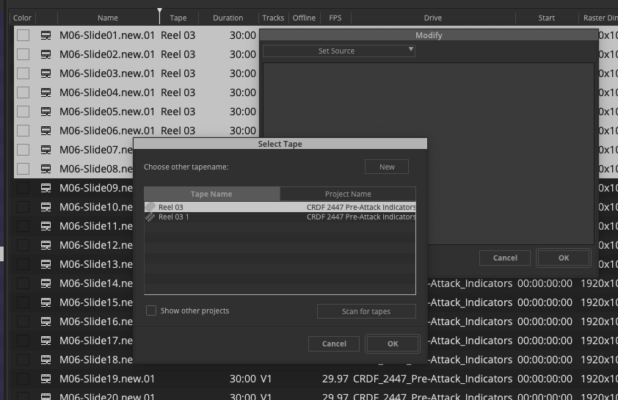
I think Neil wants you to select all the clips that should have the same tape name and use MODIFY to change the source to the same tape name. The result should appear in the “Tape” column in the Bin. You might need to refresh your sequence after completing the modify.
Neil is saying that just because the related clips already seem to have the same tape name, Avid might recognize the clips as being from different tapes. Avid won’t let you assign the same name to multiple tape sources, but that doesn’t mean it can’t happen when bringing clips in from Resolve or other third party software.
The attached screenshot should help show the procedure I’m suggesting.
Let us know if you got it working.

-
Bruce Dixon
September 24, 2021 at 9:35 pm in reply to: Can’t open titles created in Title Tool on MC V8 in Titler+ on MC 2018Short answer, probably not. If you right-click on the title in the timeline you should see a ‘promote to Titler+’ option. I tried a year or two most likely on MC 2020 and it only brought in the text from the original title. All the formatting, fonts, colors, etc. were lost. I hoped they would improve the promote feature over time but I haven’t checked in the most recent versions. Since you’re running MC2018 you may not even have the promote feature and that’s why I said ‘probably not’.
-
Bruce Dixon
September 24, 2021 at 9:26 pm in reply to: Media Creation settings not project-dependentJoseph, I don’t think it’s intended to be that way. Are you able to update your MC version? The latest version of 2018 is 2018.12.15. They’ve fixed a lot of bugs since 2018.11, not to mention the 2019, 2020, and 2021 versions. If possible, test newer versions on a different computer to make sure they don’t cause any problems for your particular workflow before you put them into ‘production’. I’m using MC 2021.6 myself and I haven’t seen this problem.
-
Maciej, I think your plan will work. Avid is just sending one feed to the Ultrastudio. The Ultrastudio is giving you 2 different outputs. As long as both reference monitors can accept the same signal (frame rate, raster size, etc.) you should be fine. An HDMI splitter should also work fine although you might see a brief signal drop out on one monitor when you turn the other one on or off.
-
In my experience Markers on video or audio tracks will stay locked to the frame where they are placed. For example if you mark a frame where you see or hear a handclap, the marker will always mark the the handclap. If you move that clip somewhere else in the sequence the marker will move along with it and still be on the handclap. The only exception I can think of is when you apply motion effects or time compression effects. As another poster already said, the timecode track can’t be trimmed so markers placed there won’t move when trimming.
If you’re seeing different behavior, you might have found a bug in the build you’re using or it’s possible that your sequence is somehow corrupted. Have you tried the old restart the computer trick? Let us know if you figure out what’s going on.
-
We’re having problems with AJA IOExpress on Media Composer 2018.5 or higher. It’s connected to a MacPro tower with a PCIe interface card. In general, when we enable the hardware for monitoring, we get a spinning beach ball which effectively hangs the application. The only way out seems to be a force-quit of Media Composer. The same system works fine with MC 2018.4 and earlier.
We have a support ticket in with Avid and I’ve tried 3 or 4 different AJA driver versions as well subsequent Media Composer versions up to 2018.8 without much change in the problem. Avid says it’s a ‘known issue’ but hasn’t offered me any solutions yet.
-
Bruce Dixon
October 12, 2017 at 5:48 pm in reply to: Sony Content Browser 2 doesn’t work with new MAC OS 10.12.4 updateMy understanding is that Catalyst Browse is a replacement for Sony’s Content Browser 2, even though it does not have all the same capabilities. I personally use Content Browser to move (not copy) clips from one virtual card to another. Catalyst Browse can copy clips, but afaik, it can’t move clips. It does have quite a few transcode options that weren’t in the previous software. Also, Catalyst Browse is free although you do have register your email address to activate it.
In short, I don’t expect Content Browser to be updated, ever. You can switch to Catalyst Browse if it meets your needs, or keep a Mac OS 10.11.x partition on your system to run the old browser software when needed.
https://www.sonycreativesoftware.com/catalyst
-
If the Media Composer export dialog still limits you to 27 characters, try the ‘Send To’ dialog instead of ‘export’. Send to has allowed longer filenames for many years.
-
We’re having a similar problem with Media Composer 8.5.2. Quicktime custom exports work intermittently. When they work, everything is as expected. When they don’t, the export progress bar hangs while the time indicators continue counting. Command-Period is supposed to allow you to cancel the export, but it does nothing. Force-Quitting Avid is the only option. Then the Mac must be rebooted before there is any hope of getting the export to succeed.
In our case, the length of the sequence doesn’t make much difference. I’ve had 3 min. videos hang on export. In our experience, a Same as Source export always works, except when it’s not permitted. I believe Long-GOP avid media is not supported for Same as Source but AMA linked Long-GOP media IS supported, go figure.
We’re lucky enough to have multiple systems, so we do most of our exports on MC 8.4.2 or earlier.
If you don’t have that option, the belt and suspenders approach is to do a video mixdown, remove all other video from the timeline, and export Same as Source. Then you have to transcode your export to the format you actually need, definitely doing things the hard way.
I think this problem was difficult for Avid to catch because custom exports work fine some of the time and there are many editors who’s workflow is always Same as Source export, so they never experienced the problem. I am perplexed at how long it’s taking Avid to fix this however. The problem has been clearly identified and replicated by Avid for almost 3 months. At the very least, Avid should add a hard-to-miss notice in the readme file with 8.5.2 so editors are aware of this problem before they install. I’m really expecting a fix to come any day now. I’ve been checking the Avid Download Center almost daily to see if the next release is out yet.