Bob Wills
Forum Replies Created
-

I have not. Might give that a try since I’m not having much luck anywhere else. Appreciate the advice.
-
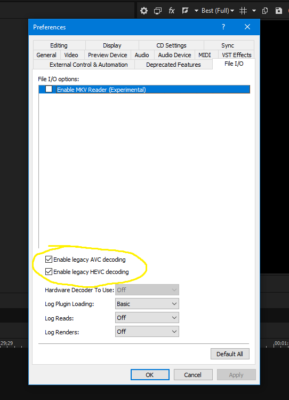
These legacy settings. Are you able to preview to a non primary set monitor without having to have one or both of these checked off in Vegas 18 or 19?
If you are then that would at least answer my question of if it’s even possible in the first place.
Using these settings allows me to preview onto my non primary monitor in Vegas 18 but I am not able to render using my video card, and some 10 bit files aren’t supported because it’s using Vegas’s old system. I would like to avoid all of this if possible so I can render with my GPU and use Nvenc for previewing.

-
Are you able to view the preview onto your non primary monitor without using the legacy settings? My issue is kind of a two parter. Ideally I’d like to find a solution where I don’t have to use any of these weird settings at all as they have side effects and I would like to use the new features.
So far I’ve tried turning GPU Accel on and off, I tried turning the legacy settings on and off. Both with and without GPU Accel on. I tried turning the GPU settings off in the preview device settings. I also tried resetting Vegas’s cache a few times as well as uninstalling and reinstalling a couple times. I even updated my Nvidia Drivers and no luck.
-
Bob Wills
January 7, 2020 at 12:22 pm in reply to: Creating bubbles using Trapcode Particular and After EffectsAnyone happen to have that preset still? I know this post is from a few years back but I started a project with it a few years ago and never saved the dang files. Red Giant got rid of their People domain and Nick himself said he doesn’t have it anymore.
-
I believe it is the same issue that this guy was having. Although none of the things they brought up seemed to fix it for me. https://community.adobe.com/t5/After-Effects/No-preview-in-the-composition-window/td-p/9415148
-
General
Complete name : D:\videos\1.mp4
Format : MPEG-4
Format profile : Base Media / Version 2
Codec ID : mp42 (mp42/mp41)
File size : 1.56 GiB
Duration : 3 min 40 s
Overall bit rate mode : Variable
Overall bit rate : 60.5 Mb/s
Encoded date : UTC 2017-09-27 21:19:18
Tagged date : UTC 2017-09-27 21:19:18
TIM : 00;00;00;00Video
ID : 1
Format : AVC
Format/Info : Advanced Video Codec
Format profile : High@L5.1
Format settings : CABAC / 3 Ref Frames
Format settings, CABAC : Yes
Format settings, RefFrames : 3 frames
Codec ID : avc1
Codec ID/Info : Advanced Video Coding
Duration : 3 min 40 s
Bit rate : 60.4 Mb/s
Width : 1 920 pixels
Height : 1 080 pixels
Display aspect ratio : 16:9
Frame rate mode : Constant
Frame rate : 29.970 (29970/1000) FPS
Original frame rate : 29.970 (30000/1001) FPS
Standard : NTSC
Color space : YUV
Chroma subsampling : 4:2:0
Bit depth : 8 bits
Scan type : Progressive
Bits/(Pixel*Frame) : 0.972
Stream size : 1.55 GiB (100%)
Language : English
Encoded date : UTC 2017-09-27 21:19:18
Tagged date : UTC 2017-09-27 21:19:18
Color range : Limited
Color primaries : BT.709
Transfer characteristics : BT.709
Matrix coefficients : BT.709
Codec configuration box : avcCAudio
ID : 2
Format : AAC LC
Format/Info : Advanced Audio Codec Low Complexity
Codec ID : mp4a-40-2
Duration : 3 min 40 s
Source duration : 3 min 40 s
Bit rate mode : Variable
Bit rate : 125 kb/s
Maximum bit rate : 201 kb/s
Channel(s) : 2 channels
Channel layout : L R
Sampling rate : 48.0 kHz
Frame rate : 46.875 FPS (1024 SPF)
Compression mode : Lossy
Stream size : 3.30 MiB (0%)
Source stream size : 3.30 MiB (0%)
Language : English
Encoded date : UTC 2017-09-27 21:19:18
Tagged date : UTC 2017-09-27 21:19:18 -
It’s actually really weird. I have a 3 second fade out and then a 3 second fade in. With GPU Accel on the fade in starts dark and fades in smooth and quickly. In the rendered video the fade in is slower and feels delayed. With GPU Accel off the fade in seems like it starts off as bright white instead of black but it also fades in smoothly. The rendered video from that also fades in brighter but is still some what delayed in comparison.
-
No I don’t see that in there. There is an improvement with GPU Acceleration off. I wouldn’t say it entirely fixed the problem but it is an improvement. Like I said I think GPU Accel is making the video darker which in turn means the fade is darker so it makes it appear as though its a slower transition.
-
Thanks for replying. I’m running Windows 7 with a GTX 1080 and an i7 4790k. Vegas 16 Build 361. After I turned off GPU Acceleration I am noticing that it seems to have fixed some of the issue. The fade out isn’t nearly as dark as it was and instead seems brighter. Not entirely sure why that is.
What’s the difference between using GPU Acceleration and choosing the Nvidia Codec? Also what would be the significance of using only 1 thread? I’d like to get a solid understanding of what each of these do so I can figure out the best set up for me.