Forum Replies Created

Page 24 of 37
  • Ben Balser

    May 22, 2023 at 9:27 pm in reply to: FCPX transcription capabilities?

    Lumber Jack, I know the developers, is a much more complex logging system. It’s more money, and lots of things you’d probably never use.

  • Ben Balser

    May 22, 2023 at 9:20 pm in reply to: Missing Keyboard command to show/hide libraries

    FCPX and most apps use the system setting for keyboard layout.

    Did you restore defaults in system settings?

    If you have an issue like that, I’d reset FCPX preferences for sure, doesn’t hurt anything, and could prevent other issues.

  • Ben Balser

    May 22, 2023 at 2:45 pm in reply to: FCPX transcription capabilities?

    FCPX by itself is a couple of years behind the competition on that. But the “Extension” SimonSays works really well. Coremelt had Scribomatic for awhile, I beta tested it, it was great, but they dropped it.

    https://www.simonsaysai.com/

  • Ben Balser

    May 22, 2023 at 2:35 pm in reply to: Missing Keyboard command to show/hide libraries

    1, Go to System Settings > Keyboard > Keyboard Shortcuts, click “Restore Defaults” (system shortcuts override app shortcuts).

    2, Hold Opt-Cmd while launching FCPX, delete preferences.

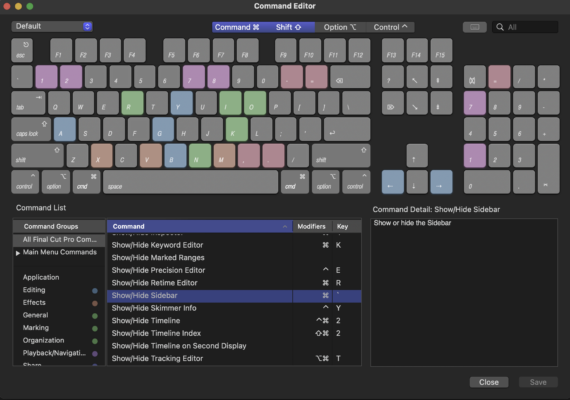
    Here’s my screenshot of the FCPX commands default set, when I do a search for “sidebar”.

  • Ben Balser

    May 20, 2023 at 7:59 pm in reply to: Motion but what about Shake

    It is so old, the code is so out of date, you’d need an ancient Mac with an ancient OS version. What specifically are you unable to do with Motion? You may want to look at Blackmagic Fusion.

    But just FYI, I’ve been using Motion for many years and get a ton of use out of it. With the MotionVFX mO2 plugin, it’s amazing.

  • Ben Balser

    May 20, 2023 at 7:51 pm in reply to: Missing Keyboard command to show/hide libraries

    The default to “Show/Hide Browser” is Control-Command-1.

    The default to “Show/Hide Library Sidebar” is Command-tilde.

    Be sure you have the Default command set active.

    Everything works fine for me in macOS 13.3.1(a) and FCPX 10.6.5.

  • Ben Balser

    May 13, 2023 at 2:17 am in reply to: They did it! Final Cut Pro and Logic Pro for iPad

    I’ve been doing audio with a full blown DAW using Auria and an Apogee Quartest on my iPads for YEARS! Way too little too late, and I never paid a subscription for it. And yes, I can take that stuff into LPX on my Mac. I think Apple made it quite clear with the videos and promo shots these apps are for YT folks, not TV broadcast or feature film. That’s not their market any longer.

  • Ben Balser

    May 12, 2023 at 5:19 pm in reply to: exporting 1080P 60 as Interlaced

    DVD will give you the two files (video and audio) that you need for SD DVD creation.

    If you want a specific encoding setting, create it in Compressor, make it a preset in FCP. Or just Export To Compressor and set it up there. The FCPX export options are super limited, frustrates me. But then, it’s a YT editing app, not a film editing app.

  • You would use the Multicam editing feature and fly through this work very fast.

    https://support.apple.com/guide/final-cut-pro/multicam-editing-workflow-ver10e087fd/10.6.2/mac/11.5.1

    But this will be the same for any NLE.

  • Ben Balser

    May 10, 2023 at 12:32 pm in reply to: They did it! Final Cut Pro and Logic Pro for iPad

    That subscription bothers me. No real need for it. And FCPX still needs a major update. I guess for a few folks this will be helpful, or just fun, maybe.

Page 24 of 37

We use anonymous cookies to give you the best experience we can.
Our Privacy policy | GDPR Policy