Forum Replies Created

Page 14 of 37
  • Ben Balser

    March 7, 2024 at 3:39 pm in reply to: Convert Apple Music (help)

    Install iTunes on the new PC laptop, copy the iTunes library over, simple.

  • Ben Balser

    March 7, 2024 at 3:36 pm in reply to: My M1 Max starts up too easily

    That’s the new Apple default. I hate it. Open the lid, or touch any key, it’s powering up! I have a situation where I have to get two HDMI and an audio interface connected BEFORE booting up (due to the specs of the app we use). But now we have to connect all the hardware while the lid is still closed. The only way to turn this function off and on is via Terminal.

    To stop auto-boot-up, open the Terminal app, and type:

    sudo nvram AutoBoot=%00

    To re-enable auto-boot-up, open the Terminal app, and type:

    sudo nvram AutoBoot=%03

  • Ben Balser

    March 7, 2024 at 3:30 pm in reply to: Motion 5, ProRes4444 alpha channel problem

    Welcome to the wacky words of TV broadcast (which I just retired from) and Motion! Yes, it would be nice if Motion allowed us to chose, but Apple keeps Motion very basic and don’t seem to want Motion to become as powerful as it could be. But no, not even if you Send To Compressor, even there you can’t set how the alpha channel is handled. But you found the solution. You’d think Apple would put that in the documentation somewhere, though.

  • Frame.io

    Avid has a new cloud service developed with Microsoft.

    If it’s just raw footage, you really can use anything these days.

  • Ben Balser

    February 28, 2024 at 1:58 pm in reply to: Timecode bug?

    Again, underestimating the intelligence of a client is very dangerous. I’ve seen so many videographers get in trouble over that.

    Performing arts? Oh heck yes they can deal with full on SMPTE timecode, for sure! They deal with way more complex stuff than you can imagine.

    Stop treating clients as idiots, respect their intelligence, just put the timecode on, they won’t freak out. I’ve been in videography, film, and TV broadcast for about 25 years, I’ve NEVER had a client freak out over frame count in timecode.

  • Ben Balser

    February 20, 2024 at 4:43 pm in reply to: Editing for multiple screens with FCPX

    This is where ROLES comes in really handy. Assign a custom video/audio role to your clips. Then in the timeline, you can use the Timeline Index to enable/disable specific Roles. When exporting, you can choose which Roles to export and which to ignore. I’ve done a few multi-language projects like this. Or place all the clips for a specific screen in a compound clip. Then you work in the compounds individually. There’s several ways to approach this.

  • Ben Balser

    February 20, 2024 at 4:40 pm in reply to: Timecode bug?

    It’s a limitation of the generator in Motion. It’s always been a half-built template, IMHO. Look at some third party timecode readers that may be more flexible. And I think you’re underestimating the intelligence of your coworkers. I’ve submitted thousands of jobs for review by clients over the past two decades, and they never get confused by frames or hundredths of a second being counted in the timecode.

  • Ben Balser

    February 20, 2024 at 4:30 pm in reply to: Markers notes

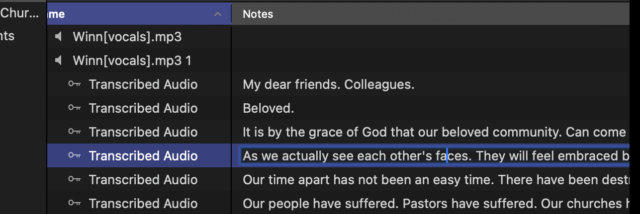
    I do it daily. Click twice on the notes field to highlight it, you can copy, alter, whatever. You can resize and customize those columns, too.

    https://support.apple.com/guide/final-cut-pro/add-clip-and-project-notes-ver5c808894/10.7/mac/13.5

    Here’s a screenshot of my notes highlighted to edit or copy.

  • Ben Balser

    February 19, 2024 at 4:24 pm in reply to: Markers notes

    You can copy/paste notes just like in any other text field on a Mac.

    Or do you want to batch export them like to a spreadsheet?

  • Ben Balser

    February 12, 2024 at 11:49 pm in reply to: Text Outlines Question

    In the OP, look at the bottom of those letters. I don’t think it’s a simple 2D outline, or if it is, it has extrusion.

Page 14 of 37

We use anonymous cookies to give you the best experience we can.
Our Privacy policy | GDPR Policy