Anthony Honciano
Forum Replies Created
-

Anthony Honciano
October 31, 2022 at 5:54 pm in reply to: Particles for a George Jetson tailpipee like thing?If you take a look at the example gif he made, you’ll find his settings visible for the particle system II plugin.
-
Anthony Honciano
October 28, 2022 at 2:52 am in reply to: Particles for a George Jetson tailpipee like thing?Here’s super rough example, like under the lil robot character, he has a lil thruster, and I just wanted to do a simple animation loop like this. But as he moves, I wanted the circles to fall off in place and not follow the robot where ever it goes, but I think using the method you showed me will work just fine, with some tweaking. This GIF is too fast, but the actual one will flow very slowly and smoothly.
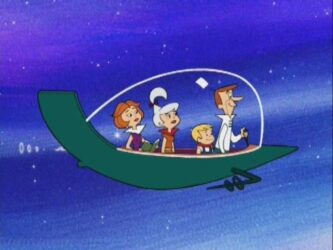
I also copied a jetsons car pic. You’ll notice the rings comign out of the tail pipe. I could do a time-remapping with it, but the rings will follow exactly where the robot moves, and that’s not what I want to do. I want the rings to fall off with gravity wherever they got birthed by the particle emitter. (Sorry for sounding wordy)
-
Anthony Honciano
October 28, 2022 at 2:42 am in reply to: Particles for a George Jetson tailpipee like thing?I think I’m okay. Because that project hasn’t started yet, and I was experimenting on how I can execute it, so I have time to experiment what you showed me. HOwever I did manage to learn what you gave me and applied it to an intro on a project I’m currently working on now. And it looks awesome! There’s some polish and corrections needed, but this is a good start to my rough draft.
-
Anthony Honciano
October 27, 2022 at 4:15 pm in reply to: Particles for a George Jetson tailpipee like thing?Ah thank you for this. Not quite what I had in mind, but it’s definitely closer than what I had. I’ll play with those settings, thank you again!
-
Oh wow! Thank you! Ya I figured that there are tools out there that already do what I’m doing lol.
-
Thank you for this! Much helpful.
-
Anthony Honciano
December 7, 2021 at 1:04 am in reply to: AE Script adding a basic shape to an existing shape layer issueOkay, so I’m figuring out that vector paths dont’ have relative coordinates to the comp, but they do have cooridnate though. So unless there’s a method to create a shape over the existing center shape path, I was thinking maybe have all the groups into one parent group and the coordinates of that and move the new shape there? Is that possible? If so, how do i move all the shape groups into a new parent group?
Sorry, my head is spinning on this, cause i can’t figure it out, and I’ve been googling keywords everywhere for the last hour.
My other guess is to get the coordinates of each group and just MATH the center area?
-
OOOH wait, nevermind, it was my mistake. I didn’t specify 0, I had it start start at 1 in the replace function. ALL GOOD! THANKS!
-
Oh that’s weird…so how do I get it to output 10?