Creative Communities of the World Forums

The peer to peer support community for media production professionals.

Activity Forums Adobe After Effects Particles for a George Jetson tailpipee like thing?

  • Particles for a George Jetson tailpipee like thing?

    Posted by Anthony Honciano on October 27, 2022 at 9:16 am

    Hi, thank you for taking the time to read this.

    So what I’m trying to do is make a floating character, but under it I want to have a repeating animation where a circle/halo starts off big and as it falls downward, it’ll scale to zero. Like a retro cartoon tail pipe.

    I tried playing around with all three particles: Particle System II, Playground and World, but they either animate too fast, or doesn’t offer a life to death transition. Particle World offers a textured square, where I could animate a graphic, but it animates too fast.

    The reason why I’m wanting to use particles instead of a comp with Time-Remapping loop, is that when the character moves, I want some physics with the exhaust. So as the character moves forward, the exhaust falls behind.

    I was hoping someone could help provide some suggestion on how I can set this up? I tried google searching, but I’m just falling onto a bunch of regular overview tutorials, and space travel type particles.

    Thank you 🙂

    Anthony Honciano replied 3 years, 6 months ago 3 Members · 8 Replies
  • 8 Replies
  • Filip Vandueren

    October 27, 2022 at 12:42 pm

    I got a pretty decent effect using Particle systems II.

    the shaded sphere can have a birth and death size as desired, and offers fade in/fade out. I then finetune the shading using levels or curves to have very little contrast.

    Shaded and faded is also an option, then using steel alpha levels adjustments to fine tune the shape of the bubble.

    The speed of the scaling animation is depended on the lifetime of the particles, but there’s no randomization, so I sometimes blend a few particle systems with very similar settings and differing lifetimes.

    What else do you find is animating too fast ?

  • Filip Vandueren

    October 27, 2022 at 2:35 pm
  • Anthony Honciano

    October 27, 2022 at 4:15 pm

    Ah thank you for this. Not quite what I had in mind, but it’s definitely closer than what I had. I’ll play with those settings, thank you again!

  • Filip Vandueren

    October 27, 2022 at 5:06 pm

    Can you post a reference picture or movie what effect you want?

  • Anthony Honciano

    October 28, 2022 at 2:42 am

    I think I’m okay. Because that project hasn’t started yet, and I was experimenting on how I can execute it, so I have time to experiment what you showed me. HOwever I did manage to learn what you gave me and applied it to an intro on a project I’m currently working on now. And it looks awesome! There’s some polish and corrections needed, but this is a good start to my rough draft.

  • Anthony Honciano

    October 28, 2022 at 2:52 am

    Here’s super rough example, like under the lil robot character, he has a lil thruster, and I just wanted to do a simple animation loop like this. But as he moves, I wanted the circles to fall off in place and not follow the robot where ever it goes, but I think using the method you showed me will work just fine, with some tweaking. This GIF is too fast, but the actual one will flow very slowly and smoothly.

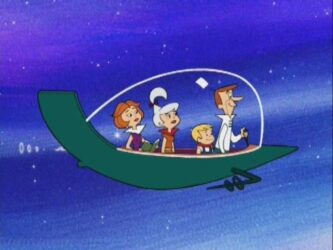
    I also copied a jetsons car pic. You’ll notice the rings comign out of the tail pipe. I could do a time-remapping with it, but the rings will follow exactly where the robot moves, and that’s not what I want to do. I want the rings to fall off with gravity wherever they got birthed by the particle emitter. (Sorry for sounding wordy)

  • Eric Santiago

    October 31, 2022 at 1:56 pm

    Love the example, Filip.

    Do you have a tutorial for that?
    Would love to use it for future classes 🙂

  • Anthony Honciano

    October 31, 2022 at 5:54 pm

    If you take a look at the example gif he made, you’ll find his settings visible for the particle system II plugin.

We use anonymous cookies to give you the best experience we can.
Our Privacy policy | GDPR Policy