-
ExtendScript for After Effects
So I’m trying to learn and teach myself ExtendScript for After Effects, and I learned how to kinda reverse engineer a layer and dial down its properties to get the property name and its Adobe Match Name. I was able to create a for loop to do this, but it only does the first “column” of properties.
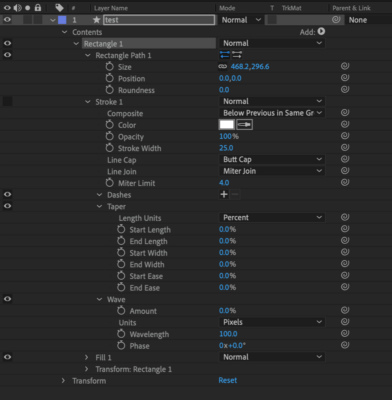
What I want: I want to be able to create a script that will display the entire hierarchy of the selected layer showing the property and its sub-properties (see image).
Below is the code I have that just gives me the first level of property names:
var project = app.project;
var comp = project.activeItem;
var lName = "test" ;
var theLayer = comp.layer(lName)


/*--I set a ridiculous number in the for loop so I can figure out how many properties there are.
Unfortunately ExtendScript (to my knowledge) won't count the length of the property group.
The TRY CATCH method will stop the loop.--*/

for (var i=1; i<1000; i++){
    try{
        var theLayer2 = theLayer.property(i).name;
        $.writeln(i+" Name: "+theLayer.property(i).name+'\<wbr>n'+
        i+" MatchName: "+theLayer.matchName+'\n \n');

    } catch (e){
        break;
    }


}
This is the output I get for the selected shape layer using the above script.
1 Name: Marker
1 MatchName: ADBE Vector Layer


2 Name: Contents
2 MatchName: ADBE Vector Layer

3 Name: Masks
3 MatchName: ADBE Vector Layer


4 Name: Effects
4 MatchName: ADBE Vector Layer


5 Name: Transform
5 MatchName: ADBE Vector Layer


6 Name: Layer Styles
6 MatchName: ADBE Vector Layer


7 Name: Geometry Options
7 MatchName: ADBE Vector Layer


8 Name: Material Options
8 MatchName: ADBE Vector Layer


9 Name: Audio
9 MatchName: ADBE Vector Layer


10 Name: Sets
10 MatchName: ADBE Vector Layer