Andrew Johnstone
Forum Replies Created
-

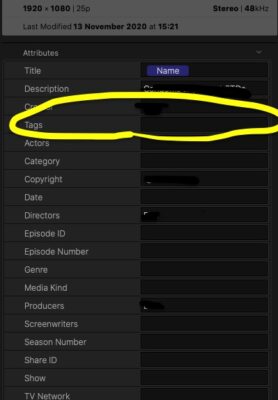
Sorry for the delayed reply…never really figured this out BTW. I can successfully Keyword multiple projects but cant see how to tag multiple projects so that they are all tagged when I want to export (“Share”) the project.
-
Yes I tried that…
-
Ah…just figured out how to add Keywords to multiple projects (handy…!), but these do not see to show up as ‘tags’ in the info panel when I am trying to Share the clips . Copying and pasting the tags is easy enough, but when i have 20 films to spit out it is better to be able to automate this…
Thanks for any help.

-
Meta is not something I have really paid much attention to although I know that is what FCPX is supposed to be good at.
At the moment I am changing the Tags for each film as I ‘share’ them. Will the Keyword editor do this for me?
-
Andrew Johnstone
February 15, 2020 at 10:33 am in reply to: Storage Solution + Workflow? (one-man-band video producer)Thanks Bob,
Good ‘tell it like it is info’.
I am starting work on a feature doc (70 mins run time) and we will need to figure out a fix for storage fairly soon. For various reasons we now cut on FCPX (which i loathed to start with but now love), but one of the the NLE’s strengths is also an issue – library size. Even a small 5-7 min project for broadcast or corporate clients (in HD) yields and FCPX library of around 8-900GB, so my best guess is that a project that we will be shooting in 4k for will need massive storage. At the moment we use individual 1 or 2TB SSDs for working edit drives form small projects and then archive the finished libraries to disk without the converted media.
We already need more capacity for the rushes as our existing system is full, but the edit raid will need to be pretty sizeable too. and that is just for one project.
What we have tried to do in the past is to retire old drives and use them as deep storage for old projects and old rushes. The worry is that the connectivity ports (USB3 or Thuderbolt 2) on these old drives will become obsolete before too long. I have already had to pull out old HDs from firewire raids from 10 years ago and we use a StarTech slot in drivereader to access any material on those.
But in a nutshell you’re right. the quest for storage seems to never end. The Gtechs look like a good solution though…
Andy Johnstone
Wild Dog Limited
film & multimedia production
http://www.wilddogworld.com -
Andrew Johnstone
February 9, 2020 at 5:57 pm in reply to: Storage Solution + Workflow? (one-man-band video producer)Yes I am all ears too.
I am in a similar situation with a SSD per project sitting on my desk, plus any number of old HD’s and drives (some are duplicated back ups of old rushes) clogging up cupboard space in the office.
I’d like to work my way back through my entire archive and back stuff up on line, just keeping current projects on project drives.
I am not sure that our current web connection is fast enough, but must be soon. I certainly want to avoid having to buy more and more external drives though.
Andy Johnstone
Wild Dog Limited
film & multimedia production
http://www.wilddogworld.com -
Thanks that is all very useful info. Good to hear that FCPX does manage very large project (library files) – all be it on a much speedier/hefitier machine…
Andy Johnstone
Wild Dog Limited
film & multimedia production
http://www.wilddogworld.com -
My normal work flow is that:
External SSDs connected by Thunderbolt 3. Cache is in the Library file on the external SSD, imported media is in the Library file too.
I have previously cut using ‘Leave files in place’ (as I would on Premier) but this creates issues when transferring projects (libraries) between my system and the online system 9for grade & dub) and I have found it is much simpler to keep everything bundled into one FCPX library file.
I would anticipate getting a much larger external T3 RAID with a dedicated project back up drive as well, but just how big is the Q…and does the sze of the FCPX library file affect performance after a while. I assume not if FCPX has everything converted to its favourite file format.
Andy Johnstone
Wild Dog Limited
film & multimedia production
http://www.wilddogworld.com -
Thanks for all the comments so far. Deleting old cache files is a good idea and something I should do more often.
I have a thunderbolt 2 Raid on my system where I keep all my rushes. The for each project (or ‘library’ in FCPX-ese) I import that material and also create proxies. The project libraries live on external SSD cards and I have one for each project. I also create a back up copy to another disk, as well as exporting the XML files of the final cut to store on my cloud server.
Andy
Andy Johnstone
Wild Dog Limited
film & multimedia production
http://www.wilddogworld.com -
I have traced the issue to a faulty SD card. I have reformatted a new card and now FCPX is quite happy.
Hopefully this is all the issue was.
Andy
Andy Johnstone
Wild Dog Limited
film & multimedia production
http://www.wilddogworld.com