Forum Replies Created

  • Alex Ardino

    October 13, 2020 at 9:30 am in reply to: Diffusion Pass coming out pixelated

    Yep.

  • Alex Ardino

    October 12, 2020 at 10:31 pm in reply to: Diffusion Pass coming out pixelated

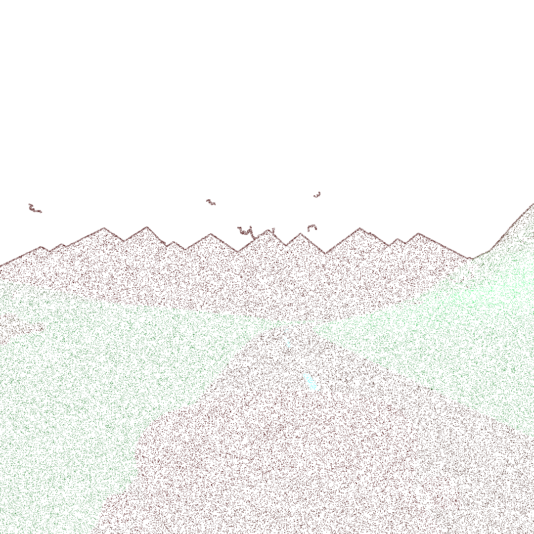
    Another example from a another project I’m working of this is the weird diffuse pass compared to the normal render file. No idea why…

  • Alex Ardino

    October 12, 2020 at 10:03 pm in reply to: Diffusion Pass coming out pixelated

    Hi MIchael, so I tried it a bunch of times, first with a cube, then step by step added reflection, lights, HRDI sky and a transperant object, and in all these renders the diffuse was fine. This is frustrating as in multiple more complex scenes my diffuse pass is always coming out pixelated as shown previously. Just can’t figure it out…

  • Alex Ardino

    October 12, 2020 at 11:46 am in reply to: Diffusion Pass coming out pixelated

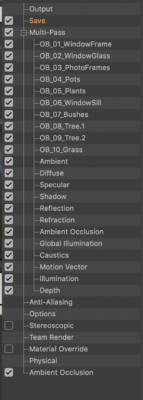
    Ah ok fair enough. I had the pass on because I wasn’t sure if ambient illumination or any other light effects might by picked up by it, I’m still learning in the way of compositing and definitely happy from culling from that long list!

    So yeh it’s weird isn’t it, I have no idea why my diffusion pass is coming out like this.

  • Alex Ardino

    October 12, 2020 at 5:40 am in reply to: Diffusion Pass coming out pixelated

    Hi Michael, thanks for helping, so I’m using the Physical renderer and I’ve got Global Illumination as a multi pass but not as an effect in the render settings. However I do have one light with ambient illumination checked on. Would any of those factors be contributing?

  • Alex Ardino

    October 5, 2020 at 7:39 am in reply to: Issues importing 3D data from C4D to Ae

    Hi guys I’ve just worked out that I can very easily import 3d data using Cineware, so much faster. Don’t think I’ll be using the Aec for this again. Cheers 🙂

  • Alex Ardino

    August 27, 2020 at 5:25 am in reply to: Animating the position of baked particles

    Solved:
    I’ve found a way round this by using the Cloner and MoGraph cache instead of the Bake Particles option for the emitter. First I cloned the emitted object (sphere) with the cloner in Object mode and the emitter in the object field, then applied the MoGraph Cache and hit bake. Once baked I was able to move the emitted particles with no additional affect on the emitted particles. Cheers

    batblob-solutiondetails.png

    batblob.png

  • Alex Ardino

    August 27, 2020 at 5:22 am in reply to: Animating the position of baked particles

    Thanks Brian, I’ve just had a look at Alembic baking options and very impressed with what’s available here, I definitely have a lot to learn in this particular area. So I found another work around that worked for me using the cloner and MoGraph Cache with I’ll explain in a separate message. Thanks again 🙂

We use anonymous cookies to give you the best experience we can.
Our Privacy policy | GDPR Policy