Forum Replies Created

Page 1 of 5
  • Albert Kowalski

    June 25, 2024 at 6:41 am in reply to: Duplicating and randomizing shape layer

    Thank you, that was really useless.

  • Hi, I am trying this attempt but not sure what the steps are:

    1) How the layers should be stacked? Which is on top, the middle, and on the bottom? Which one should have the effect on?
    2) What do you mean by “changing the threshold?”

  • Albert Kowalski

    September 1, 2023 at 10:16 am in reply to: Shared copies of keyframes

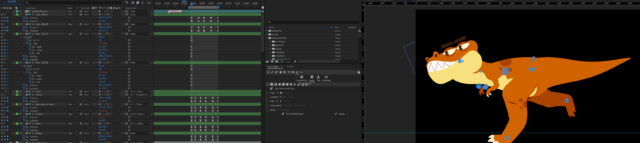
    I don’t really know if it would work in my project so I’ll just show you exactly what I am doing.

    In the screenshot you can see my comp. I am animating a dinosaur. He is doing different things in the whole comp. If those would be just “one shot” routines it won’t be a problem but sometimes he runs (cycled animation). In the screen you can see one cycle of the run. I want to duplicate this cycle couple of times but now I am sure that loopOut expression won’t work because it will affect other keyframes in the comp where dinosaur is doing different things. I could limit the loopOut to only couple of cycles but if there will be a different cycled animation in this comp, for example a walk, then I would need to use another loopOut for that and I don’t think it is even possible…

    So the simplest way it would be to copy the keyframes couple of times but then any change I want in the run I would need to change every frame in the whole cycle which is painful.

    I tried using Connector in DUIK but unfortunately it affects the whole comp and I cannot use it multiple times in one comp in different ranges.

    So maybe what I am trying to achieve is simply impossible 🙂

  • Albert Kowalski

    August 31, 2023 at 5:18 pm in reply to: Shared copies of keyframes

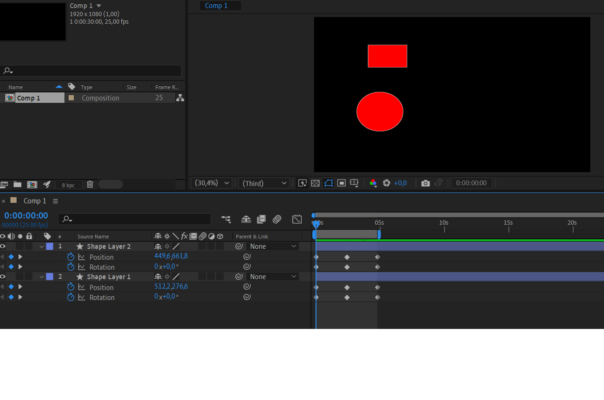
    Ok, I’ll try to explain as easy as possible with this example:

    As you can see on the screenshot I have two objects that change their positions and rotate. It is a looped animation (the last keyframes are the same as the first one). Now I want to loop those properties (position and rotation) by copying those keyframes multiple times. But I want to make a shared copy so whenever I make any change in those first keyframes, those copies will change as well.

    I could use a loopOut expression but the problem is I would need to put it in every property and in my real project I have much more objects. So now I would have tons of loopOut expressions and in case I want to make a change in the expression I would need to go to each one and make a change, lot of work. So the solution would be to have one expression linked to all those properties.

    I know I could precomp this and loopOut the precomp but that would also not work because in my real project there are also objects that changes independently during the whole composition, so looping just one small part of the comp would not work.

  • Albert Kowalski

    August 31, 2023 at 7:15 am in reply to: Shared copies of keyframes

    Hmm, that doesn’t really solve the case. How about this: can I share an expression? So let’s say I make an expression on Position of the layer and now I want the same expression to be used on other Positions of 10 other layers but the first expression is the parent. So if I change anything in the first expression all the other expression will also change.

  • Albert Kowalski

    September 2, 2020 at 11:39 am in reply to: Puppet Pin 3D Parenting

    Your tip works ☺ Although I wonder is there a way to rotate the layer view? I need to rotate my 3d object, so when it is upside down and in the layer view it is not, the motion path is upside down 🙂

  • Albert Kowalski

    August 31, 2020 at 7:51 pm in reply to: Puppet Pin 3D Parenting

    Sweet! I’ll give it a try, thanks!

  • Albert Kowalski

    August 31, 2020 at 7:32 pm in reply to: Puppet Pin 3D Parenting

    It’s related to both parenting and 3D. If it’s not 3D the parenting doesn’t mess it up. Of course if it is 3D and there is no parenting it also works, but that’s not what I want. I don’t really understand what do you mean by opening the comp in footage windows. Alt+click on the comp doesn’t do anything.

  • Albert Kowalski

    August 31, 2020 at 6:11 am in reply to: Puppet Pin 3D Parenting

    Hi!

    As you can see below the comp there is a motion path of the puppet pin position.

  • Unfortunately I haven’t found a solution 🙁

Page 1 of 5

We use anonymous cookies to give you the best experience we can.
Our Privacy policy | GDPR Policy