

-
Twixtor slow motion is choppy?
Posted by Andrew Mcgraw on August 3, 2018 at 5:49 amFor some reason whenever I add slow motion to a clip in Vegas, it’s choppy. The video will continue as normal, but there will be a lot of pauses. I understand that this is a frames issue, so I recorded in 60 (59.94) frames and set my project to 60 frames. I then tried again with no luck. Is there any way that I could fix this? Thank you!
Graham Bernard replied 8 years, 1 month ago 3 Members · 15 Replies -
15 Replies
-

Graham Bernard
August 3, 2018 at 7:17 am[Andrew McGraw] “The video will continue as normal, but there will be a lot of pauses.”
I use TWIXTOR, it’s a great package. I disable resampling. This might help.
* Grazie
Video Content Creator and Potter
PC 7 64-bit 16gb * Intel® Core™i7-2600k Quad Core 3.40GHz * 2GB NVIDIA GEFORCE GTX 560 Ti
Cameras: Canon XF300 + PowerShot SX50HS Bridge -

Steve Rhoden
August 3, 2018 at 3:00 pmDisable resampling and watch a few online twixtor tutorials, you will be surprise the many features
in it you are not using for impressive results.Steve Rhoden (Cow Leader)
Film Maker & VFX Artist.
Owner of Filmex Creative Media.
Samples of my Work and Company can be seen here:
https://www.facebook.com/FilmexCreativeMedia -

Andrew Mcgraw
August 4, 2018 at 6:11 pmI have tried all the tutorials there possibly are. I am doing all the right things they say to do yet I still encounter this problem.
-
Graham Bernard
August 4, 2018 at 6:39 pm[Andrew McGraw] ” I still have the issue.”
Does your Project Settings MATCH your Media?
This is what I do.
1) Ensure Resample is Disabled.
2) From the Event create a SubClip. Did you do that?
3) Apply TWIXTOR.
If you’re still getting an issue then somewhere your getting an error. Do you have any Motion Blur activity going on?
Please post your Timeline clearly showing the SubClip.
TWIXTOR is just so solid a piece of software I can’t imagi just how the stutter is being created. Also your TWIXTOR Settings.
* Grazie
Video Content Creator and Potter
PC 7 64-bit 16gb * Intel® Core™i7-2600k Quad Core 3.40GHz * 2GB NVIDIA GEFORCE GTX 560 Ti
Cameras: Canon XF300 + PowerShot SX50HS Bridge -
Andrew Mcgraw
August 5, 2018 at 7:42 amMy project settings do match my media. My project settings are at 59.94 FPS and my GoPro clips were recorded at 59.94 FPS.
1.) I did ensure my resample is disabled.
2.) Yes, it is a subclip.
3.) I did apply Twixtor.
I am getting some motion blur actually.
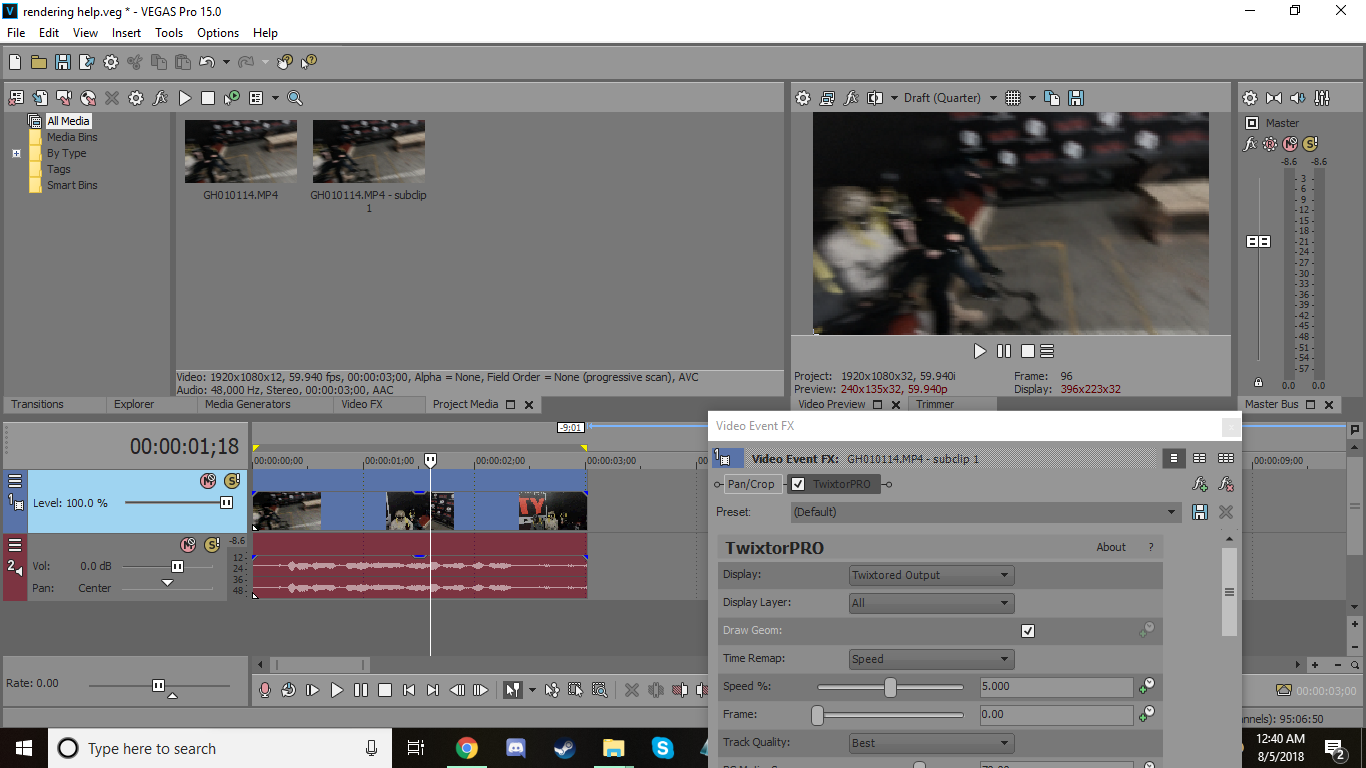
-
Andrew Mcgraw
August 5, 2018 at 7:46 amHere is the timeline https://i.gyazo.com/a238e643995e441556c6a94c1e9c522d.png
-
Graham Bernard
August 5, 2018 at 8:10 amLooking at your TWIXTOR Settings you have % set to 5.0000 – do you want that?
* Grazie
Video Content Creator and Potter
PC 7 64-bit 16gb * Intel® Core™i7-2600k Quad Core 3.40GHz * 2GB NVIDIA GEFORCE GTX 560 Ti
Cameras: Canon XF300 + PowerShot SX50HS Bridge -
Andrew Mcgraw
August 5, 2018 at 8:52 amI do want it at five. I’m trying to make it super slow. Is that alright?
-
Graham Bernard
August 5, 2018 at 9:21 am[Andrew McGraw] “Is that alright?”
Are you asking for my permission, which isn’t my purpose for attempting to help people here, or, are you asking if it is technically possible?
You decide.
* Grazie
Video Content Creator and Potter
PC 7 64-bit 16gb * Intel® Core™i7-2600k Quad Core 3.40GHz * 2GB NVIDIA GEFORCE GTX 560 Ti
Cameras: Canon XF300 + PowerShot SX50HS Bridge
Reply to this Discussion! Login or Sign Up