

Activity › Forums › Adobe After Effects Expressions › toFixed() for all iterations after “.join()
-
toFixed() for all iterations after “.join()
Posted by Smet Kira on November 18, 2022 at 8:50 amHello guys. How i can apply “toFixed(3)” to all iteratins after a.join()?
 Filip Vandueren replied 3 years, 8 months ago 3 Members · 4 Replies
 -
4 Replies
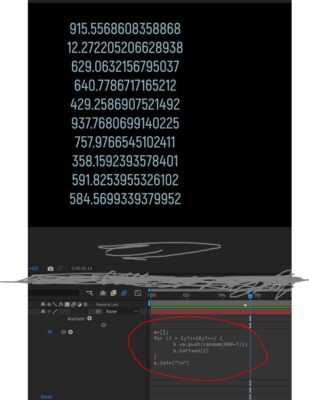
-

Filip Vandueren
November 18, 2022 at 3:02 pmHi Kira,
it depends.
If it’s ok that “a” becomes an array of string-representations of the numbers with just 3 decimals:
a=[];
for (i=1; i<10; i++) {
    a.push(random(998+i).toFixed(3));
}
a.join("\r");
if you need “a” to still have the numbers with full precision, but want a string list with 3 decimals:
a=[];
for (i=1; i<10; i++) {
    a.push(random(998+i));
}
a.map( n => n.toFixed(3)).join("\r");
this will not alter the numbers in a.
-

Otávio Nascimento
November 30, 2022 at 10:26 pmHi. I tried to add columns to this expression but I couldnt. Is there a way to add columns in addition with rows to this expression?
a=[];
for (i=1; i<10; i++) {
    a.push(random(998+i).toFixed(3));
}
a.join("\r");
-
Filip Vandueren
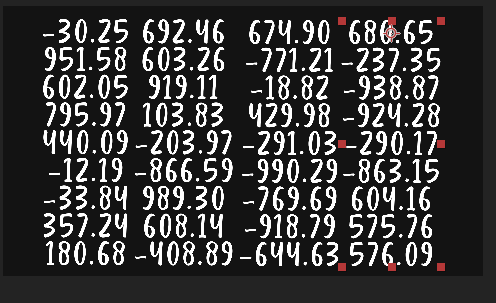
December 1, 2022 at 8:06 amUnless you are using a fixed-width font, it is almost impossible to do that kind of layout using an expression on sourceText alone.
I prefer doing it with text animator like this:
- add a position text-animator.
- set the position-value to: 10,000 , 10,000
- remove the default range and add an expression selector
- change its “based on” property to: “Lines”
- this is the expression for that selector:
i = textIndex-1;
st = text.sourceText.style;
ld = st.autoLeading ? st.fontSize*1.2 : st.leading;

rowH = 128;
columnW = 360;

itemsPerRow = 8;
x = (i%itemsPerRow) * columnW;
y = Math.floor(i/itemsPerRow) * rowH;

y-= ld*i; // offset the already present Y-difference caused by newlines
[x, y]/100;
This will fill up the “grid” rows first, then columns.
If you want it to fill up by columns first, then change the middle part to:
itemsPerColumn = 8;
x = Math.floor(i/itemsPerColumn) * columnW;
y = (i%itemsPerColumn) * rowH;
Some extra remarks:
It will look best with the paragraph Right Aligned I suppose.
Make sure that in the Paragraph palette “Add space before” and “…after” and all the other margin parameters are set to 0px. (they don’t get count in the leading and will push each next cell a bit more down and off the grid)
Some Fonts lay out their digits so that they line up nicer in spreadsheets (as if they are fixed-width) but to get that feature, the kerning of your text-layer needs to be set to “Metrics”.
Not all fonts have this (for example Museo, Montserrat or more Display/whimsical stuff like Comic sans or Herculanum don’t) but most professional typefaces that are used for layout do.You can of course hook up some of the parameters to sliders.

Reply to this Discussion! Login or Sign Up