

-
Sony Vegas Render Time: 33 hours for a 8 minute video?
Seetha ramaiah Velicheti replied 5 years, 9 months ago 7 Members · 15 Replies
-

David Alfredo
April 30, 2013 at 2:50 am[Anthony Desjardins] “I see what you’re trying to say but whats weird is that the first two times i rendered, it gave me realistic render times. this was also done on the same computer where the cpu was used to its full potential. so i dont think buying a dedicated gpu will solve my problem but it would definitely help me in the future.
“sorry if I’m “trying” to properly comment here, I’m obviously not a native English speaker, I’m Spanish and took advanced German and French at school so I just speak the most basic English you can learn in Spain public school. With that said I’d like to know if the issue you’re experiencing with Vegas rendering happens with the exact same settings you used those times it was running fine for you…
I mean, same integrated-GPU drivers, same Vegas build, same source material, the same template with same plugins’ versions if you used them in the first place… you cannot judge performance based on different codecs/templates/source material/desired output/plugins chain…
if that’s indeed the case and suddenly the performance has severely dropped then it’s a hardware-related issue, is your CPU overclocked ? if it is… is your PSU (power supply unit) rated for your CPU ? have you upgraded the drivers of your integrated Intel GPU ? have you tried resetting Vegas to default (hold CTRL+SHIFT while booting Vegas) ? in any case I would recommend uninstalling and re-installing your IGP drivers, then re-installing DirectX, booting Vegas with default settings, disabling GPU acceleration, restart computer and enable acceleration back, report back after that. Good luck.
Edit: Also, go into Control Panel -> Install/Uninstall programs -> Windows Updates and look for Update KB2670838 or Internet Explorer 10, if you are using IE10 you definitely have KB2670838 installed, get rid of it and hide it from auto-updating, that update can mess with your system performance and it’s not fixed yet.
-

Anthony Desjardins
April 30, 2013 at 3:34 amthanks for the help, i will try to update my drivers. i have already tried resetting vegas and uninstall+reinstalling but no success 🙁
-

John Rofrano
April 30, 2013 at 10:22 am[Anthony Desjardins] “i think theres something weird in my settings. “
Check that you didn’t touch the Level setting on any of the Video track headers. Setting the level to anything that’s not 100% will cause render times to skyrocket. The same is true for dropping the opacity on the events by accident.
This is why I told you to render to a different format like MainConcept AVC. If all of the formats take long then something is wrong with your project. If only WMV takes long then something is wrong with the format.
You also should turn off the GPU in Options | Preference | Video to see if the GPU is affecting your times like others have suggested.
~jr
http://www.johnrofrano.com
http://www.vasst.com -
Emmanuel Virgil Albelda
October 24, 2020 at 1:20 amHi who can help me? Im rendering a 10 min film with lots of layers, and it took 12 hours to render but whenever it reaches 43 percent it stopped , my laptop doesbt hang and i can still click thw software its just that the rendering process stopped and never moved, whats the reason of this ? Can anyone help me? ? Im using vegas 18
-

Seetha ramaiah Velicheti
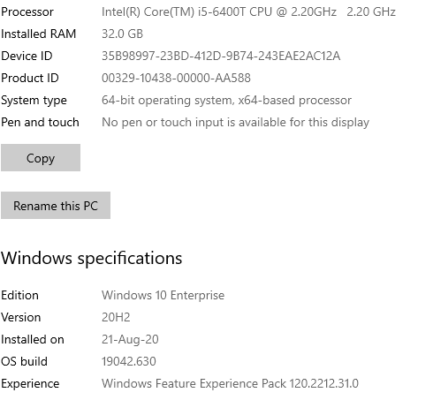
December 1, 2020 at 10:19 amDon’t worry. In which country you are put up? I am from India. I am using Vegas Pro 17. I read somewhere that desktops are always better for video editing and laptops of what power and strength they may have, most likely to hang or stuck depending on the workload of powerful editing plug-ins. I am not a master but a constant self-learner. I do my music video-editing on desktop with 24″ monitor so that my eyes never pain and I am quite comfortable with external keyboard and 24″ screen. i5/6th Gen/32GB-DDR4 Ram with NVidea GTX-1050ti Graphic Card. Such graphic cards have a facility known as NVNEC for quick rendering, appearing just below your any rendering format, which reduces the rendering time to somewhat lesser than 50% of actual time taken in normal rendering offered by Vegas Pro. Can you come on team viewer? I wish to see your project file. Is your Vegas Pro 18 original or cracked one?

Reply to this Discussion! Login or Sign Up