

-
Problem with toCompVec() inside the expression selector
Hey folks,
I’ve been messin’ around with toCompVec() inside an expression selector to hide words that don’t face the camera and had some decent success with it. I’ve attached some examples of what I managed to achieve.
The way I made this work is by virtually re-calculating the text animator setup inside the opacity expression selector to give each textIndex updated rotation data for toCompVec to work with. Not sure if there’s a more straightforward way to do so, but if there is, I’d love to know!
It was fairly simple only having to update the rotation data, and I found a way to nail the boundaries too. All I did was use the cuboid’s z-anchor (or half its depth) as a threshold to determine whether a front vector has exceeded the outer cuboid edges, meaning it’s within the visible front. When I leave out the threshold, it’s not fully accurate.
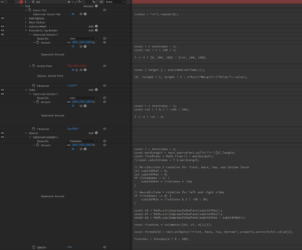
Now, a problem arises when I try to create multiple cuboids with text on all 6 faces. The goal is to have a word where each character is a cuboid. The way I laid it out is by having 6 repeated lines of text, 1 for each face of the cuboid. (A screenshot of the setup and a project file are down below)
As you can see in the “Problem” example, the center cuboid behaves correctly, but the others don’t. I suspect it is because not only do I need to re-calculate the rotations, but also the text’s positions/anchor points and virtually spread out all cuboids. And that’s where I’m stuck.
I can imagine that it would require virtually offsetting each cuboidIndex by its dimensions + tracking, but I couldn’t figure out how to calculate it and feed the updated transform data into toCompVec().
Here’s the expression selector code that handles the opacity:
const i = textIndex - 1;
const wordLength = text.sourceText.split("\r")[0].length;
const lineIndex = Math.floor(i / wordLength);
//const cuboidIndex = i % wordLength;
// Re-calculate X rotation for front, back, top, and bottom faces
let cuboidXRot = 0;
if (lineIndex < 4) {
cuboidXRot = lineIndex * -90;
}
// Re-calculate Y rotation for left and right sides
let cuboidYRot = 0;
if (lineIndex >= 4) {
cuboidYRot = lineIndex % 2 ? -90 : 90;
}
const dX = Math.sin(degreesToRadians(cuboidYRot));
const dY = Math.sin(degreesToRadians(cuboidXRot));
const dZ = Math.cos(degreesToRadians(cuboidXRot + cuboidYRot));
const frontVec = toCompVec([dX, dY, dZ])[2];
// Cuboid's Z-anchor or half its depth
const threshold = text.animator("Spread").property.anchorPoint.value[2];
frontVec > threshold ? 0 : 100;
Would truly appreciate any help on this. Cheers 🙂



Sorry, there were no replies found.