Creative Communities of the World Forums

The peer to peer support community for media production professionals.

Activity Forums Adobe After Effects Expressions loopOut(“offset”) As A Function?

  • loopOut(“offset”) As A Function?

    Posted by Nils Hammers on May 9, 2024 at 1:50 pm

    I have animated-on-twos moon-walking character, and I need to put it into tracking camera motion, which, when match-moved, either strobes the character or the environment.
    Thus, I’d like to see how it works with some inbetween-keyframes controls.
    There are some dozen linear keys in every even frame number for the first second, which then is looped into 10 . What I want to achieve is to modify odd frame values, to find some sweetspot between stepped and linear tangents.
    However, I can’t wrap my head around on loopOut integration into values, as it either overrides (as seen in the script example), has no looping effect if used before valueAtTime, or causes an error if used as a function value.loopOut(“offset”).

    f = effect("T2F")("Slider") ; dt = effect("DeltaT")("Slider") ;
    if (f%2) {
    valueAtTime(time+dt) ;
    loopOut("offset") ;
    }
    else {
    value ;
    loopOut("offset") ;
    }

    DeltaT slider basically is the one that should determine, how much the current frame is closer to the previous key value, probably will need to animate it too.

    Dan Ebberts replied 2 years ago 3 Members · 7 Replies
  • 7 Replies
  • Dan Ebberts

    May 9, 2024 at 3:24 pm

    loopOut() ignores and overwrites anything you’ve done previously in the expression. However, you can create your own code that does what loopOut() does but applies it to something you’ve calculated. I might be able to help if I understood exactly what it is that you’re trying to do.

  • Nils Hammers

    May 9, 2024 at 3:57 pm

    Hey, thanks Dan!

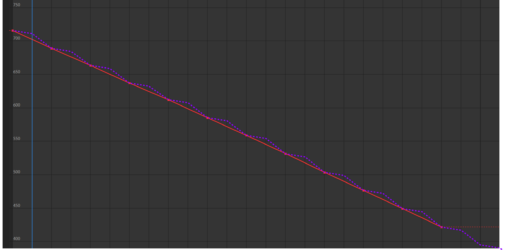
    All I want is to sample a value from the loopOut(“offset”)-ed data, and output it instead of actual value. There in the image you can see the keyframed animation in red, and desired animation in dotted magenta.

    In my code, there for the sampling I used valueAtTime(time-DeltaT), were DeltaT was the amount of time I want to sample backwards, some small negative value e.g. 0,02 @ 25fps. Unfortunately it doesn’t loop the animation, which I have to extend to some 10 seconds.
    Is there an elegant way to integrate the loopOut()?

    I hope this clears the matter🤞

  • David Conklin

    May 9, 2024 at 4:49 pm

    It’s hard to know without seeing your full setup but in the abstract you want to use the modulus operator (%) to “loop” the time property rather than trying to loop the expression. Check out this article from the legend himself 🙂

    deltaT = 0.02;
    loopTimeInSeconds = 0.5;
    thisProperty.valueAtTime( time % loopTimeInSeconds - deltaT);

    This will get you a sawtooth graph which is about half way there. To then offset each loop you could do something like

    deltaT = 0.02
    loopTimeInSeconds = 0.5;
    numLoops = Math.floor(time / loopTimeInSeconds);
    t = time % loopTimeInSeconds; deltaV = thisProperty.valueAtTime(loopTimeInSeconds) - thisProperty.valueAtTime(0);
    (numLoops + deltaV) + thisProperty.valueAtTime(t - deltaT);

    Basically, we measure how much our value changes from the start of our comp (0), to wherever the loop would end. We then add that amount multiplied by the current iteration count of the loop to create the “offset” loop effect.

    I just made this on a simple shape layer with 2 keys on Y position for a proof of concept but hopefully that gets you started. Also note that I typed this in the browser didn’t copy+paste so apologies in advance for any typos.

    Good luck!

  • Dan Ebberts

    May 9, 2024 at 8:22 pm

    I have no idea if this gets you any closer, but this is how you could turn loopOut(“offset”) into a callable function where you could specify the time:

    function loopOffset(theTime){
    if (numKeys > 1 && theTime > key(1).time){
    t1 = key(1).time;
    tn = key(numKeys).time;
    dt = tn - t1;
    v1 = key(1).value;
    vn = key(numKeys).value;
    dv = vn - v1;
    n = Math.floor((theTime - t1)/dt);
    t = (theTime - t1)%dt;
    return vn + (n-1)*dv + valueAtTime(t1 + t) - v1;
    }else{
    return value;
    }
    }
    f = timeToFrames(time);
    offset = -thisComp.frameDuration/2;
    if (f % 2){
    loopOffset(time + offset);
    }else{
    loopOffset(time);
    }
  • Nils Hammers

    May 10, 2024 at 10:35 am

    Guau, Dan!
    Thanks to you, it works exactly as expected. Subtracting a minuscule amount time (here: frameDuration/2) from the current time equalized the overall look of the character, which was animated “on twos” – the feet are sliding less, while the body hasn’t started to strobe noticeably.
    I’m still going to experiment with animation of that amount depending on the phase of the walk-cycle, or last night I even had a dream of using Time Displacement to play back the parts of the footage at various frame rates, where I will still find the use of this script.
    I’m surprised, the loopIn()/loopOut() can’t be used as js methods, or can they?
    Thank you again Dan, the case is solved.🙏

  • Nils Hammers

    May 10, 2024 at 10:47 am

    Hey David,
    Thank you for taking time and explaining the thing.
    I was rather surprised I could not find an example where looping commands are used in a way wiggle could be used as a “method” e. g. opacity.wiggle(2,50), which was used in the very example by The Dan you quoted.
    Yes, apparently playing with the time was the most affordable way to workaround the original looping command shortcomings, which just required automatic cycle length detection, otherwise the solution was there. Thank you very mucho 🙏

  • Dan Ebberts

    May 10, 2024 at 6:04 pm

    >I’m surprised, the >loopIn()/>loopOut() can’t be used as js methods, or can they?<

    loopIn() and loopOut() are methods of the property object, so you can use them in that way and actually apply them to properties other than the one hosting the expression and stick the result in a variable. For example, you could have a rotation expression like this:

    yLoop = position.loopOut()[1];
    yLoop - time*25

    but you can’t get loopOut() to process some arbitrary calculation you came up with in the same expression–it has to be attached to a property (defaulting to the property hosting the expression).

We use anonymous cookies to give you the best experience we can.
Our Privacy policy | GDPR Policy