

Activity › Forums › Adobe After Effects Expressions › Audio Expression
-

Malcolm Ricci
October 31, 2022 at 6:33 pmHey Dan,
So we’ve kept on playing around with this and came up with the following:
posterizeTime;
audioOn = -22;
audioOff = -6;
fadeFrames = 10;
fadeTime = framesToTime(fadeFrames);
v = audioOff;
data = [
{
audioOn:
comp(“Slide 1 Image or Video”)
.layer(
“Scene 1: Video Audio – On/Off”
)
.effect(“On”)(“Checkbox”) == 1,
startFade: thisComp.layer(“Slide 1”).inPoint,
endFade: thisComp.layer(“Slide 1”).outPoint,
},
{
audioOn:
comp(“Slide 2 Image or Video”)
.layer(
“Scene 2: Video Audio – On/Off”
)
.effect(“On”)(“Checkbox”) == 1,
startFade: thisComp.layer(“Slide 2”).inPoint,
endFade: thisComp.layer(“Slide 2”).outPoint,
},
{
audioOn:
comp(“Slide 3 Image or Video”)
.layer(
“Scene 3: Video Audio – On/Off”
)
.effect(“On”)(“Checkbox”) == 1,
startFade: thisComp.layer(“Slide 3”).inPoint,
endFade: thisComp.layer(“Slide 3”).outPoint,
},
{
audioOn:
comp(“Slide 4 Image or Video”)
.layer(
“Scene 4: Video Audio – On/Off”
)
.effect(“On”)(“Checkbox”) == 1,
startFade: thisComp.layer(“Slide 4”).inPoint,
endFade: thisComp.layer(“Slide 4”).outPoint,
},
{
audioOn:
comp(“Slide 5 Image or Video”)
.layer(
“Scene 5: Video Audio – On/Off”
)
.effect(“On”)(“Checkbox”) == 1,
startFade: thisComp.layer(“Slide 5”).inPoint,
endFade: thisComp.layer(“Slide 5”).outPoint,
},{
audioOn:
comp(“Slide 6 Image or Video”)
.layer(
“Scene 6: Video Audio – On/Off”
)
.effect(“On”)(“Checkbox”) == 1,
startFade: thisComp.layer(“Slide 6”).inPoint,
endFade: thisComp.layer(“Slide 6”).outPoint,
},
{
audioOn:
comp(“Slide 7 Image or Video”)
.layer(
“Scene 7: Video Audio – On/Off”
)
.effect(“On”)(“Checkbox”) == 1,
startFade: thisComp.layer(“Slide 7”).inPoint,
endFade: thisComp.layer(“Slide 7”).outPoint,
},
{
audioOn:
comp(“Slide 8 Image or Video”)
.layer(
“Scene 8: Video Audio – On/Off”
)
.effect(“On”)(“Checkbox”) == 1,
startFade: thisComp.layer(“Slide 8”).inPoint,
endFade: thisComp.layer(“Slide 8”).outPoint,
},{
audioOn:
comp(“Slide 9 Image or Video”)
.layer(
“Scene 9: Video Audio – On/Off”
)
.effect(“On”)(“Checkbox”) == 1,
startFade: thisComp.layer(“Slide 9”).inPoint,
endFade: thisComp.layer(“Slide 9”).outPoint,
},{
audioOn:
comp(“Slide 10 Image or Video”)
.layer(
“Scene 10: Video Audio – On/Off”
)
.effect(“On”)(“Checkbox”) == 1,
startFade: thisComp.layer(“Slide 10”).inPoint,
endFade: thisComp.layer(“Slide 10”).outPoint,
},
// Add as many scenes as you want here
];
fades = [];
for (i = 0; i < data.length; i++) {
curr = data[i];
level = curr.audioOn ? audioOn : audioOff;
lastFade = fades[fades.length – 1];
if (lastFade && lastFade.level === level) {
fades[fades.length – 1].endFade = curr.endFade;
} else {
if (fades.length === 0 && level !== audioOff) {
fades.push({
level: level,
startFade: curr.startFade,
endFade: curr.endFade,
});
} else if (fades.length > 0) {
fades.push({
level: level,
startFade: curr.startFade,
endFade: curr.endFade,
});
}
}
}
for (f = 0; f < fades.length; f++) {
curr = fades[f];
if (time >= curr.endFade) {
if (f === fades.length – 1) {
if (curr.level === audioOff) {
v = audioOff;
} else {
v = linear(time – curr.endFade, 0, fadeTime, audioOn, audioOff);
}
} else {
continue;
}
} else if (time >= curr.startFade) {
if (f % 2 !== 0) {
v = linear(time – curr.startFade, 0, fadeTime, audioOn, audioOff);
} else {
v = linear(time – curr.startFade, 0, fadeTime, audioOff, audioOn);
}
}
}
[v, v];
It basically looks at each comp (10 slides) in the timeline and will fade in and fade out the main audio track to a lower level if the precomps in the timeline have audio from their end.
It is working fine, but it has made the render time much longer.
I wanted to ask whether there is a way to make it more streamlined or have it not slow down the render too much.
I thought that if we add posterizeTime at the beginning of the expression it would do the trick, but the render time is still quite slow.
Any help with polishing it up or finding a better way of writing this out is greatly appreciated 🙂
Thanks
-

Dan Ebberts
October 31, 2022 at 7:43 pmThat seems pretty complex. Can you describe the set up a little? Do your scenes ever overlap? Does the checkbox need to be inside the scene comp, or could it be on the precomp layer so the expression doesn’t need to dig into the precomp to get it? From looking at the code, it looks like the precomp layers don’t have the same names as the precomps themselves, is that correct?
-
Malcolm Ricci
November 1, 2022 at 8:58 amThanks for the reply.
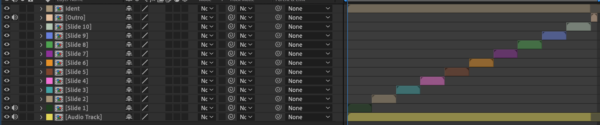
I’ve attached a screenshot to better explain the set up.
The main comp is called RENDER, which has a number of slide precomps in it and one Audio layer precomp background music track in it.
For this project the slides do not overlap, however we might have a project where they do in the future so this is also something we are working on.
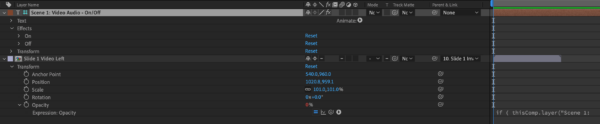
In each pre-comped Slide there is another precomp with a Video layer in it and an expression checkbox (image also attached)
Basically if the client inputs a video and chooses OFF form the check box then the video would play without its own audio, but if the client chooses ON from the checkbox, that means that the audio from the video that he inputs will also be included. This is set up by another expression which changes the audio levels of the video, based on the checkbox layer.
Should the client choose ON from the checkbox in the Video precomp Slide 1, then the pre comped Audio layer levels in the RENDER comp will fade down at the inpoint of Slide 1 and back up at the outpoint of Slide 1.
Should the client choose ON from the checkbox in the Video precomp Slide 2, then the pre comped Audio layer levels in the RENDER comp will fade down at the inpoint of Slide 2 and back up at the outpoint of Slide 2.
And so on.
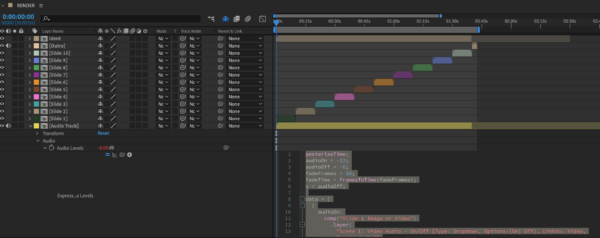
I’ve attached one more screenshot to show that the expression I pasted earlier is on the levels of the precomped Audio layer in the main comp RENDER. This expression is linked to each checkbox layer that resides in each Video precomp of each slide…
As to your other questions:
The precomp layers do not have the same names as the precomps themselves to ensure that any mapping we do to fill these in externally doesn’t end up with any conflicts.
Secondly, the checkboxes could definitely be on the Slide precomps in the RENDER main comp, if that means that it not having to dig into the precomps would make it faster.
I’ll try this out and run a few more tests
I hope that I’ve explained it better, and thanks once again for your help 🙂
-
Dan Ebberts
November 1, 2022 at 4:07 pmAssuming you put the checkboxes on the Scene precomp layers, this is how I’d do it:
audioOn = -22;
audioOff = -6;
fadeFrames = 10;
fadeTime = framesToTime(fadeFrames);
v = audioOff;
for (i = 1; i <= thisComp.numLayers; i++){
  myLayer = thisComp.layer(i);
  if (myLayer.index == index) continue;
  if (myLayer.name.indexOf("Scene") == 0 && time >= myLayer.inPoint && time <= myLayer.outPoint){
    if (myLayer.effect("On")("Checkbox") == 1){
      if (time < (myLayer.inPoint + myLayer.outPoint)/2){
        v = linear(time,myLayer.inPoint,myLayer.inPoint + fadeTime,audioOff,audioOn);
      }else{
        v = linear(time,myLayer.outPoint - fadeTime,myLayer.outPoint,audioOn,audioOff);
      }
    }
    break;
  }
}
[v,v] -
Malcolm Ricci
November 1, 2022 at 4:24 pmThanks for this Dan, much appreciated 🙂
I’ll test it out and keep you posted.
Reply to this Discussion! Login or Sign Up