Forum Replies Created

Page 19 of 1278
  • You’re welcome, John! Let me know if you have any questions on how it works; I’d be happy to explain in more depth.

  • Here’s a sample project.

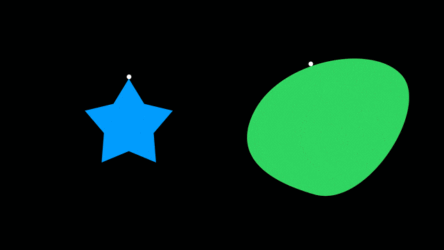
    It has three components: a layer we need to find the top of, a null that will represent the top of that shape, and the graphic elements we parent to the null.

    You have to initially position the null inside the target shape; then an expression on the Y position uses a binary search to somewhat-efficiently sample the comp raster column above the null image until it zeroes in on the transition point between transparent and non-transparent alpha (aka, the top edge of the shape).

    Here’s a little GIF of the results in action, too, on a couple different shapes.

  • I don’t understand how this will be used in production. If you don’t mind re-explaining it, I’d love to try to help.

    For now, I’ll just mention that for a lot of my motion graphic templates, I expose text sources from guide layers via Essential Graphics, then use expressions on the actual visible/rendering layers to set the type. This would allow me, for example, to have a default value that’s only overridden if the editor enters new text. These are not directly editable in Premiere’s Program panel, but they are perfectly accessible through Premiere’s Essential Graphics / Edit tab.

  • Paddy, I’d use the Fractal Noise, Mosaic, and Colorama effects to build the colored squares layer procedurally, and I’d use the Card Dance effect (in conjunction with another animated noise layer) to animate its scale on.

  • You should write a loop to walk through all of the items in the project. Compare the path of the file you’re considering importing to the path of each project item’s source. If you find a match, no need to import.

  • Walter Soyka

    May 23, 2022 at 9:00 pm in reply to: Too Many Effects making Effects Menu too long!

    There is no way to organize or hide elements from the Effect menu, although this exact issue has been addressed sometime since the older version you’re running. The current release of After Effects splits the Effects menu into columns so it doesn’t run off the bottom of the screen.

    Here are a few other options for getting to Effects quicker than drilling through the menu system:

    1. Use the Effects and Presets panel, which a tree similar to the Effects menu. The hotkey to bring up the panel is Ctrl+5. If you then hit Ctrl+F for find, you can start typing the name of the effect you want, and the list will instantly filter. You can double-click or drag and drop to apply effects from the list.

    2. Use a third-party launcher. I use Video Copilot FX Console, but there’s also Quick Menu (and probably several others). This way of working is so fast, you will never want to use the menu system again.

    It’s possible that right-clicking the layer you want to add effects to, then selecting the “Effects” submenu will break the list into columns as I mentioned above, but I’m not sure what version that was added.

  • Walter Soyka

    May 17, 2022 at 2:39 am in reply to: parentFolder, script fix

    Yes — your indentation is deceptive. You are creating pComp and attempting to move it to pMedia inside your loop. Unless the pMedia folder is the very first item in the project, this will fail; creating pComp needs to happen outside the loop, after you’ve identified the pMedia folder.

    See this revision. (I’ve also renamed your ‘comp’ variable, because reading ‘comp instanceof FolderItem’ made me do a double-take, I’ve added a little error checking in case the folder isn’t found, and I’ve added comments to explain what’s going on throughout.)

    app.beginUndoGroup("Create pComp in pMedia");
    // create a variable to store our media folder
    var pMedia = null;
    // step through the project, looking for the pMedia folder
    for (var i = 1; i <= app.project.numItems; i++) {
    var projectItem = app.project.item(i);
    // check the current project item to see if it's a folder named 'pMedia'
    if ((projectItem.name == "pMedia") && (projectItem instanceof FolderItem)) {
    // we found it, so let's store it in pMedia, then stop processing the loop
    pMedia = projectItem;
    break;
    };
    }
    // if we failed to find a pMedia folder, tell the user
    // otherwise, create a new comp and put it in the pMedia folder
    if (pMedia == null) {
    alert("No pMedia folder found!");
    } else {
    var pComp = app.project.items.addComp("pComp", 1920, 1080, 1, 15, 30); // Create Comp
    pComp.parentFolder = pMedia;
    }
    app.endUndoGroup();
  • Walter Soyka

    May 14, 2022 at 1:04 am in reply to: Script Expression, how to add character

    Glad you found the solution. As for why that’s the solution, it’s because the backslash is an “escape character” in Javascript strings. It’s not taken literally; rather, it escapes the string and indicates the next character should be not be processed literally. You can use it to add special characters to strings.

    For example, if you wanted to add a single quote to a string enclosed in your script in single quotes, you’d do it with \’. You can also add a tab with \t, a newline with \n, and, as you’ve noted, a backslash with \\.

  • Effects in Ae like the Puppet Tool are inherently raster-based, not vector based.

    I think your best bet is to do your puppet work on your vector layer in a precomp at high resolution, so it’s mostly scaling down in the camera comp, instead of scaling up.

  • This might be a good case for the Essential Graphics workflow. This would let you put all your logic into one reusable comp, then render out instances of it:

    https://helpx.adobe.com/after-effects/using/creating-motion-graphics-templates.html

    https://www.schoolofmotion.com/blog/essential-graphics-panel

    That said, we still see our project files get pretty big any time we have a large number of comps.

Page 19 of 1278

We use anonymous cookies to give you the best experience we can.
Our Privacy policy | GDPR Policy