Forum Replies Created

  • Tom de Jongh

    January 7, 2023 at 2:11 pm in reply to: Feather the end of a line that draws along a path?

    Very old topic, but this came on top of my Google search. I thought the methods were too much effort for my project. What did the trick for me was toggling the ‘motion blur’ option. That made the front of the moving patch blurry and worked for what I wanted to accomplish. Hope it will work for others too, because it’s a very easy option!

  • Tom de Jongh

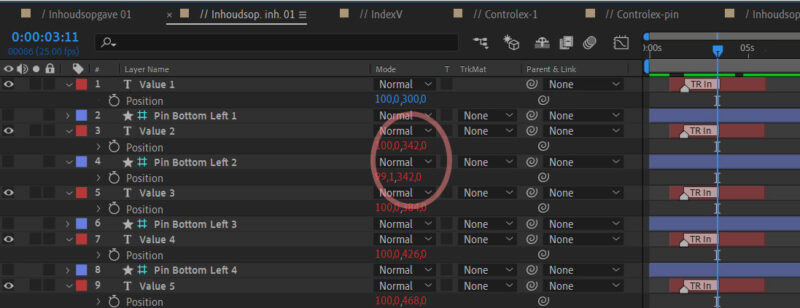
    January 25, 2022 at 6:22 pm in reply to: If else expression when using position coordinates

    Thanks for the fast reply!

    With if (a = b) I always get the first (if) value
    With if (a == b) I always get the second (else) value,

    regardless of the y-position’s being the same or not.

    The y-position of the pin-layer gets it’s value from a script. And the pin-layer is a guide layer (does that make a difference?)

    I tried it too with:

    s = (a-b);

    if (s = 0) etc.

    but this gives me the same result

  • Hi, thanks for the update. This is almost working for me. But not quite. Hope someone will come to the rescue!

    It works great for single line texts, but if you add another line, the position of that text layer won’t change. You’ll end up with screwed layout.

    Is there anyone who’s got an answer how to fix this? Maybe add the total height of the text layer above.. I don’t know how (yet).


We use anonymous cookies to give you the best experience we can.
Our Privacy policy | GDPR Policy