Hi Ivan,
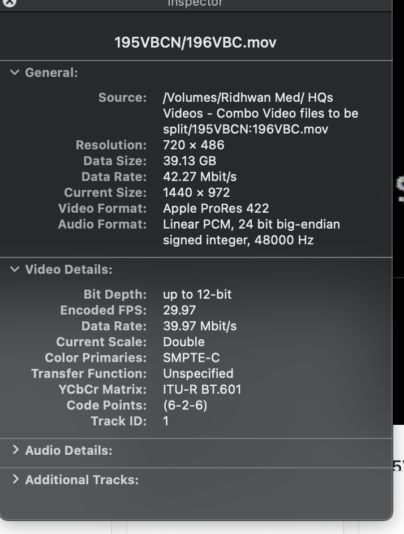
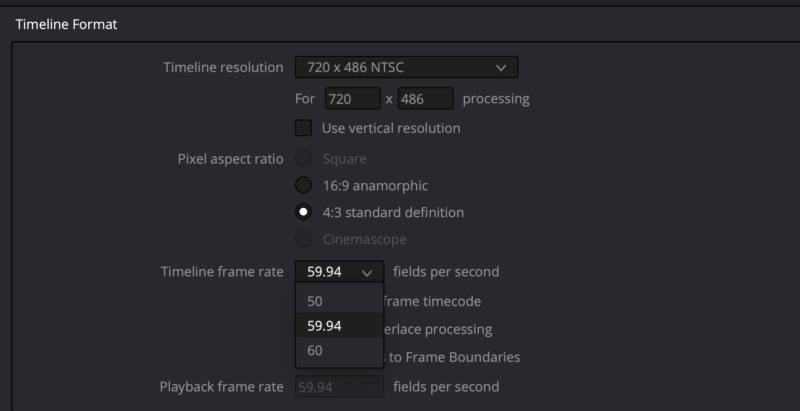
Thanks again for your help, but now I’m running into problems that make absolutely no sense. I set the project settings for 486×720 with 29.97 fps. But then when I try to import my original footage with the same settings, as evinced by the attached Quicktime movie inspector window (same as last time), I get a notice that my frame rate for the footage does not match my timeline. If I choose to change the footage, the timeline somehow switches to 59.94 fps (see 2nd screen capture of project settings window *after* I change footage). If I choose to NOT change the footage, the video plays fine and is in sync. But that makes me wonder what the heck is going on that I can’t see in which there seems to be a mismatch between my footage and the timeline I created to match exactly that footage.
By the way, this NEVER happened before. I’ve imported the same footage several times as I’ve been getting familiar with the interface of Resolve, and it never told me the footage didn’t match the 29.97 fps of the timeline until today.
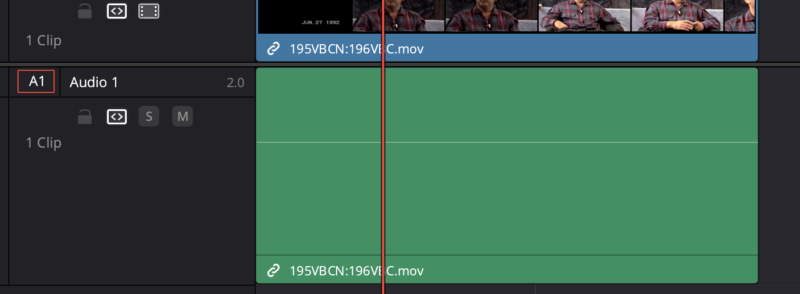
In addition, I can’t get the wave forms to consistently appear on the audio track (see 3rd screenshot. There’s audio on the track as well as wave forms. They just are invisible for some reason sometimes.). They appeared fine last week, but didn’t show up multiple times this week at all, even if I’d restart the app as well as the computer multiple times. Then suddenly today, the wave forms appear after I restarted one more time.
So it seems there are random quirks appearing in the interface causing problems intermittently.
Last question: the db meter in Fairlight seems to go red at anything over -5 db. This is unlike any other meter I’ve used. Usually it doesn’t turn red until you are over Unity or 0. Are the settings different / lower in Resolve for audio or is that just a quirk and, like usual, anything under Unity or 0 is safe?
Any help will be appreciated again,
Tim


 3
Audio Coins
3
Audio Coins
 21
COW Coins
21
COW Coins
 8
DaVinci Coins
8
DaVinci Coins