Stephen Dixon
Forum Replies Created
-

I get the feeling you don’t really understand how AE and expressions work.
You can use sampleImage() to get the colour of the pixels at a point on the layer, and then check to see if they are green. To check if another layer is completely inside the green area you would find its bounding box and check each corner to see if it was inside. -
The time variable in the precomp is equal to the time that the playhead from the parent comp is at, relative to the precomp. So if the main comp contains the precomp starting at 2:00 the value of the time variable for the precomp at the beginning of the parent comp is -2.
To access the parent comp’s time we need to add the precomp’s in-point offset, thus:
time + comp("parent comp name").layer(thisComp.name).inPoint; -
Since expressions aren’t able to store previous values, to achieve something like this you have to calculate the results for every frame up to the current one.
e.g.
calculatedPos = thisProperty.valueAtTime(0); //initial (blue) value
for (let f = 0; f < time; f += thisComp.frameDuration){
    if (calculatedPos[0] % 2 > 0){ //x is odd
        calculatedPos[1]++ //add one to y
    }
    if (calculatedPos[1] % 3 === 0){ // y is multiple of 3
        calculatedPos[0]++ //add 1 to x
    } else {
        calculatedPos[0]-- //subtract 1 from x
    }
}
caculatedPos -
Stephen Dixon
November 22, 2020 at 7:37 am in reply to: Move Current Time Indicator Forward to a specific FrameYou can’t change the current time of a comp with expressions, you can only set the value of the layer properties that they’re applied to.
You can use scripts to change the time, but that won’t have any effect at render time, it would be as if you changed the time yourself with the UI.
-
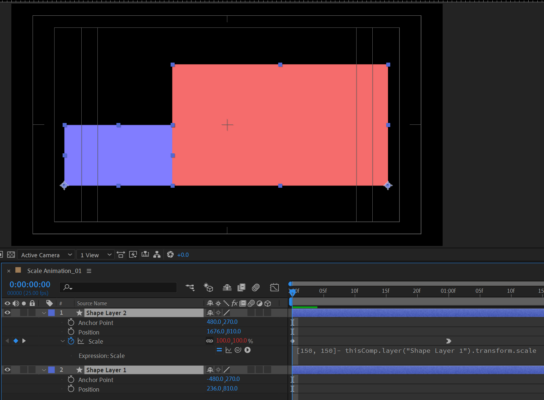
When solid 1 is 100% scale, solid 2 is 50% and vice versa. So we can set the scale of the second solid thus:
[150, 150]- thisComp.layer(“Shape Layer 1”).transform.scale
To make its left edge line up with the right edge of solid 1, we can just put the anchor points of the solids at the bottom left and bottom right respectively. The easiest way to set this is to use the pan behind tool. Hit y and drag the anchor point to the lower left of the blue solid, holding ctrl to snap it to the corner point. Do the same for the red solid, but drag it to the lower right corner, holding ctrl to snap.
Delete all the position keyframes, and apply the expression above to the scale property of solid 2.
The values of anchor points of solid 1 in the file you shared were [0,540] and for solid 2 [960,540]. Then the position of solid 1 was [236,810] and solid 2 [1676,810].

-
ESTK is deprecated, Adobe recommends you use VSCode and the Extendscript Debugger add-on.
-
Stephen Dixon
November 5, 2020 at 6:30 am in reply to: Procedural Parenting of Transform Properties relative to Layer PositionNot quite sure what you mean when you say
The comps themselves don’t procedurally shift over time. I’ll still have
to manually shift every layer to the modified transform propertiesCan you explain what you want them to do?
-
You could do this with text animators to give yourself the flexibility of keyframes, but what you need to do with that expression is change the substr() on the last line.
Substr takes a string (a collection of characters, like a word or a line of text) and chops it up according to its two parameters, which give you the first character (in this case 0, because we start counting at 0) and the length T, which is incremented to give you the typing effect. Then the flashing cursor is added at the end.
We can modify that by making the substr expression only give 1 character, we do that by setting the second parameter (length) to 1, and use the incrementing T value for the start character. This will progressively give us each letter of the input string.
We also want to precede that by as many asterisks as letters, minus one. There is a built-in javascript function repeat() that takes a character or string and, well, repeats it. So if we write “*”.repeat(T-1) that will give us an incrementing line of asterisks. The only problem is that at the start T-1 will be negative, which will cause an error, so we need to complicate it a bit. Using the Math.max() function, which returns the maximum of two values, we can make sure it never goes below 0, thus: “*”.repeat(Math.max(T-1, 0)) when T < 0 the Math.max expression will return 0.
Putting it all together
Speed = 10; // typing speed
Blink = 2; // Speed of blinking cursor
CursorType = “|” // cursor type. Usually it is a vertical line “|” or Underscore symbol ‘_’
F = Math.round(time*Blink % 1);
L = text.sourceText.length;
T = (time – thisLayer.inPoint)*Speed;
if(F ==1 | (T<L & T>0) ){Fl=CursorType;}else{Fl=””;}
"*".repeat(Math.max(T-1,0)) + substr(T,1) + Fl -
Stephen Dixon
October 22, 2020 at 10:35 am in reply to: Get value of an Anchor-Point of an Layer which name is choosen by CSVTry making a text layer and setting the source text using the expression to test what value landkreis is returning. E.g., put this on the source text property:
markerNr = thisComp.layer(“Werte_Speicher”).effect(“Auswahl-MarkerNr”)(1);
landkreis = footage(“Landkreisauswahl.csv”).dataValue([1,markerNr]);
landkreis
That will tell you if the data is coming from the csv properly
-
Stephen Dixon
October 19, 2020 at 11:02 pm in reply to: Check if comp exists before running rest of scriptIf you use CEP panels you can use the setInterval() method to run a loop, but I feel like learning how to use CEP panels may be more overhead than you need.