


Shahid Raza
 1
COW Coin
1
COW Coin
Forum Replies Created
-

Shahid Raza
June 30, 2019 at 12:13 pm in reply to: Best way to create an 88-key piano (incl. pressed keys) without many layers / low render time?Hi Tomas,
I’ve never referred to the work done on VisiPiano as just completely mine. You can see my threads across this forum, on Adobe Forums, Reddit and other multiple sites asking for help and guidance.
While we did business together at one point, you are being a little unfair with your reply to this thread since you decided it was best that you didn’t continue working on this project – you wanted transparency and recognition for your part in this project (yet the work was done and paid for on a freelance / white label basis via Upwork at the time, as I hired your company for version 2 and 3). So I have moved forward from our differences just like you have.
The concept and idea was created by myself as well as the graphics and project structure, then given automation functionality by developers. I am still thankful for you giving this project some direction, but Version 4.0 and above has been re-written. VisiPiano is a growing team now. My plan is to make VisiPiano a realtime piano visualisation / sheet music composing software, not just an After Effects project.
I have a new developer involved on this project now and still looking for more people to get involved, as well as a sales team. The system now uses a Java web app to create the right files for import as well as an updated codebase in the script (with new features like multiple tempo detection, and 16 channel MIDI import functionality coming soon). The bugs from 2.0 and 3.0 have been removed.
To get to the point VisiPiano’s After Effects project is today, I am grateful for all the help I’ve got from people like yourself, this forum, Dan Ebberts (as I’ve mentioned in the past), the help from Adobe Forums, and people like Patrik Pietschmann / Rousseau for inspiring me in the first place.
-
Shahid Raza
June 27, 2019 at 9:23 pm in reply to: Best way to create an 88-key piano (incl. pressed keys) without many layers / low render time?I know this is probably a very old post bump but I’d like to post an update after 2 years of working on this project!
I tried to automate the whole process in the making, so you can now load in MIDI and MP3 files, the script does the magic (all automated), ready to render and export.
I’ve been refining the project and have made it available for purchase for anyone who is interested in supporting the work (and further development of this project).
I plan to expand it into something much bigger than just an After Effects project (like a web app or a real time visualisation software).
Check it out at https://www.visipiano.com/ if you are interested!
-
Shahid Raza
October 21, 2018 at 10:54 am in reply to: sampleImage + Trapcode Particular – If sample area is not a specific color, emit particlesThanks for your help Filip, this does point me in the right direction.
Sorry I wasn’t too clear before. I am actually changing the Emitter Position rather than the layer position.
Here’s what I’m actually trying to achieve:

The sampleImage() area needs to be detecting “Animations” comp, based off the “Particular” comp’s “red square particles” Emitter Position.
I didn’t quite understand the l and p variables in order to modify the code you gave.
Would appreciate it if you can help explain these or update the code for me ☺
Thanks!
-
I don’t know if it’s this but have a look at Trapcode Mir.
-
Shahid Raza
November 2, 2017 at 10:29 pm in reply to: Scripting: Generate varying height rectangles based on checkbox controls?This was my first ever AE project and has taken me pretty much most of 2017 from start to finish.
Decided to challenge myself after seeing the video I posted above of the piano cover.
The guy is pretty amazing for what he has done on the visuals and he inspired me to start this project.
Went through lots of draft versions, UI refinements, restructure of the project layers and comps, redoing expressions efficiently, then ending up scripting a lot of it in the end.
I had a lot of advice and suggestions from this forum and Adobe Forums when I was stuck, so thanks to everyone who helped, especially Kevin Camp and Dan Ebberts!
I’m going to try and finalise this project using ScriptUI and probably think about marketing this, as it’s probably the first of its type out there!
-
Shahid Raza
November 2, 2017 at 3:56 pm in reply to: Scripting: Generate varying height rectangles based on checkbox controls?Nevermind, I think the rendering glitched out the first time!
Here’s the completed version for the piano roll. Happy with the outcome ☺
https://www.youtube.com/watch?v=IUphnATiWso
Thanks Kevin for your suggestions.
Some contents or functionalities here are not available due to your cookie preferences!This happens because the functionality/content marked as “Google Youtube” uses cookies that you choosed to keep disabled. In order to view this content or use this functionality, please enable cookies: click here to open your cookie preferences.
-
Shahid Raza
November 2, 2017 at 2:15 am in reply to: Scripting: Generate varying height rectangles based on checkbox controls?Spoke too soon. When rendering the particle systems for both hands (176 layers of particle systems and the same checkbox expressions), I get these glitching artifacts:
https://i.giphy.com/3ohBVtcjVG93DyUcxi.gif
How can I correct this? I can now see these throughout the previews too. Wasn’t seeing them before.
-
Shahid Raza
November 2, 2017 at 1:32 am in reply to: Scripting: Generate varying height rectangles based on checkbox controls?Thanks for your help Kevin, I’ve done my best with the particle systems method and I think it’s worked well.
The timeToFrames wasn’t really working so I did the following:
thisLayerNum = (thisLayer.name).replace(" Left Hand", "");

chk = comp('MIDI Control').layer("activeLeftHand").effect(thisLayerNum)("Checkbox");

if ( chk == 1 ) 100 else 0;
And then moved the comp for particles system to the left, offsetting it enough in time.
But the death size is too long, it doesn’t stop where I need it to.

If you look at the top part of each note, it goes slightly over before the next note starts.
This isn’t the case with the actual keyframes, but rather the particle emitter.
How can I change this so that it has an abrupt end? Here are my settings:

Thanks.
-
Shahid Raza
November 1, 2017 at 6:30 pm in reply to: Scripting: Generate varying height rectangles based on checkbox controls?Thanks for that tip! Seems super useful. However, I’m still trying to find a method that would be a big timesaver for the project. The way I’m picturing it is something like this:
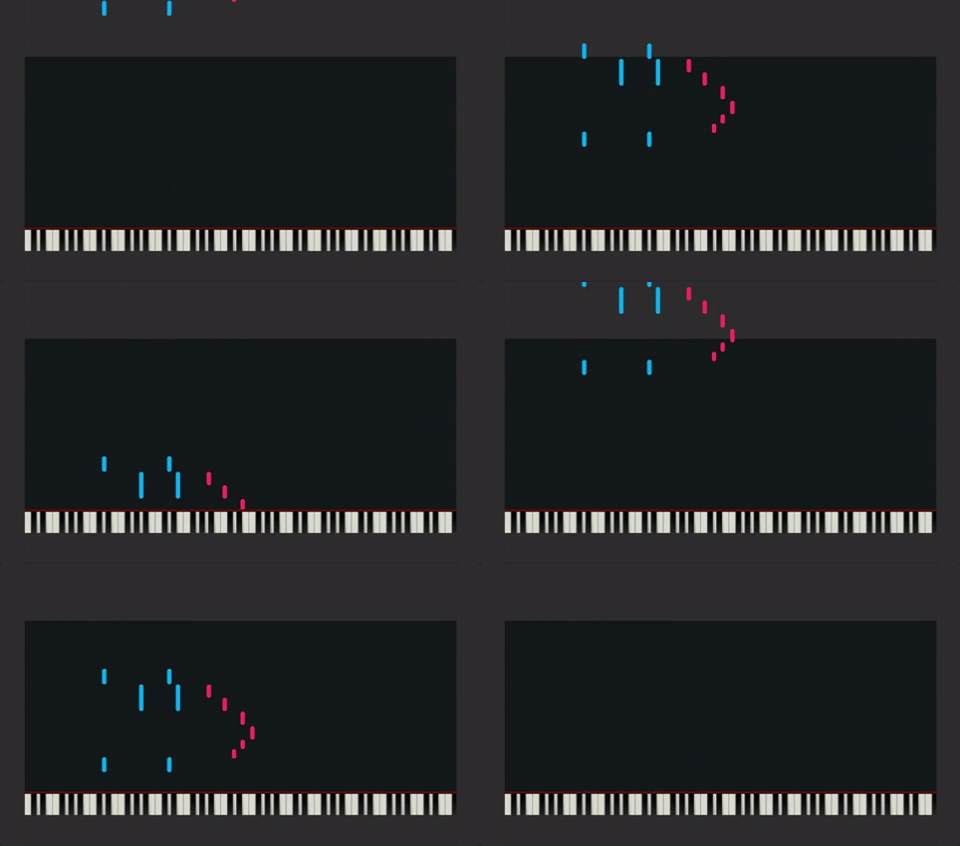
I’m guessing it would be better to visually see this data in rectangles, precomp’d and offset out of view (e.g. the darker area above) and then just animate the position all the way down, making it go out of view again. Or is this just not feasible? Thinking comp sizes here too as well as timing it with the keyframes.
-
Shahid Raza
October 31, 2017 at 11:28 pm in reply to: Scripting: Generate varying height rectangles based on checkbox controls?I was originally doing something similar with Trapcode Particular but the rendering time was awful.
I was using expressions here for each particular layer and in the end, I only got a 40sec render before the whole thing crashed:
https://www.youtube.com/watch?v=JN1VLKaTUXI
Would CC Particles World have this issue with birthrates? Also, would I be correct in saying keyframes are more efficient to render since you’re not running 176 if statements doing the same thing for different checkboxes?
Some contents or functionalities here are not available due to your cookie preferences!This happens because the functionality/content marked as “Google Youtube” uses cookies that you choosed to keep disabled. In order to view this content or use this functionality, please enable cookies: click here to open your cookie preferences.

