Forum Replies Created

  • Seb Harder

    March 19, 2021 at 5:35 pm in reply to: LOG colour workflow

    Thanks all for the replies!

    <b style=”font-family: inherit; font-size: inherit;”>Chris Wright: If you are encoding in an ACES environment, you can use the opencolorIO plugin which they use to encode EXR files which supports color display mapping.

    …I’m using After Effects and c4d mostly and am not familiar with ACES. I’ll look into it.

    Douglas Bowker with mixed Footage I just set the project up with Adobe RGB color space as it plays nice with 32 bit and is reliable for keeping things artifact free.

    …This doesn’t look right. Footage still looks flat.

    Paul Carlin not try to convert the Log footage to anything

    …working in the flat LOG colour space doesn’t seem like a good option for me. Keying won’t work well, blend modes etc.


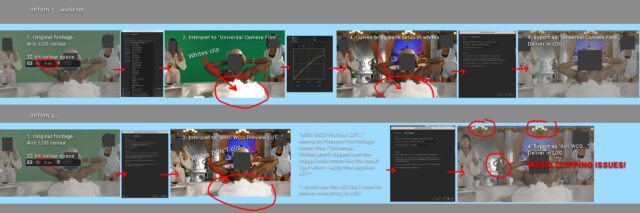
    Here’s my typical workflow and resulting issues below (images)


  • Seb Harder

    March 3, 2021 at 12:37 am in reply to: LOG colour workflow

    After some digging I think my issue may have been related to using 16 bit instead of 32 bit.

  • Seb Harder

    May 17, 2018 at 7:00 pm in reply to: Illustrator to c4d size issues

    I may have figured it out and the solution is kinda dumb.

    So my print file is 5 inches wide in illustrator (I’m using inches because the job requires that size)

    I change my illustrator document setup to points. It is now 360 points wide.

    I merge my illustrator file into c4d and in the illustrator scale dialogue I do this math 5/360 =.0138

    so the scale is .0138 inches

    Maybe I’m dumb and there’s an easier way which allows me to use inches in my print file. My 3d printed does use mm so I will have to convert again. I wish this was easier.

  • Seb Harder

    May 17, 2018 at 6:53 pm in reply to: Illustrator to c4d size issues

    Sorry to say that’s not very helpful. I understand that both 3d files and vector files don’t use pixels.

    I need to print an image created in illustrator and print a shape for that printed image to fit on to. It’s not good enough to eyeball it, I need the 3d print to match. Changing my units in both program to mm had no effect. Question is how do I get my vector file, which has dimensions assigned in illustrator for printing, into c4d with the same dimensions?

  • Seb Harder

    April 15, 2014 at 5:04 pm in reply to: Resolution of nested 3D layer issue

    I wound up going a very different way – motiontracked the styrofoam mountain and rebuilt it in 3d- so I could have better control over the camera. No matter which way I tried collapse transformations I couldn’t get it to parent properly. Maybe there is no way to parent a 3d layer to a 2d one and get it to move properly.

We use anonymous cookies to give you the best experience we can.
Our Privacy policy | GDPR Policy