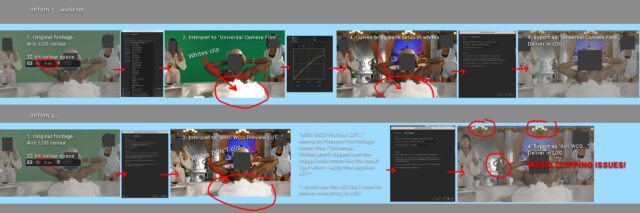
-
LOG colour workflow
Hi! Doing VFX for a Canadian TV show. Shot on Arri, delivered to me in LOG colour space. My workflow has always been to set the Working Space to “HDTV (Rec. 709), interpret the footage to “Universal Camera Film Printing Density”, composite and then when I export under the “Color Management” tab. Select “Universal Camera Film Printing Density” from the Output Profile. This mostly works OK but I’m finding that the whites in the video are tending to clip. I was provided with a LUT that looks much better but can’t think of an efficient way to use it on all the video.
I tried–> interpret the footage to ARRI Rec 709 Preview and then exporting in that colour profile which looks better and much more like the LUT but causes an odd glitchy effect wherever the whites clip. Not a big deal but it can be annoying to always keep the whites from clipping (explosions, lasers etc).
NOTE ** “talk to your colorist” is not the advice I need here.
Thanks!