
Forum Replies Created
-

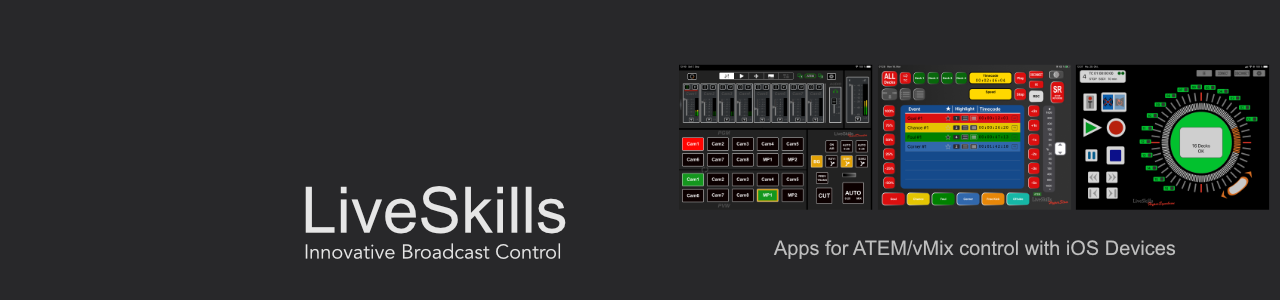
TouchDirector ATEM panel app release 5.02
TouchDirector Mini ATEM panel app release 5.0
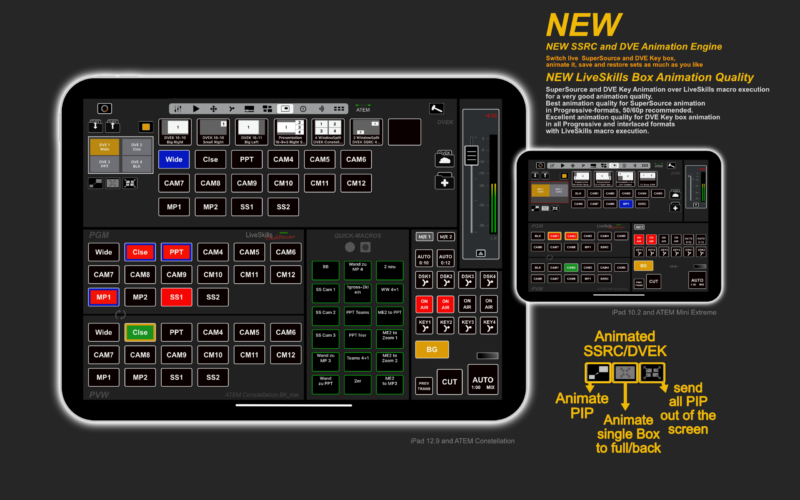
New: Macro driven animation of SuperSource boxes and also up to 4 DVE key boxes with realtime generated macros. TouchDirector is generating, sending and executing animation macros in realtime.
This revolutionary solution makes animation much smoother, for SuperSource animation in progressive formats.
For DVE Key animation in high quality in all progressive and interlaced formats (Mini only progressive Formats).
With built in easing and ramp for run in and run out for all animations with automatic calculation for the video project framerate.
User are now able to create complexe DVE Key (DVEK) animations with up to 4 PIP boxes in one composition and to use it in the same manner as SuperSource compositions.
(number of DVEK PIP boxes depends on ATEM type)
TouchDirector combines up to 4 single DVE Key PIP boxes to one composition, which can be saved, animated and assigned to quick buttons like a SuperSource composition (4 Boxes by ATEM Constellation, 2 Boxes by ATEM Mini Extreme).
SuperSource wasn’t intended for animation by Blackmagic Design, but DVE Key PIP was. With the new LiveSkills macro driven DVEK animation the user can generate PIP animation in high quality.
Network connection isn’t more so critical compared to other SuperSource animation solutions, which doesn’t create macros like TouchDirector and instead of macro generating firing many commands to the ATEM to move the PIP boxes.
Use of animated Multi PIP compositions in high quality or broadcast environment is now much easier with TouchDirector DVEK compositions.
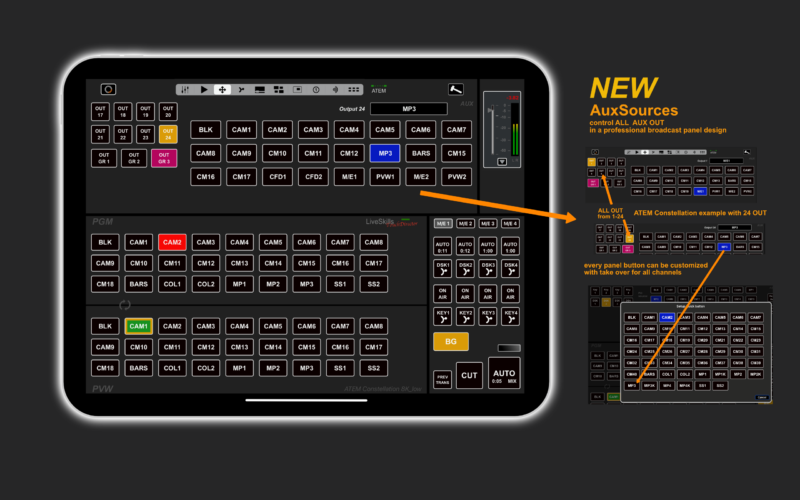
New: Select sources for all aux out in a broadcast panel design with customizable buttons.
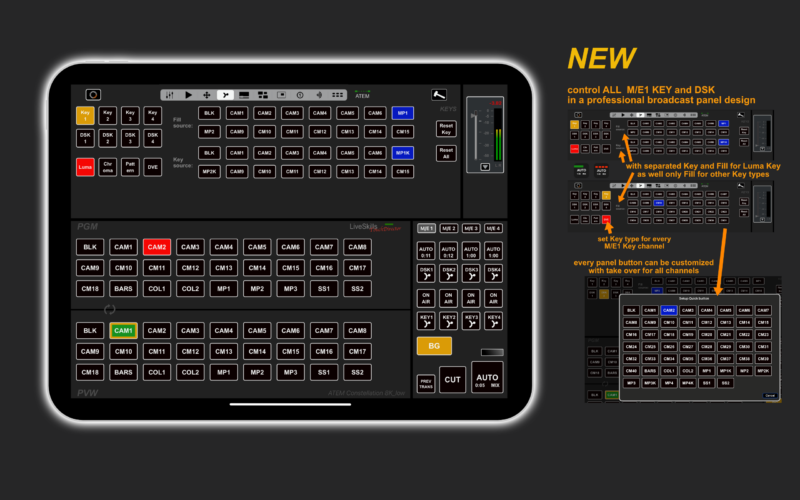
New: Select sources for all upstream keys and all DSK keys in a broadcast panel design with customizable buttons.
New: Control up to 4 ATEM integrated Media Player (up to 4 by Constellation 8K)
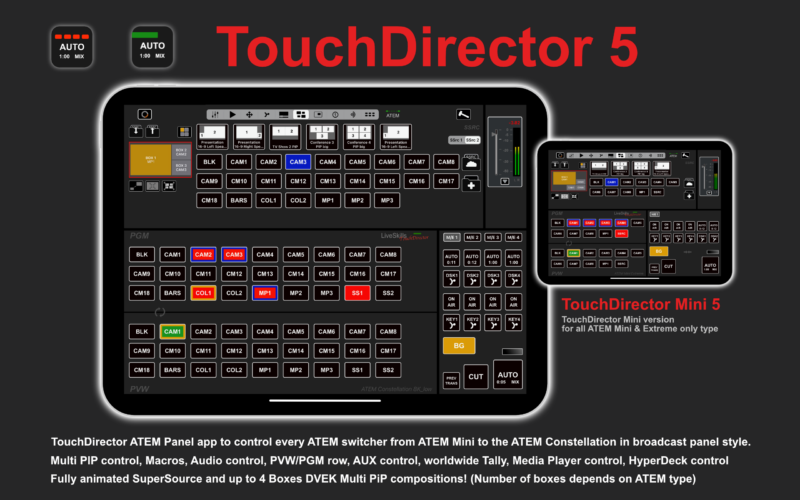
In addition to PVW/PGM and transition/key area, you can select one of the following sections:
• Audio
• HyperDeck playback control
• Aux source control
• Key source control
• ATEM internal media player
• SuperSource control and animation /DVEK control and animation
• Worldwide Tally system over internet server (free WorldTally client app for clients)
• streaming/recording (ATEM Mini’s), timecode (all ATEM)
• all macros (available in macro section and as quick macro buttons in PVW/PGM section)
TouchDirector ATEM panel App for iPad for all ATEM switcher.
Available in the Apple App Store.
https://apps.apple.com/de/app/id1450852852
TouchDirector ATEM panel App for iPad for all ATEM switcher.
Available in the Apple App Store.
https://apps.apple.com/de/app/id1501018263
28 days free test code via Apple TestFlight, full current app version!
https://testflight.apple.com/join/RcvAqWtS
28 days free test code via Apple TestFlight, full current app version!
https://testflight.apple.com/join/VPnLGtdj
TouchDirector (Mini) App works with ATEM software 8.9 and higher.
App works with all iPads from iOS 14.
The TouchDirector App works with all ATEM switchers models from 2015, as also now with older models, as far they have installed ATEM software 8.6.x.
The TouchDirector Mini App works with all ATEM Mini switchers.
We recommend urgent to test the app from the test code above.
The price for the TouchDirector full app for iPad is approx. $50,
Prices depending on local taxes in your country.
The price for the TouchDirector Mini app for iPad is approx. $35,
Prices depending on local taxes in your country.
Combine TouchDirector App with other free LiveSkills-Apps to
get worldwide Tally or ATEM worldwide remote control.
TouchDirector Remote for ATEM
WorldTally client
Use your iPad as ATEM panel with TouchDirector.
We recommend to use the Blackmagic Design ATEM software in addition to adjust special setups for e.g. key or stinger.
Best regards to all, the LiveSkills Team

-
ATEM and HyperDeck iPAD Apps 20% off Deal
until 03.12.2019!TouchDirector, introduction 30,-USD until 03.12.2019
https://apps.apple.com/de/app/touchdire … 1450852852
https://liveskills.net/touchdirector/
HyperSlow 3.0, 40,-USD until 03.12.2019
https://apps.apple.com/de/app/hyperslow/id1147161413
https://liveskills.net/hyperslow/
HyperSynchron, 15,- USD until 03.12.2019
https://apps.apple.com/de/app/hypersync … 1242530106
https://liveskills.net/hypersynchron/
Best regards, LiveSkills
Download HyperSynchron One for free to control a single HyperDeck.
https://apps.apple.com/de/app/hypersync … 1439652093Saskia-Anett Ebelt, vision mixer on BM Atem, Tricaster 460 and TC1, Panasonic, NewBlueFX Live Titler, Teradek, Matrox, Developer of Liveskills Apps HyperSlow to control BM HyperDecks as an instant replay system, and HyperSynchron to control and supervise up to 16 HyperDecks
-
Hello BMD friends,
we LiveSkills released V 2.2.1 of the HyperSlow instant replay app for up to 4 BMD HyperDecks.
The improvements:
– auto record after SuperPlay ( SuperPlay = playing the same event from different view angles one after another), HyperDecks are switching now after SuperPlay back to record automatically
– ready for the HyperDeck BMD update 6.0
https://liveskills.net/hyperslow/
See also our other recently released app, HyperSynchron to control up to 16 HyperDecks in record and playback. With the smart error manager and speech output from the iOS device, record timer and single deck popup to control and adjust the settings of every connected deck.
https://liveskills.net/hypersynchron/
Best regards, Anett
Saskia-Anett Ebelt, vision mixer on BM Atem, Tricaster 460 and TC1, Panasonic, NewBlueFX Live Titler, Teradek, Matrox, Developer of Liveskills Apps HyperSlow to control BM HyperDecks as an instant replay system, and HyperSynchron to control and supervise up to 16 HyperDecks
-
Hello TJ,
sorry, I wasn’t here for a time.
Did you decide for a system?
HyperSlow is recommended, if you own HyperDecks and you need to achieve instant replay and no budget for vmix or 3Play.1. HyperDecks Mini are need to switch between record and playback 1-2 seconds.
2. The buttons are user configurable and it’s possible to save your settings.
3. The eventlist is infinitely long as the number of your tagged events. You can scroll trough.You can get a HyperSlow test code for 28 days, if you like to test HyperSlow.
Best regards, Anett
Saskia-Anett Ebelt, vision mixer on BM Atem, Tricaster 460 and TC1, Panasonic, NewBlueFX Live Titler, Teradek, Matrox, Developer of Liveskills Apps HyperSlow to control BM HyperDecks as an instant replay system, and HyperSynchron to control and supervise up to 16 HyperDecks
-
An update for the last post:
After the Blackmagic Firmware update 1.8 for the HyperDeck Studio Mini (contained in the update 5.2 for “Blackmagic HyperDeck Setup“ for Mac or Windows), our HyperSlow 2.1 app is able to work with the HyperDeck Mini. We integrated and tested the app with a setup of different HyperDecks and implemented some adaptions for the Mini. Particularly the escape time from rec to play mode and back demanded some adjustments. The app now checks the model for HyperDeck Mini and sends special commands to devices identified as such.
A note regarding video connection with HyperDeck Mini: the Mini doesn’t have a continuous EE-live output, which means, in play mode the deck only transmits the play signal on both SDI outputs.
If you need the camera live signal on your switcher at all times, you have to distribute it before connecting it to the HyperDeck Mini, e.g. with a HDSDI distributor. -
HyperSlow ready for Blackmagic Hyperdeck Mini
After the Blackmagic Firmware update 1.8 for the HyperDeck Mini (HyperDeck 5.2 update) our HyperSlow 2.1 app ist able to work with the HyperDeck Mini. We integrated and tested the app with a setup of different HyperDecks and implemented some adaptions for the Mini. Particularly the escape time from rec to play and backward demanded for adaptions. The app will now scan for HyperDeck Mini and send special comands on this recognized IP-channel.
A notice for the video connection with HyperDeck Mini: The Mini doesnt have a EE-live output, this means, the deck sends in play only the play signal to the 2 SDI outputs. If you need the live signal from the camera at all time on your switcher, you have to distribute it before connect it to the HyperDeck Mini, e.g. with a HDSDI distributor.
-
Hi, Anett again, I have some news some of you might be interested in. We have released „HyperSlow V2.0”, a low cost slow-motion system for HyperDecks.
The app named „HyperSlow“ is available in the AppStore.
I always had in mind, that for a really great solution, the software should take over the control of the switcher when playing back multiple slomo sequences from different angles. And my software engineer made it, we can control the ATEM switcher now! So, the “SuperPlay” function now performs stinger and other transformations, plays back a scene from HyperDeck, switches to next HyperDecks, plays back, etc.
And you no longer need to have time code synchronized cameras for that.
And we added two more event types for tagging interesting moments of an event.You can still export the event list as Excel file (e.g. via e-mail or AirDrop) and open it on your PC. After importing your recorded content into Adobe Premiere, you can easily jump to marked events by copy/pasting the timecode from the list.
We have been asked several times: What about HyperDeck Mini? We have prepared HyperSlow to deal with the Mini decks, but we have to wait for the new firmware coming soon from BM to fix some isssues on these devices, e.g. the black recorded clips. We hope to officially support the Minis with our next release.
On invitation of Fight24TV people we were visiting the Kickmas Fightnight Hamburg to test our app and joined a great sport spectacle, broadcasteted via livestream to the world.With our app we controlled an ATEM Liveswitcher with 10 channels SDI and 4 Hyperdeck Studio to provide the greatest moments of the fights in SlowMotion. After 30 minutes training we had a good workflow with the program mix workplace, he mixed the livecams, the SlowMotion output from our ATEM, and the sport graphics downstreamkey on a second ATEM.The result can be seen here in the video of the european championship fight Toprak vs. Pratnik.
https://liveskills.net/Clips/Fight24-shortversion.mp4
https://liveskills.net/Clips/Fight24-longversion.mp4
-
Hi Gregg,
I did a shot with a Phantomflex for a McDonald’s Highspeed Foodshot, and I used Arri CP=Cineprime.
It was an indoor shot and we used 6x1kw 1000hz Arri Highspeedlight, but in the bright sun you probably don’t need it. Maybe for the shadows.
It’s not useful to use canon lenses, because the rental price for a Phantomflex is so high, that the lens price is not so important.
The challenge when using the Phantomflex is to find a good relation between frame rate and shutter, normaly you need an hour to figure it out for your special shot situation. And the data wrangling is also not simple, you need an extra assistant for this.
The workflow is: do a shot, play it from the cartrigde in the camera, to see if it was successful, after a lot of shots change the cartrigde to secure the content and continue recording with the second cartrigde. The data usage is enormous high!
But the quality is phantastic.Best Regards, Saskia-Anett Ebelt