Forum Replies Created

Page 1 of 2
  • Hmm, not extremely experienced in scripting. I’ve wrote a couple with a decent amount of help – still learning. How would I inspect the object model?

  • Didn’t know that! Brilliant, will take a look, thanks!

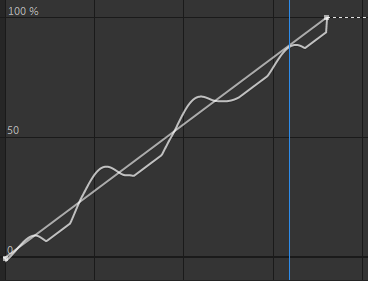
  • Also, the expression gives me some jolting. Screenshot attached, not sure if it works, never added a photo on here before.

    Would be nice to smooth() POST expression value. I stumbled across an old post from about 10 years ago that you had commented on (I’m pretty sure every thread I look at, you’ve helped someone, so thanks for being awesome).
    You mentioned “building your own smoother” like this:

    (valueAtTime(time – .1) – [10,10,10] +
    valueAtTime(time – .05) – [10,10,10] +
    value – [10,10,10] +
    valueAtTime(time + .05) – [10,10,10] +
    valueAtTime(time + .1) – [10,10,10])/5;

    Is there a way I could implement this into my current expression?

  • This works much better. But I think I’ve found something that looks more natural. This is what I’ve been using on the Range Selector:

    range = text.animator("Animator 1").selector("Range Selector 1").start;
    k1 = range.key(1).time;
    k2 = range.key(2).time;
    w = wiggle(1,15);
    
    if (time > k1 && time < k2) {t = w;}
    else {t = value;}
    
    clamp(t,value-6,100)
    

    It looks really natural, and you can use the keyframes to have a precise start and end point. Could also add a slider to the wiggle values to have some extra control.

    I actually kind of like the fact that letters are ‘deleted’ by the value getting smaller than previous. However, what would be AWESOME, would be 2 things:

    • Have the ‘error’ letters that end up deleted, be the WRONG letter before they’re deleted, and the correct letter after its ‘re-typed’. Is this at all possible?
    • Have a blinking Caret or underscore that follows after the type. Would add to the realism I think.

    Cheers in advance Dan, you’re always a great help with things that genuinely seem impossible to me/others!

  • Hey Dan, seems like it could work great. But for some reason when I increase the randomness, some of the characters later on in the text layer are showing up before the characters before them. If that makes any sense at all!

  • Would still be too smooth, would need something random, not an ease. Testing some stuff, but I think I’ve found a way! Will update if I sort it 🙂

  • Does something need to happen with Anchor point?

  • Thanks Andrei, unfortunately, still way off for some reason!

  • Sami Bayley

    November 30, 2021 at 8:54 am in reply to: Position based off right edge of shape

    Hey Walter! This is great, I’m wondering if theres a way to stick to the bottom right edge instead of top right? Can’t seem to figure it out.

  • Hey Dan!

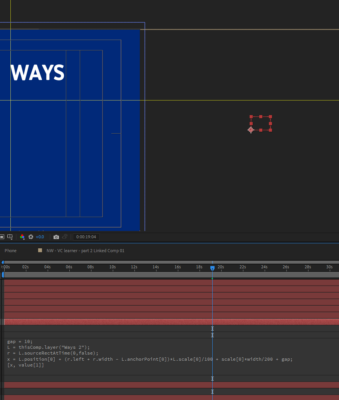
    Is there a revised version of this expression for newer versions of after effects? For some reason, when I add the “right edge” expression, even with the gap at 0, its WAY off to the right. No other expressions or parenting. Using on 2 text layers.

    Cheers!

    Another note: not sure why this happens, but when I copy and paste expressions, AE gives me errors. I just retype the whole expression myself exactly the way it was copied and it ends up working. Very odd!

Page 1 of 2

We use anonymous cookies to give you the best experience we can.
Our Privacy policy | GDPR Policy