Forum Replies Created

  • Peter Gillies

    April 26, 2021 at 10:10 pm in reply to: Transparent Canvas

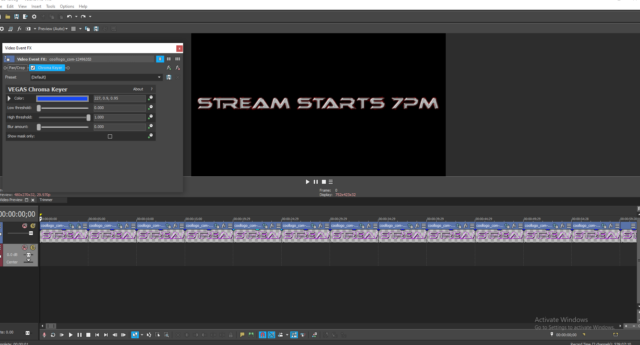
    All good thanks. It’s getting close to stream night, (tomorrow night) so I’ll leave the video the way it was for now behind us. I gather I need photoshop to remove the black background, I can’t do what I want in Vegas alone. We are streaming to YouTube and Facebook amongst other 7pm tomorrow night AEST if you are interested.

    https://www.youtube.com/channel/UCR72yPxqfQwLAUjWZF9DK7Q

    https://www.facebook.com/blackrainbowrockmusic

  • Peter Gillies

    April 26, 2021 at 10:15 am in reply to: Transparent Canvas

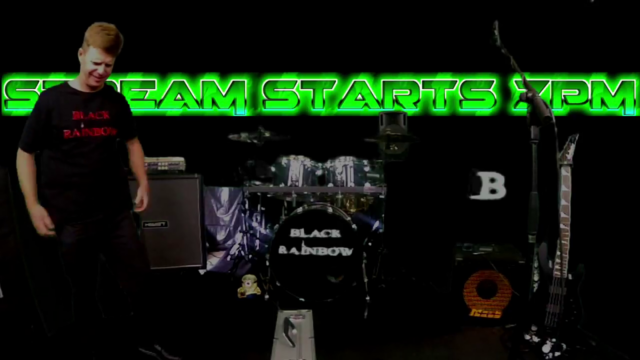
    G’day John. I’ll see if I can explain what is happening better. The video you watched is a live stream video to Facebook. We also live stream to other platforms. The live stream is a ‘post’. It’s literally ‘live’. What you are watching is the live stream that is saved on Facebook, that I have downloaded from Facebook using Clipgrab. The video behind us is the one I make up in Vegas. It is layered up behind us in OBS on green screen. People watching the stream live see it as you can in my last message. As you can see I can layer the Video I construct in Vegas behind us. If I put that video as the first layer in OBS you wouldn’t be able to see us. I’m trying to find out if I can create the part of the video that contains the text with a transparent surround ( the black rectangle that surrounds the text) so when I use it as the first layer all you can see is the text, and because the black rectangle (the canvas) is transparent you will be able to see us behind it.

  • Peter Gillies

    April 25, 2021 at 9:35 pm in reply to: Transparent Canvas

    ok thanks

  • Peter Gillies

    April 25, 2021 at 3:30 pm in reply to: Transparent Canvas

    I’m not 100% sure but perhaps what I’m want to do isn’t possible ( it won’t be the first time). Remember John that whatever the video looks like on the preview screen is what the video will look like when rendered. Also, I’m not adding band media (footage) into Vegas under the text (SREAM STARTS 7PM). I’m rendering the time line, which contains the text part and other video parts, to make a single video to layer up behind us on the green screen during a live stream. https://www.youtube.com/watch?v=4sUgf8FRD7E

  • Peter Gillies

    April 25, 2021 at 8:55 am in reply to: Transparent Canvas

    G’day John. Thanks for your efforts. I have done all that with no luck I’m afraid. It has to happen at some stage.

  • Peter Gillies

    April 25, 2021 at 2:05 am in reply to: Transparent Canvas

    Thanks John for your reply. Yes that’s what I’m after. How do I do that?

  • Peter Gillies

    April 22, 2021 at 9:38 pm in reply to: Transparent Canvas

    Thanks for the reply. I probably wasn’t clear enough with my question. If you look at this frame of the live stream of my band you’ll see the footage is behind us with a black background. I’d like to make the background transparent so you can only see the words, then layer them in front of us in OBS instead of behind us.

We use anonymous cookies to give you the best experience we can.
Our Privacy policy | GDPR Policy