Forum Replies Created

Page 1 of 2
  • Thank you. Seems right. Then I’ll just export each track separately – the first 4 channels – and will see how it goes. I’ve been just told ProTools should be able to relink the complete files.

    Best,

    Pawel

  • Thank you, Mads. First of all thank you for the tip about extending the leader sounds to all the tracks. Actually I’ve been asked to provide them with all the above plus the EDL on top of it. I guess this is just the workflow they assumed to make sure they’re on the safe side. Anyway, should I assume there’s no way to use the EDLs in this case then?

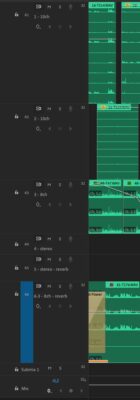
    The only idea I had was to redistribute the audio clips the following way, for example:

    A1 – 4ch: 10 channels WAV file #1 – only channels 1-4

    A2 – 4ch: 10 channels WAV file #1 – only channels 5-8

    A3 – 4ch: 10 channels WAV file #1 – only channels 9-10

    A4 – 4ch: 10 channels WAV file #2 – only channels 1-4

    A5 – 4ch: 10 channels WAV file #2 – only channels 5-8

    A6 – 4ch: 10 channels WAV file #2 – only channels 9-10

    A7 – stereo: stereo WAV file #1- channels 1-2

    A8 – stereo: stereo WAV file #2 – channels 1-2

    A9 – 4ch: 10 channels WAV file #3 – only channels 1-4

    A10 – 4ch: 10 channels WAV file #3 – only channels 5-8

    A11 – 4ch: 10 channels WAV file #3 – only channels 9-10

    (see the screenshot of the densest part of the sequence for reference – i realize I should rename the tracks for clarity)

    I’m guessing this could make it work although it just makes the whole thing a bit cumbersome. And well, it would mean I’d need to paste for example a 10ch file in three consecutive tracks which feels a bit odd.

    Another solution came to my mind but since I lack any experience with ProTools I’m not sure if that would work. I thought maybe if I chose only four of the file’s 10 channels, they could somehow re-link the file in ProTools with all its 10 channels. I guess I’ll have to just experiment and verify it with them directly…

    Anyway, what do you think?

  • Thanks a lot!

    Best
    Pawel

  • Update: Boris works!! 🙂

  • Thank You both! I hope Boris will do the job. I’ve just watched the tutorial video and it seems to be the solution, especially that they offer trial version.. I guess these 14 days are enough to get it done. And it’s good news about Automatic Duck too, I was afraid it’d only work if I had it installed.
    As for CS5 – honestly, I completely forgot about Premiere, however I still have mere CS4 so I gues it wouldn’t do any good.

    Thanks once again!
    Pawel

  • Pawel Gardynik

    October 8, 2009 at 12:13 pm in reply to: Letterboxing the image and 35mm

    Thank you for reply,

    I’m not the author of the film, just his assistant so I didn’t make the decision. The film was shot on 16mm and after that the director/author decided to change the frame aspect ratio but he doesn’t want 16:9 but something between 16:9 and 4:3. Our workflow is like free-improvisation sometimes so I just got used to it.
    As I said, the film was shot on 16mm so we have the footage as film transferred by telecine to DV-PAL. As for the frame rate – the original material is 24fps (as it is to be on final 35mm) so we’re working in 24@25 FCP project.

    Anyway, I think you’re right and simply I have to ask someone from the lab. I just thought I could learn something here.

    Thank you
    Pawel

  • Pawel Gardynik

    October 7, 2009 at 1:06 pm in reply to: DPX and FCP project

    Thanks a lot,

    P

  • Thanks, I’ll try to follow your instructions once I get home. The movie is about 1h20mins, too dificult for me, that’s for sure.

    Best
    Pawel

  • Pawel Gardynik

    September 11, 2009 at 6:59 pm in reply to: Export issue – terrible glitches

    Thank you both,

    Unfortunately it doesn’t help, I keep getting thoe glitches. It must be some problem with software or.. I don’t know. I called the guy I work with on the project (it’s his movie), he exported some portion from the same sequence using Quicktime >> DV PAL >> “Current settings” (suppose, the safest way) on his computer and everything works fine. And I failed. We have the same projects, I made the copy today. Is it possible that codecs got broken? Or maybe files while copying got corrupted somehow?
    Tomorrow I’m going to check if the copy on my drive works on his computer.
    But if somebody knows or supposes anything, please let me know.

    Thank you in advance
    Pawel

  • Pawel Gardynik

    September 11, 2009 at 6:26 pm in reply to: Export issue – terrible glitches

    Isn’t it the proper forum for my question??

Page 1 of 2

We use anonymous cookies to give you the best experience we can.
Our Privacy policy | GDPR Policy