Forum Replies Created

Page 4 of 16
  • You should look into the Digital Anarchy 3D Assistants Pro plug-in. Wait… what? Oh, Red Giant purchased that and it’s not called Red Giant PlaneSpace and part of the Effects Suite. No? Now it’s part of the Universe? Not the Universe? Now it’s called Red Giant Complete? What? Are you kidding me? Red Giant is now Maxon? And they make no mention of this plug-in anymore?

    WTF is happening? I’m getting too old for this.

    Red Giant PlaneSpace is designed to ease the tedious task of managing individual layers in multi-layer effect videos. Allowing you to automatically create layers that include cubic, cylindrical, and spheroid shapes or complex matrices, the software facilitates arranging 3D layers throughout 3D space into the shape of your choice without requiring keyframes or complicated math.
    Using Creator Tools, the PlaneSpace allows generating multiple layers with variable scale, height, width, and controls for a creative video output. It includes 6 distribution tools which enable you to easily distribute new layers around the original layer. In addition, the 6 lite and 10 pro control palettes allow you to build shapes with minimal effort, and offer control over placement and repetition respectively, which save RAM providing greater processing speeds.

  • Paul Carlin

    July 6, 2021 at 4:47 pm in reply to: Studio ‘over’ to free version woes

    I’m going to back up Michael on this one. The time you spent (and will spend) on this is worth more than two Studio licenses… and you get a FREE DaVinci Resolve Speed Editor with each one. It is an astonishingly good deal… and such a simple solution to all of your problems.

  • Paul Carlin

    July 2, 2021 at 4:32 pm in reply to: How to ingest old DV?

    You are going to want to clean the heads in your DV deck often. Those old tapes are shedding, and DV is very intolerant to drop outs. Get some Texwipes and head cleaner and blow the dust out of that VTR. Clean after each tape and let it dry before inserting a new tape.

    Also, DV uses an obsolete compression codec no longer supported, so convert those captured movs to ProRes 422HQ if you want to have any hope of using them in the future. Use Topaz Video Enhance AI to convert the interlaced footage to something useable in today’s progressive world.

  • Paul Carlin

    July 2, 2021 at 4:00 pm in reply to: Trying to lose highlight details

    What Michael said. The issue you are fighting against is 32-bit floating point math. You need to force the image through integer math to cause clipping. This is also known as clamping.

  • Paul Carlin

    May 11, 2021 at 5:45 pm in reply to: Digitize VHS using FCPX

    You should be using the Black Magic Intensity Shuttle as your capture device and bypass the UltraStudio Mini completely. The only other device you might want to add is a TBC to stabilize the video before it reaches the Black Magic Intensity Shuttle (for example the TVone-1t TBC Time Base Corrector). A TBC will make a big difference in the quality of a VHS capture. If you have an S-VHS deck, use the S-Video output into the Shuttle (or TBC->Shuttle). Be sure to capture native interlaced 720×486 to something like ProRes 422 HQ, and then use BMD Resolve 17 to deinterlace (new feature in v17 is improved deinterlacing) or something like Topaz Video Enchance AI to deinterlace and upres. And be careful not to clip your whites and blacks by interpolating any captured video as full video range, and use color correction to make it legal again.

  • Paul Carlin

    May 7, 2021 at 4:10 pm in reply to: Screen Capture app

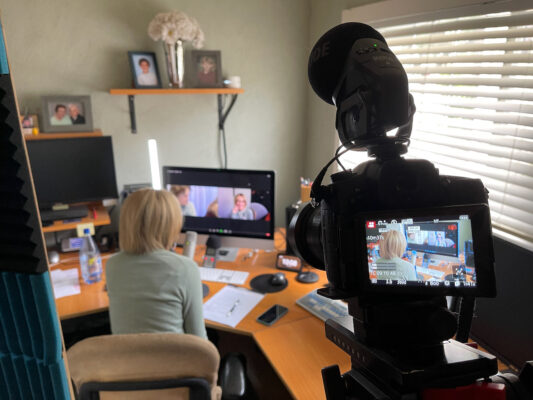
    I would not suggest using a screen capture application as a backup for Zoom recording. Mainly because the computer is already burdened with handling a Zoom call AND recording the call to your hard drive. Adding another CPU intensive task on top of all that would most likely make the quality of the Zoom call drop, not to mention two apps writing data to your drive simultaneously. You computer’s fan noise will most certainly become an issue as well (for audio quality). I would strongly suggest you feed a second monitor output (in mirror mode) to an external device for recording (for example, a BMD UltraStudio Mini Recorder connected to a second computer). You may need to change your screen resolution to be compatible with an external recorder, but this is not a big deal as Zoom only does 720p (free) or 1080p (paid) at the most anyways, and would further reduce the CPU overhead. I would also point a camera at the computer with the interviewee in the foreground as a third option. This gives you something to cut away to and more options in editing (and if all of the recordings have failed, you at least have this one guaranteed reliable recording of the call). In the picture, you can see I even have a separate Zoom H4n (no relation to the other Zoom) as an audio backup (just in case).

  • Paul Carlin

    May 5, 2021 at 5:20 pm in reply to: Activation code

    I hear that if you send BMD $295 they will send you a fresh new one.

  • Paul Carlin

    April 30, 2021 at 2:18 pm in reply to: Syncing up two different clips of similar footage.

    Frame blending simply blends the frames based on how far they temporally. For example, if you have a 25% slow down, the second frame is made up of 75% first frame and 25% second frame. The next frame would be 50%/50% and then 25%/75%.

  • Paul Carlin

    April 30, 2021 at 2:11 pm in reply to: Syncing up two different clips of similar footage.

    Timewarp both clips so that they both have a lot of frames. If each clip has 120 to 240 frames per second, then the temporal differences will be minor (after you speed them back up). Try using Resolve’s speed warp. This AI driven algorithm is the best for this job and should make buttery smooth in-between frames. Although any timewarp with motion estimation should handle this as well.

  • I’ve seen where they use iPhones to record using Filmic Pro and a separate laptop for streaming/directing. You also need dual audio and the best lighting. Lighting will make all the difference no matter how you record it.

Page 4 of 16

We use anonymous cookies to give you the best experience we can.
Our Privacy policy | GDPR Policy