Forum Replies Created

Page 1 of 2
  • Palak Bhatt

    August 25, 2022 at 4:59 pm in reply to: How to move timeline layers with marker?

    thanks Andrei but I want expression on control with markers. [ will not work for me

  • Palak Bhatt

    August 25, 2022 at 4:56 pm in reply to: How to move timeline layers with marker?

    sorry, only specific color layers

  • Palak Bhatt

    August 25, 2022 at 4:15 pm in reply to: How to move timeline layers with marker?

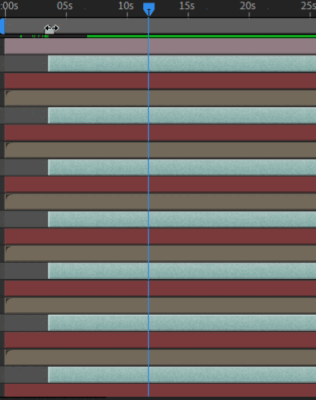
    find in gif, it would be great help if is it possible thanks in advance

  • Palak Bhatt

    August 25, 2022 at 4:12 pm in reply to: How to move timeline layers with marker?

    Script method best in my case but, Is there any other way to control all layer start by marker?

  • Palak Bhatt

    August 25, 2022 at 1:59 pm in reply to: How to move timeline layers with marker?

    Thank you so much for reply 🙂 very helpful

    you are just near which I want to trigger same thing when i move marker, is it possible ?

  • Palak Bhatt

    July 29, 2020 at 9:49 pm in reply to: Is there any idea why this gave undefined error?

    Corrected and tested
    Now its final

    var d = 0;
    var NumberOfMove = 2;
    var myLayers = app.project.activeItem.selectedLayers;
    var myMove = app.project.activeItem;

    if (myLayers.length > 0){
    for (var i=0; i < myLayers.length; i++){
    d = myLayers[i].index;

    myMove.layer(d).moveAfter(myMove.layer(d+NumberOfMove+myLayers.length));
    }

    }else{
    alert ("No layers selected.");
    }

  • Palak Bhatt

    July 29, 2020 at 9:37 pm in reply to: Is there any idea why this gave undefined error?

    I Got it ☺

    Check it below
    Thank you, Brother

    I want to add you on Facebook if you don’t mind
    give me your id if possible, You are super pro :)))
    many thanks

    ver NumberOfMove = 10;
    var myLayers = app.project.activeItem.selectedLayers;
    var myMove = app.project.activeItem;

    if (myLayers.length > 0){
    for (var i=0; i < myLayers.length; i++){
    var d = myLayers[i].index;
    myMove.layer(d).moveAfter(myMove.layer(d+NumberOfMove));
    }

    }else{
    alert ("No layers selected.");
    }

  • Palak Bhatt

    July 29, 2020 at 9:24 pm in reply to: Is there any idea why this gave undefined error?

    The problem is on above code is only moved last number of selected layer, How can I move bulk layers at once? at fixed number of layers

  • Palak Bhatt

    July 29, 2020 at 9:16 pm in reply to: Is there any idea why this gave undefined error?

    Thanks ☺ Brothers i have no words for you.

    I have the other question
    I am trying to move all selected layers at every Nth number.

    What should i do this code to works?

    var d = 0;
    var myLayers = app.project.activeItem.selectedLayers;
    var myMove = app.project.activeItem;

    if (myLayers.length > 0){
    for (var i=0; i < myLayers.length; i++){
    d = myLayers[i].index;
    }
    myMove.layer(d).moveAfter(myMove.layer(d+10));

    }else{
    alert ("No layers selected.");
    }

  • Palak Bhatt

    July 29, 2020 at 8:12 pm in reply to: Auto Arrange Layers with Same Name

    Thank you Filip Vandueren, You are a life saver

Page 1 of 2

We use anonymous cookies to give you the best experience we can.
Our Privacy policy | GDPR Policy