Nikolay Arkhipov
 22
AE Expressions Coins
22
AE Expressions Coins
 19
COW Coins
19
COW Coins
Forum Replies Created
-

Nikolay Arkhipov
May 10, 2024 at 11:38 am in reply to: Define width&height of a single word from a text lineUPD:
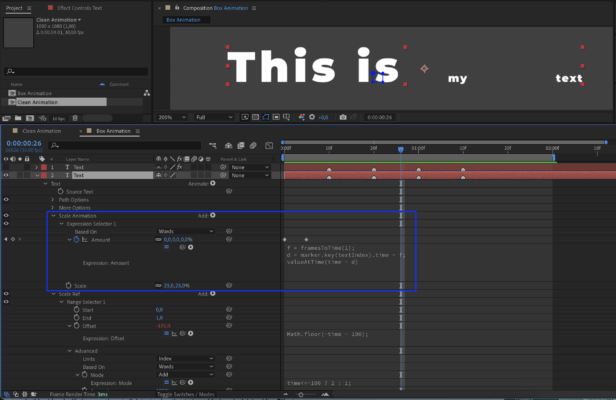
I’ve figured out what the problem was. But now I have another issue. The mask just takes the points from the initial position/scale of the words… However they are animated, and the mask doesn’t ‘follow’ this animation, and doesn’t ‘scales up’ with the words.. A btw, I tried to change the amount option in Scale Ref animator (this is where I put your settings) and scale option im Scale animation, and it works more or less (I mean it does change the mask size), but it stops working as soon as I put a keyframe…
Could you please help me animate the mask somehow, so that it follows the scaling up words..? Is there a solution for this?
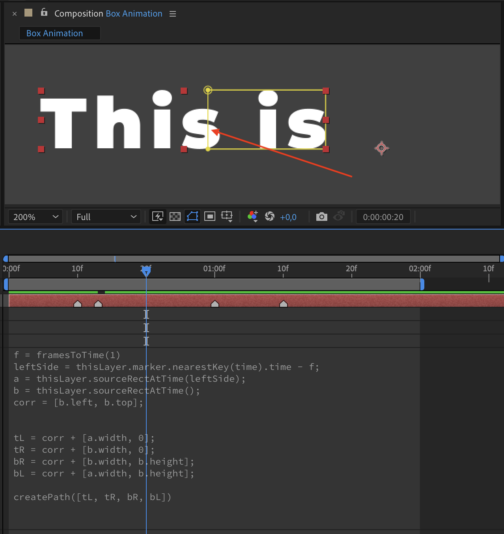
Here’s a screenshot of my animation.
P.S. I made it 25% just to see what happens with the mask, and I also moved it 1 frame back (f) in order the animation starts exactly on the marker.
New UPD:
I understood… the mask is taking values form the starting state of the text line, and its scale initially is 25%. But still don’t know how to make the mask ‘grow’ following the scaling up words…

-
Nikolay Arkhipov
May 10, 2024 at 9:40 am in reply to: Define width&height of a single word from a text lineHi Filip!
Thank you so much! This is the very thing I am looking for. But I have some problems with your expressions though..
I’ve deleted the Expression Controls’ effects and rewrote them into the mask path, because I’m going to leave the Expression Controls’ window clean for further control options.
And also I’m going to link the ‘i’ value to markers, because my animation is linked to them. So, that it takes the text index or the marker index, and converts it into a value in real time during the animation (marker 1 – 0, marker 2 – 1, and so on).
But… the mask doesn’t work 🙁
Could you please look at the screenshot and maybe find the problem?
P.S. And I also couldn’t figure out what for you created the ‘Right – Bottom’ Point Control, and where it refers to… maybe this is the problem why it doesn’t work for me?
-
Nikolay Arkhipov
May 10, 2024 at 8:01 am in reply to: Define width&height of a single word from a text lineHi David!
Thank you very much for your participation and advises.
I’m trying to make a template for subtitles, so I need to make everything just on a single layer, otherwise it makes no sense in terms of convenience.. In fact I initially also had an idea of making some kind of reference for original text… I mean when the text line ‘looks’ on smth else at a certain time (where markers are) and defines the size of ‘this something’ at that moment of time. But every time I’m thinking of this idea, I end up with making an additional layer. But again, I need to make everything on a single layer…
I also had an idea of making another text animator (range or expression), where there will be just one word at a time (make an expression based on text index, and link it to markers), and somehow make this animator ‘not active/invisible’ for the animation. And then make the original text ‘look’ at this animator and get the size of each word. But again I can only imagine it on an additional text layer.
And btw, your textbox also covers the space between the words..
-
Nikolay Arkhipov
May 9, 2024 at 7:11 pm in reply to: Define width&height of a single word from a text lineHi Hector! Thanks for your reply..
Frankly speaking it’s not exactly what I need. At the moment, I’m trying to deal with masks, because additional shape layer, is an additional layer, and I want to make everything on a single layer.
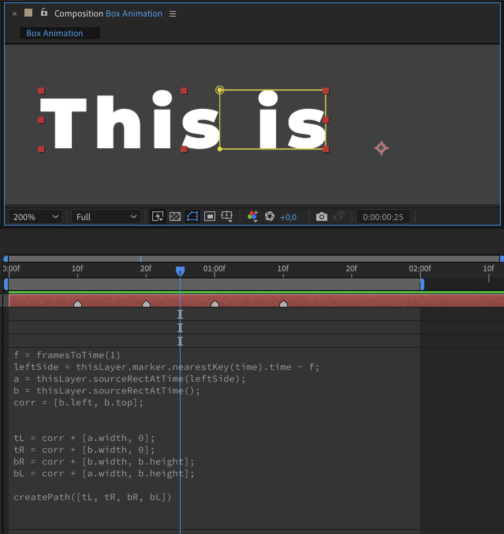
So, by this moment, I managed to to do this (on the screenshot 1):
The full textline is “This is my text”, and it is animated by scaling up each word, one by one, and the animation is linked to markers (1st marker – 1st word scales up, 2nd marker – 2nd word, and so on).
So, I defined the mask points, and there was no problem with the right side of the mask, because it is defined by a usual sourceRectAtTime expression. But I had problems with the left side of this mask, I didn’t (and don’t) know how to define it correctly. At the moment, it is defined as the right side of the same mask, but at the moment of the previous marker (because this is the very place where the text ended at that time…).
But there are some issues with this method:
1. I need the mask to cover just the word, but not the word with the space.
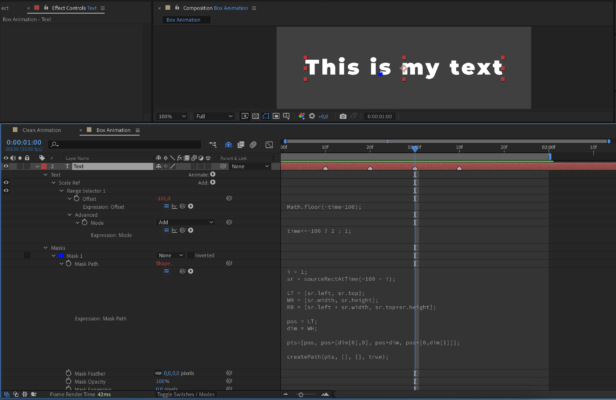
2. And the second, the most important, that the animation lasts 5 frames, and if the interval between the markers is less than 5 frames (screen 2), the mask covers a part of the previous word….
So, in simple words, I need a mask, that behaves absolutely in a way that sourceRectAtTime expression does, but covering just a single word from the text line. This would solve my problem…
P.S. Why I need this mask… I need the mask in oder to make the box behind the word with a couple of effects, and then reference them to this mask using compositing options.
P.P.S. I know Jake, I’m subscribed on his channel and watched almost all of his videos =)
-
Hi Filip!
Could you please tell how you made the box to cover separate words (not the whole text line)..?
I am trying to achieve a similar effect…
But the best way for me, is to make a mask that covers a single word (from the text line), that is being revealed at the moment. I can define all the points of that mask using sourceRectAtTime() expression. But the problem is that its left side stays in the beginning of the text line. And I need it travel to the beginning of each next revealing word.
https://creativecow.net/forums/thread/define-widthheight-of-a-single-word-from-a-text-line/
Please, have a look at the topic above.
Thank you.

creativecow.net
Define width&height of a single word from a text line - Adobe After Effects Expressions - Creative COW
-
Nikolay Arkhipov
December 17, 2019 at 10:06 am in reply to: Editing graph when an ‘ease’ expression is usedAnd the most important thing is that this method makes possible editing graph.
-
Nikolay Arkhipov
December 17, 2019 at 9:14 am in reply to: Editing graph when an ‘ease’ expression is usedThanks for everybody for taking part. I’ve finally found a solution.
If it is interesting for somebody:
I created a Null object and put a slider on it. Then I just created keyframes for this slider – 0 and 100. These particular keyframes are the future animation between the 1st and the 2nd position that I needed.
So, finally I just turned the position numeric values into % using a formula and made them dependent on this slider.In this way one can animate the position of an object, using not numbers, but its realtime height or width.
P.S. In script below the anchor point of the layer is in the center, so as the anchor point of the Null.
x1 = thisComp.layer("Null").transform.position.value[0] - thisLayer.sourceRectAtTime().width;

x2 = thisComp.layer("Null").transform.position.value[0];

s = thisComp.layer("Null").effect("Animation")("Slider");

x = x2 - (100 - s) * (x2 - x1) / 100;

y = thisComp.layer("Null").transform.position.value[1];

[x, y] -
Nikolay Arkhipov
December 16, 2019 at 10:46 am in reply to: Editing graph when an ‘ease’ expression is usedThanks for your participation, but I’m not sure this is what I need… I can’t find where to put the position values that I have to animate. The very problem is that these values are not numbers. I need to animate the text, that starts moving from its left side and goes to the right on a distance of its length. So, the text size is not constant, that’s why I use sourceRectAtTime expression to define the starting and ending points. And the problem is that I can’t figure out (or simply don’t know) how to animate these points not using “ease” or “linear” expression.
Example of starting and ending points (Text anchor point is in the center):
InStart = thisLayer.sourceRectAtTime().left – thisLayer.sourceRectAtTime().width / 2;
InEnd = thisLayer.sourceRectAtTime().left + thisLayer.sourceRectAtTime().width / 2;I was trying to use text animators, and I suppose it was a very good idea, because I could define the position and animate the Start that is in %. BUT the text starts acting very strange when I type an expression for its position… I’ve even posted another post concerning this problem yesterday.
-
Thanks for your reply, however it doesn’t work…
I just reread the post, and maybe I haven’t explained the interaction between layers correctly. So, there is the Text layer. Then there is a shape layer (Box), and it keeps the size of the text using sourceRectAtTime expression. Finally I’m going to apply an Alpha Matte and animate text revealing, that will go from the left side of the Box to its center, and become fully visible.I tried to change thisComp.layer(“Box”) to thisLayer, and even to thisComp.layer(“Text”) / or SAMPLE TEXT as it is in the project), but it didn’t work either… The contour moves, but the particular text stays still…

-
Nikolay Arkhipov
December 13, 2019 at 8:27 pm in reply to: Editing graph when an ‘ease’ expression is usedThat’s sad…
But is there any alternative? The main idea is just to get movement between these 4 keyframes, when the initial position of the moving object can vary.