

Activity › Forums › Adobe After Effects Expressions › Define width&height of a single word from a text line
-
Define width&height of a single word from a text line
Posted by Nikolay Arkhipov on May 8, 2024 at 6:21 pmHi everyone!
I need to make a box (or a mask), that is driven by sourceRectAtTime expression, but covers not the whole text line, but only one word at a time. I mean, for example there’s a scale animation (each word reveals by scaling from 0 to 100), and I want the box to cover just the word that is scaling at the moment.
For example: “This is my text” – in this line “This” scales up, then “is”, then “my”, then “text”. SourceRectAtTime makes the box on the word “This”, then on the words “This is”, then on the words “This is my”, and then “This is my text”. And I want the box to follow only the words, that are scaled up at the moment – “This”, then “is”, then “my”, then “text”. And also disappear somehow in the end, but it’s another thing…
So I need to define somehow the width and hight of a single word, that is revealing at the moment. And for my project, it’s even better not to make boxes, but use masks. I first thought of making two masks – first one from the left of the text line and to the end of the revealing word, and the second one from the left of the revealing word to the end of the text line. And then use the intersection of these two masks.. But if I define somehow the top left and bottom left points of the word (left side of the word), I won’t even need two masks, I’ll be able to make just one (because top right and bottom right points will be defined by sourceRectAtTime).
Hope I clearly explained what I need…
Thanks in advance.
Julian Chojnacki replied 2 years, 2 months ago 5 Members · 8 Replies -
8 Replies
-

Hector Vera
May 9, 2024 at 6:38 pmSounds like you wish to do an animation like text line where whatever you say at that exact moment, the word appears on screen pretty big so anyone can see it right? There is a full on tutorial I found online that may be able to help you: https://www.youtube.com/watch?v=CVliDoNgoCg It gives very well in details on how each elements work with the sourceRectAtTime() coding which you can customize it to your liking! Hope this helps!
Some contents or functionalities here are not available due to your cookie preferences!This happens because the functionality/content marked as “Google Youtube” uses cookies that you choosed to keep disabled. In order to view this content or use this functionality, please enable cookies: click here to open your cookie preferences.
-

Nikolay Arkhipov
May 9, 2024 at 7:11 pmHi Hector! Thanks for your reply..
Frankly speaking it’s not exactly what I need. At the moment, I’m trying to deal with masks, because additional shape layer, is an additional layer, and I want to make everything on a single layer.
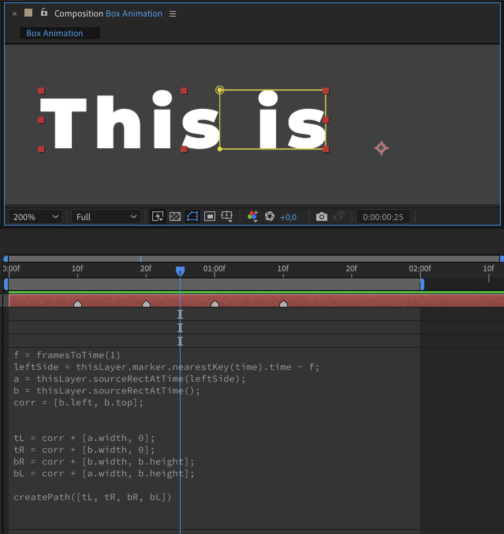
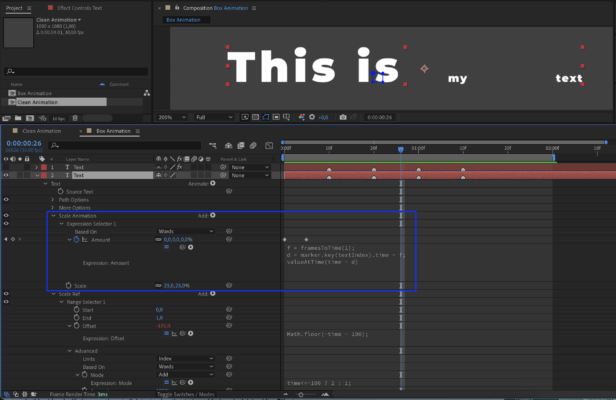
So, by this moment, I managed to to do this (on the screenshot 1):
The full textline is “This is my text”, and it is animated by scaling up each word, one by one, and the animation is linked to markers (1st marker – 1st word scales up, 2nd marker – 2nd word, and so on).
So, I defined the mask points, and there was no problem with the right side of the mask, because it is defined by a usual sourceRectAtTime expression. But I had problems with the left side of this mask, I didn’t (and don’t) know how to define it correctly. At the moment, it is defined as the right side of the same mask, but at the moment of the previous marker (because this is the very place where the text ended at that time…).
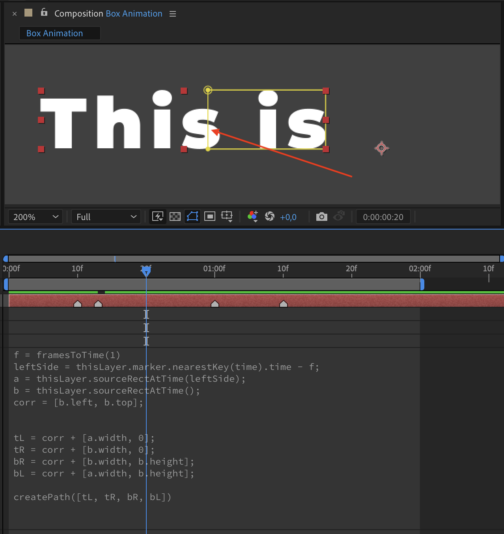
But there are some issues with this method:
1. I need the mask to cover just the word, but not the word with the space.
2. And the second, the most important, that the animation lasts 5 frames, and if the interval between the markers is less than 5 frames (screen 2), the mask covers a part of the previous word….
So, in simple words, I need a mask, that behaves absolutely in a way that sourceRectAtTime expression does, but covering just a single word from the text line. This would solve my problem…
P.S. Why I need this mask… I need the mask in oder to make the box behind the word with a couple of effects, and then reference them to this mask using compositing options.
P.P.S. I know Jake, I’m subscribed on his channel and watched almost all of his videos =)

-

David Conklin
May 9, 2024 at 9:06 pmHey friend,
Unfortunately there is no easy way to do what you’re saying in AE currently. It’s impossible to get the X location of a character within a string.
Fortunately, this task does become trivial if you have each word (or letter, line) on its own layer. If you need help with that, let me know, but the short version animate a slider (or use an interpolation function) from 0-1 and then use that to “scale” your height variable in your expressions.
If you’re able to separate your text into individual words, that is definitely the path of least resistance. Trust me. However, because you posted this in the expressions forum I think you may be in search of the needlessly complex answer. This is not very practical, BUT…
<div>
- Duplicate your text layer and link the copy’s source text back to the original.
- Add a Scale Text Animator to the duplicate. Set scale to [0,0] and delete the range mapper
- Add an expression selector and add this expression: textIndex <= timeToFrames(time) ? 0 : 100;
- Important: Change the “based on” dropdown inside the expression selector to “Words”
- This expression writes on 1 word per frame. So frame 0 will have 0 words shown, frame 1 will have 1 word shown, etc.
- The idea here is that we can use sourceRectAtTime(frame#) to look at how big our text layer is at a specific frame, and because frame#=textIndex due to our expression selector, we can now essentially request the sourceRectAtTime object for all of the text up to the given index. Now, if we compare the bounding box at our desired index against the bounding box at our index minus 1 we can create a box for each word).
Here’s an example with an expression that goes on the mask property of a solid layer. It lets you input an index and will make a box that covers that word and animate it up from the baseline over half a second.
(AEP attached, code didn’t really make sense without context)
Good luck!</div>
-

Filip Vandueren
May 9, 2024 at 9:24 pmSorry, I was mistaken in the other thread; I though you were talking about this animation preset of mine: subsourcerect .
I haven’t released the source of v2 which works with fractional frames, b it perhaps this version already works for your case
-
Nikolay Arkhipov
May 10, 2024 at 8:01 amHi David!
Thank you very much for your participation and advises.
I’m trying to make a template for subtitles, so I need to make everything just on a single layer, otherwise it makes no sense in terms of convenience.. In fact I initially also had an idea of making some kind of reference for original text… I mean when the text line ‘looks’ on smth else at a certain time (where markers are) and defines the size of ‘this something’ at that moment of time. But every time I’m thinking of this idea, I end up with making an additional layer. But again, I need to make everything on a single layer…
I also had an idea of making another text animator (range or expression), where there will be just one word at a time (make an expression based on text index, and link it to markers), and somehow make this animator ‘not active/invisible’ for the animation. And then make the original text ‘look’ at this animator and get the size of each word. But again I can only imagine it on an additional text layer.
And btw, your textbox also covers the space between the words..
-
Nikolay Arkhipov
May 10, 2024 at 9:40 amHi Filip!
Thank you so much! This is the very thing I am looking for. But I have some problems with your expressions though..
I’ve deleted the Expression Controls’ effects and rewrote them into the mask path, because I’m going to leave the Expression Controls’ window clean for further control options.
And also I’m going to link the ‘i’ value to markers, because my animation is linked to them. So, that it takes the text index or the marker index, and converts it into a value in real time during the animation (marker 1 – 0, marker 2 – 1, and so on).
But… the mask doesn’t work 🙁
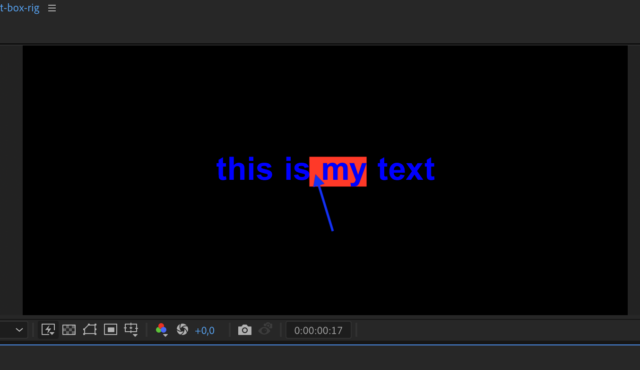
Could you please look at the screenshot and maybe find the problem?
P.S. And I also couldn’t figure out what for you created the ‘Right – Bottom’ Point Control, and where it refers to… maybe this is the problem why it doesn’t work for me?
-
Nikolay Arkhipov
May 10, 2024 at 11:38 amUPD:
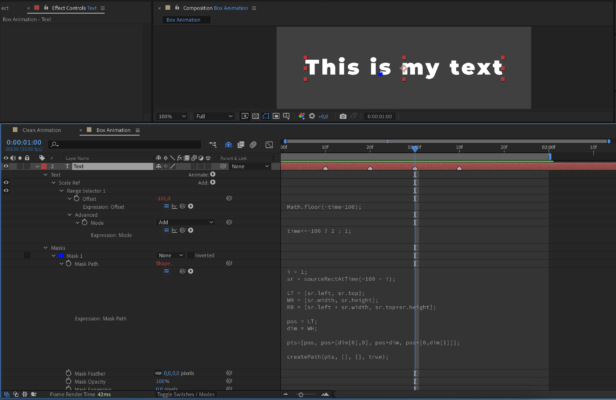
I’ve figured out what the problem was. But now I have another issue. The mask just takes the points from the initial position/scale of the words… However they are animated, and the mask doesn’t ‘follow’ this animation, and doesn’t ‘scales up’ with the words.. A btw, I tried to change the amount option in Scale Ref animator (this is where I put your settings) and scale option im Scale animation, and it works more or less (I mean it does change the mask size), but it stops working as soon as I put a keyframe…
Could you please help me animate the mask somehow, so that it follows the scaling up words..? Is there a solution for this?
Here’s a screenshot of my animation.
P.S. I made it 25% just to see what happens with the mask, and I also moved it 1 frame back (f) in order the animation starts exactly on the marker.
New UPD:
I understood… the mask is taking values form the starting state of the text line, and its scale initially is 25%. But still don’t know how to make the mask ‘grow’ following the scaling up words…
-

Julian Chojnacki
July 1, 2024 at 12:57 pmHi Filip, any updates on the final v2 of subSourceRect? 🙂 I’ve noticed that fractions don’t work reliably for all framerates depending on the granularity of the setup (your single-layer textboxes for example seem to only work for framerates < 40), and all my efforts to find a robust solution weren’t successful. If you found a way to make the technique production-ready that’d be a true blessing!
Reply to this Discussion! Login or Sign Up