Forum Replies Created

Page 1 of 3
  • Dan, this is amazing! This is acxactly what i need
    Where is your damn book about Ae.expressions? )
    You have to write this book
    Every your peace of code is very interesting to study

    Im mostly graphic/motion designer and i would love to work on this book with you!
    I Enjoy to mix math and art but im not that experienced as you, i mean in math
    here is some of my stuff if you interested
    https://www.behance.net/Mikhail1983

    You know, this thick 300 pages book with a lot of divers examples, cool illustrations and animations/

  • Thanks Dan,
    tried it today

    in your version it kind of speeds up the object rather than changing its “stay still time”
    I also try to do it without any keyframes. Position will be driven by expression as well
    your version is actually usable for me but not exactly what i need

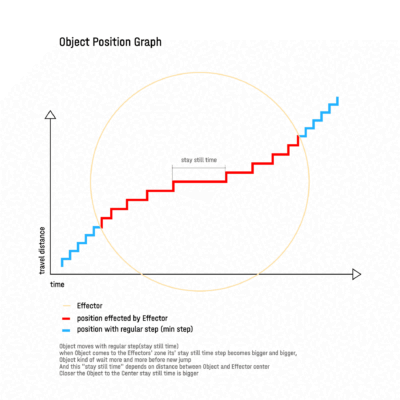
    here is an image of the Object position graph which will illustrate it better
    i need this position graph to be generated with expressions only(no effects no keyframes)

  • hmm…interesting..some alien stuff here )
    Thanks Dan, will explore it today

  • here is my best result so far

    start = 0;

    end = 0;

    j = 0;

    endPos = 0;

    tDur = thisComp.frameDuration ; // by one frame

    //time generation!!!

    while ( time >= end) // it sets new milestone for the time then time follow it and reach it, became larger and we have new ‘ end ‘ jump

    {

    j += 1;

    seedRandom(j,true);

    // start = end;

    //end += Math.abs( Math.floor( random(tDur,tDur) ) ) // it sets time jumps\sectors

    end += Math.abs( random(tDur*j*2,tDur*j*2) ) // it sets time jumps\sectors

    endPos += Math.abs( Math.floor( random(2*j,2*j) ) ) ;// it sets pos +

    }


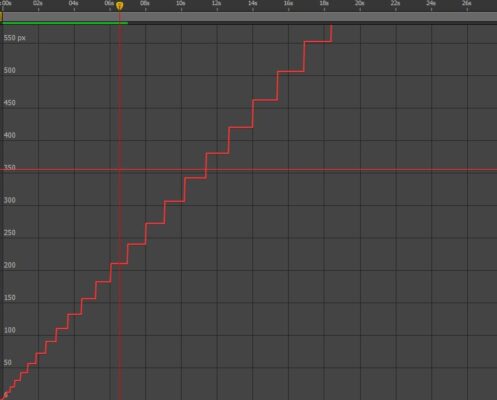
    it gives this kind of graph
    but it does not depend on distance between objects

  • also “const” declaration does not work for me
    had to clear it

  • thanks Max

    it looks like it should work but it gives same jumpy motion i had before
    something wrong with posterizeTime effect/expression command
    it just does not work properly, that why i tried Den Ebberts random stuff to handle this jumpy thing. I even made some progress but my steps are random and not depend on distance between Obj. and Effector

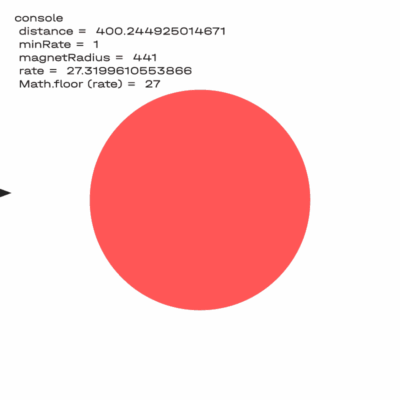
    here is an example with your expression
    i tried both posterizeTime effect and expression
    tried it in cs6 and cc2022
    same jumpy thing…
    any other ideas?
    it should be something that stops expression for sometime(while we are on the plateau) than feed new new numbers(plateau length/hold time) to the function

  • Mikhail Vasilev

    December 25, 2019 at 3:54 pm in reply to: How to set accurately the Region of Interest

    Move your Region to the left-top corner
    Resize it as u need, you will find exact dimensions/size of it on the Info Panel(it will go from zero, which is convenient)
    After size set Move it to the position u need, use its border to grab it to avoid shape/size destortion
    Done!

  • We have god os the Sun, God of the Earth, and God of the After Effects Expressions : )

  • You’d saved me man! : )
    Thansk a lot!!!!!!!!!!!!!!!!!!!!!!!!!!!!!!!!!!!!!!!!!!!!!!!!!!!!!!!!!!!!!!!!!!!!!!

  • You’d saved me man! : )
    Thansk a lot!!!!!!!!!!!!!!!!!!!!!!!!!!!!!!!!!!!!!!!!!!!!!!!!!!!!!!!!!!!!!!!!!!!!!!

Page 1 of 3

We use anonymous cookies to give you the best experience we can.
Our Privacy policy | GDPR Policy