


Michael Mcintyre
Forum Replies Created
-

Hey, John…
It is an option. I always like going to owner/operators first. Might be a moot point as this Nitris DS probably holds more value for trade and parts to an existing DS workflow than as a standalone ‘trapped-in-time’ 7.5 box.
-
Another great scene in ‘Black Hawk down’. Ewan McGregor’s character temporarily loses his hearing due to a nearby RPG ricochet…. “Can you hear me?!??!?!?… I hear bells ringin’….”
-
I was thinking of saving a little money…. The XDCAM is already compressed in that format and a HDCAM deck is $1,000/day rather than $300/day for an XDCAM PDW-70.
Fever City Studio, LLC
1035 madison
denver 80206 -
Hey, Steve:
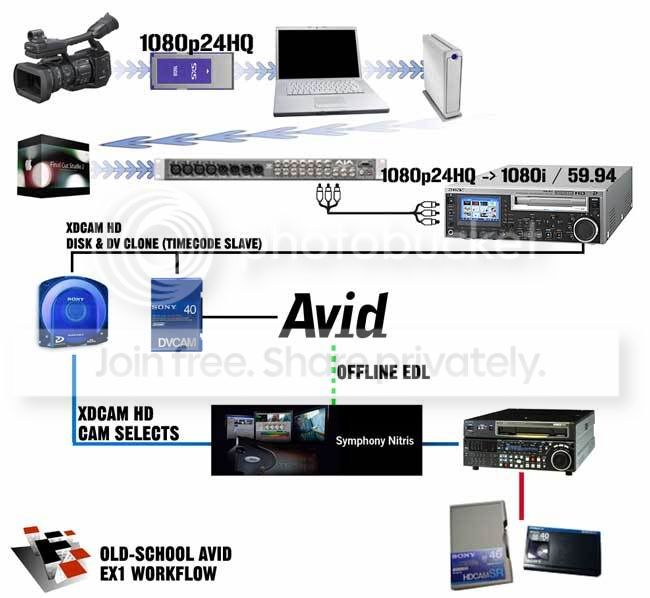
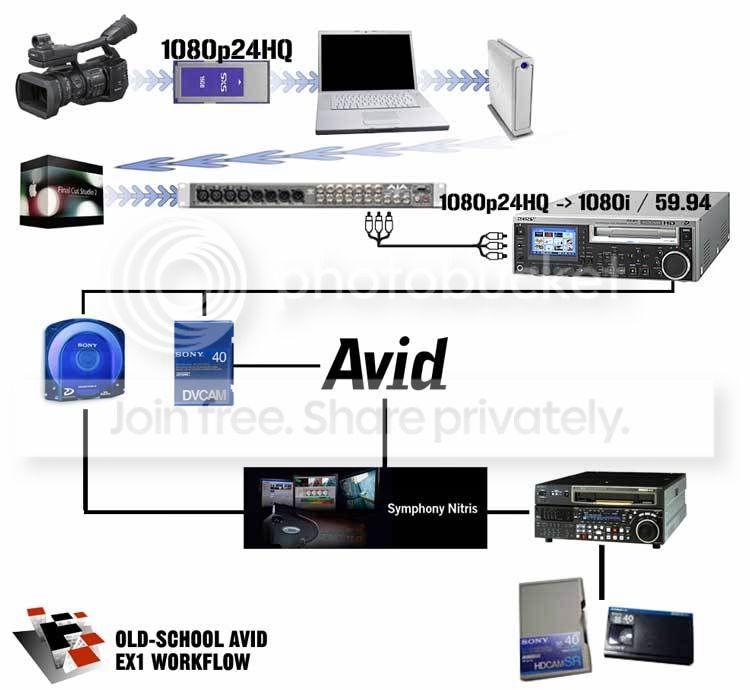
There remains some confusion on your end. The DV is only used for the offline edit. His EDL will be used for the HD online. No DV will be bumped up or up-rezzed. Hence part of the subject title: “Old-School Off/Online”.
Shoot files get archived to XDCAM HD disks and timecode-slave DV dubs. He cuts the DV on his older system and spits out an EDL. I walk into a Nitris bay with the EDL and XDCAM disks and walk out with a HDCAM master. Again – we’re not bumping DV up to HDCAM.
I realize this workflow is a little odd but I’m not ‘one of those guys bumping up 8mm to Beta’. Give me a break. Read the thread. It’s actually a workable solution that saves money.
Fever City Studio, LLC
1035 madison
denver 80206 -
Understood. And – thanks for checking it out. Maybe the diagram exaggerates the steps too much. When all’s said and done, it’s not overly complex. End result will come out with archives on XDCAM HD disc with DV dubs and a HDCAM show master.
A PDW-F70 is around $700/week here versus $1,000/day for a Sony ‘real’ HD deck. Plus, you save money in that it can be cut on just about any ancient NLE (with no upgrade costs on his end).
Maybe I am old school but I still like working with a colorist in an expensive, pretty room and lunch catered. They’ve got the HD scopes and monitors. For some projects, being able to do it at home doesn’t mean you should do it at home.
Fever City Studio, LLC
1035 madison
denver 80206 -
As mentioned in the subject heading, this is addressing an ‘old-school offline / online’ scenario. I have all the gear to handle XDCAM EX – no problem. Final Cut 6.0.3 and Media Composer 2.8.3 (still haven’t tested that CPR yet). However – I am not cutting this project. The lead editor is in a remote location with an older Avid. Pulldown will need to be added (at some point) to get to 1080 / 59.94 for the broadcast deliverables. A 1080/23.98p master is not an option here.
Imagine it as a tapeless workflow with the archive in the middle rather than the end of the project. Camera files get selected and dumped to XDCAM optical disks with DV clones. His DV Avid offline creates the EDL for the XDCAM -> HDCAM Nitris online.
Like I said ‘totally bizarre’ but could it (theoretically) work? And, no, Final Cut will not be considered for any part of this equation other than building the camera selects reel. I’d invite you to that debate with this editor but I seriously doubt you want to go down that road with this guy.
Bizarre? Yes. Feasible? Maybe….
{REVISED jpeg}
Fever City Studio, LLC
1035 madison
denver 80206 -
Fever City Studio, LLC
1035 madison
denver 80206 -
That’s who it was! Thanks for sharing, Todd. I just remembered reading a piece on them when all the Oscar nomination buzz was happening for that film.
Fever City Studio, LLC
1035 madison
denver 80206 -
Another way and even more laborious is what James Longley did for ‘Iraq in Fragments’. They actually exported individual tiff’s for the entire documentary and blew-up that way. I’m not suggesting this – just adding to the knowledge base as it were. I don’t even want to know what that cost him.
-
I realize this is, now, a bit dated but I’ll post anyway. Maybe there was some confusion since you specified ‘in a bin’. All your clips are in bins – you just want to be able to keyword search through a mountain of footage for a big documentary.
Just use ‘Custom Sift’ in Media Tool. Launch Media Tool w/ master clips for current project (or all projects if your stuff is captured elsewhere too). Type in what you’re looking for (i.e. ‘sunset’, ‘building’, whatever) and just leave it for ‘Any’ in the columns area. If there’s nothing for that search, nothing shows up and the Media Tool is empty. You can choose ‘Show Unsifted’ and all the clips fill it up again. Try another sift.
Once you do find a clip you’re looking for, open it in the source side and close Media Tool. As long as the clip is from a bin in that project, you can do ‘Find in Bin’ and it will load up that bin with the clip selected. ‘Find in Bin’ won’t work if your sift in Media Tool was for ‘All Projects’ and you haven’t yet opened that bin in your current project. You can still use the clip – it just won’t find the bin for you, saying “That bin is not in this project” or something like that. Take note of the bin name and open it in that project if you think you’ll be using it.
I hope this helps and not too far off. I’ve had some massive projects with footage pulled from other projects and footage captured by pa’s who weren’t quite ‘there’ yet leaving media all over the place. Sometimes, they’d get the clip name right but not in the proper bin.

