Forum Replies Created

  • Michael Mathes

    February 14, 2024 at 4:25 pm in reply to: AE scripting: using the colorpicker

    I’ve tried this on several different systems and OS’s. And I’ve found the same thing the OP did. It all works fine and correct until you use the eye drop tool, then it’s just slightly off with any conversion after. The windows system color picker doesn’t have an eye drop tool, at least that I can find, hence there being no issue there.

    Thanks for the help, I guess this continues to be unresolved.

    I don’t understand why Adobe doesn’t make AE’s color picker available…

  • Michael Mathes

    February 13, 2024 at 5:57 pm in reply to: AE scripting: using the colorpicker

    How very strange. I tried that, just for giggles, with the same result as before. I’m starting to think maybe it has something to do with the OS. I’m running Monterey on a late 2013 mac pro. I don’t know what else it could be…

  • Michael Mathes

    February 13, 2024 at 5:33 pm in reply to: AE scripting: using the colorpicker

    Hi Dan,

    Sure. Here is what I’m doing:

        var dec = $.colorPicker(parseInt(hex.replace("#",""),16));
    alert(dec.toString(16));

    This happens when using the eye drop tool. For example, I’ll select a color that is 6033B0 and it will display 6033B0 in the hex color window of the color picker but when it converts, it turns into 4C1BA0.

  • Michael Mathes

    February 13, 2024 at 4:34 pm in reply to: Expressions with essential properties not working

    I apologize for never responding to this. I just noticed it now… a year later. Sorry.

    If I recall, my issue had something to do with it being linked through an expression control. Once I used whatever expression was going on in that control in the dominant expression it fixed the issue. I don’t remember my reasoning behind using the control in the first place. I think it was just a tester kind of thing. Thanks for responding!

  • Michael Mathes

    February 13, 2024 at 4:29 pm in reply to: AE scripting: using the colorpicker

    Did you ever find a solution for this? I’m experiencing this exact thing. It all looks correct in the color picker, correct hex code and everything, but when I convert the returned decimal to a hex using toString(16) it is wrong…

  • Michael Mathes

    August 3, 2022 at 3:45 pm in reply to: Layer size and bounding box not in sync

    I figured out what the problem is. I had the distance from layer expression in a slider and was linking to that slider in my scale expression. When I applied that expression directly into my scale expression it works fine. Don’t ask me why… That’s what I get for unnecessary things! Thanks for the help.

  • Michael Mathes

    August 3, 2022 at 3:17 pm in reply to: Layer size and bounding box not in sync

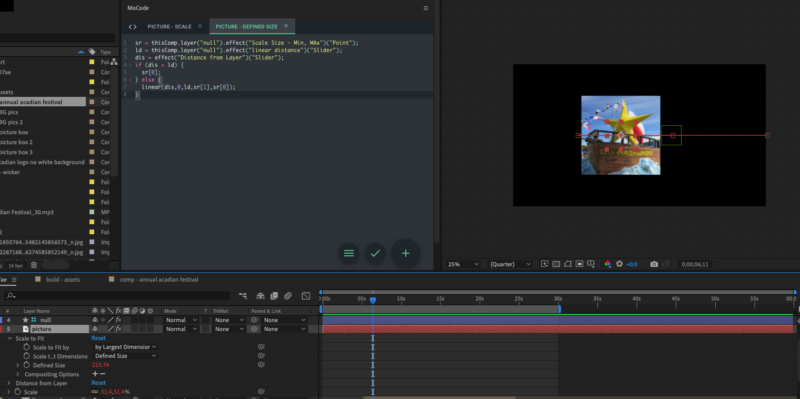
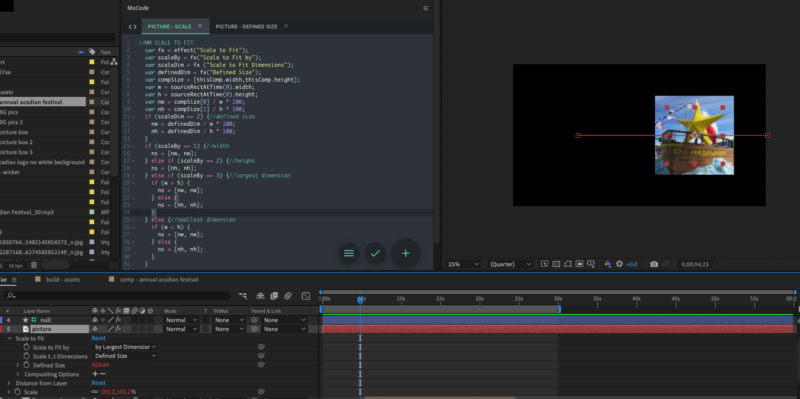
    I’ve attached a few images to better explain what going on. As you can see, the bounding box changes and so does the scale property values but the layer in the view port doesn’t change size at all. It isn’t parented, I tried purging all memory and cache, I tried a different image and tried pre-comping it, I restarted After Effects and I restarted my computer. Still the same.

    You can also see the expressions I am using in the images. Basically I have a preset I made that scales images depending on the settings, the setting I’m using scales it to a defined size. It’s that value that I’ve applied the expression to change depending on distance from the null layer. It all works, but it doesn’t…

  • The scalar error you’re getting is because your v1 variable is only supplying 1 value when it needs 4 for a color value. So you could also use [0,0,0,0] as your v1 value. I’ve run into this issue enough times that I thought it might be helpful to share what the error means.

We use anonymous cookies to give you the best experience we can.
Our Privacy policy | GDPR Policy