


Matthew Plourde
Forum Replies Created
-

Matthew Plourde
November 24, 2015 at 1:53 am in reply to: How to create new CLIPS from a Sequence given to me by PluralEyes? Has to be a way.THAT function is the reason why I have gone to PluralEyes. I should have mentioned this but the Merge function is insanely frustrating. No matter how precise I get the sound sync (it’s quite easy to get it perfect by hand) once you MERGE the clip and then place it in a bin, when you go back to that merged clip the sound on all the tracks has gone off. By as much as a full frame, though typically about half a frame. This will make later sound mixing a nightmare since each track is at a different level and the mixer will fade from one to another if a track gets too hot or too low.
This project has almost sent me into a nervouse breakdown. I have been on it for over a month and edited nothing. I quite simply cannot get my assets fully prepared.
PluralEyes SHOULD be the solution. But it’s proven not to be.
-
Matthew Plourde
November 13, 2015 at 9:10 am in reply to: Sound sync nightmare w/Premiere or PluralEyes. I REALLY need assist. Project stalled with no hope in sight.I don’t see how to merge clips from the source monitor. I can certainly set in points there, but to merge a clip they need to be in the timeline. Merging via the IN point appears to work, but again, once I place that merged clip into a BIN and go back to it later, the sound is off. It seems like complete lunacy, but it is. It has to be a glitch.
-
Matthew Plourde
November 12, 2015 at 1:09 am in reply to: Sound sync nightmare w/Premiere or PluralEyes. I REALLY need assist. Project stalled with no hope in sight.There are not any settings to choose. Everything is grayed out. What are you referring to?
Once I have the sound tracks synced with the video I select all sound and video and MERGE CLIP. I then move that clip to a BIN (that’s what a number of tutorials show). That clip that is now in the bin will have sound out of sync.
-
Matthew Plourde
November 11, 2015 at 2:39 pm in reply to: Sound sync nightmare w/Premiere or PluralEyes. I REALLY need assist. Project stalled with no hope in sight.I was able to see the sound being off at times but the key is without perfect sync my audio guy cannot come close to doing my sound mix. Each track is recorded at a differnt level so that if one gets too hot, go to track 2, etc.
I’m not sure how to do multi-clip. Is there a tutorial that is relevant for my situation? I haven’t found one.
More information on PluralEyes. It easily syncs the audio. But when it exports to an XML and I place that in premiere I then have a down-mixed stereo track. That’s completely useless and takes away the ability for the editor to do my sound mix. The multiple tracks recorded at different levels are baked together.

-
Matthew Plourde
November 11, 2015 at 11:22 am in reply to: Easiest way to fix sync of merged audio & video clips (sync clips) after the fact?Uhhh… Has anyone found a fix? I am in Merged Clip sound sync HELL right now. I am not able to figure out how to use PluralEyes. It’s just too new and complicated for me. So I am using the Merge Clip function in Premiere Pro.
I went ahead and synced everything the old fashioned way, by hand. Got it all perfect. Merged clips. Did it for two days. Uh, but once I checked those merged clips they are ALL out of sync!
I’m ready to have a complete breakdown on this project. It’s been nothing but trouble but this is just b***sh*t. It’s unconscionable for Premiere to have such a ridiculous flaw.
-
Matthew Plourde
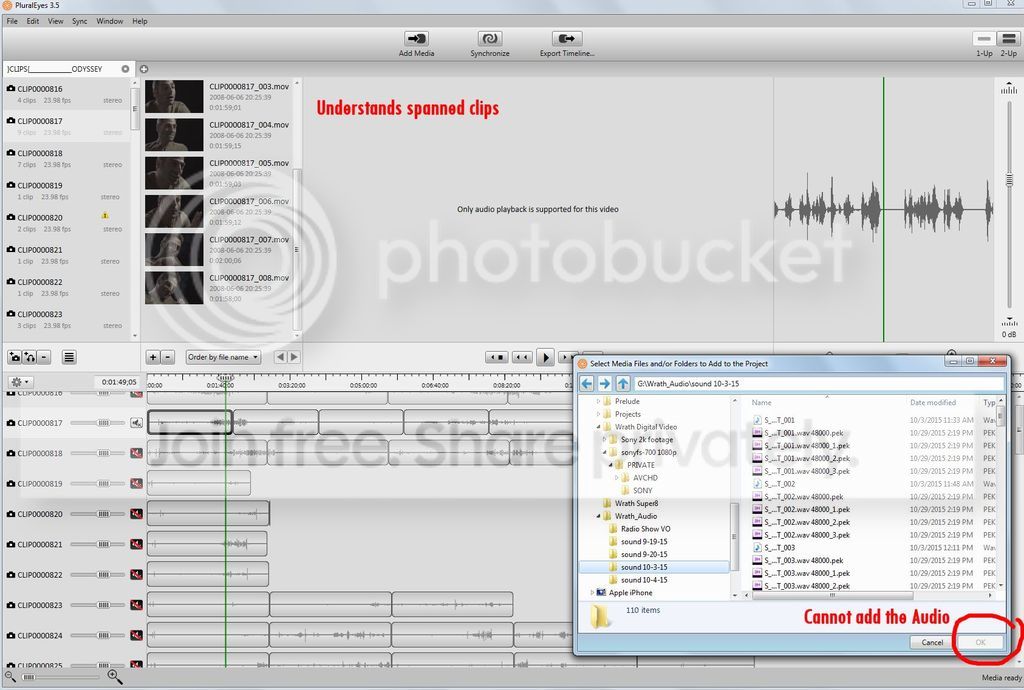
October 31, 2015 at 8:08 am in reply to: Broken up video w/Sony FS700 and Adobe CC PremPro. Really stuck with spanned clip insanity. Need advice.It just gets deeper and deeper. 🙁 I have downloaded PluralEyes an am trying to use it to get things going. It does understand Spanned clips when I stick them in and that is great. But I am 100% unable to add the audio and try to sync. It just won’t let me. See this?
Meanwhile the Sony Card footage, which Premiere Pro reads fine, has it’s own isues in Plural Eyes. The audio will not sync up. See this?
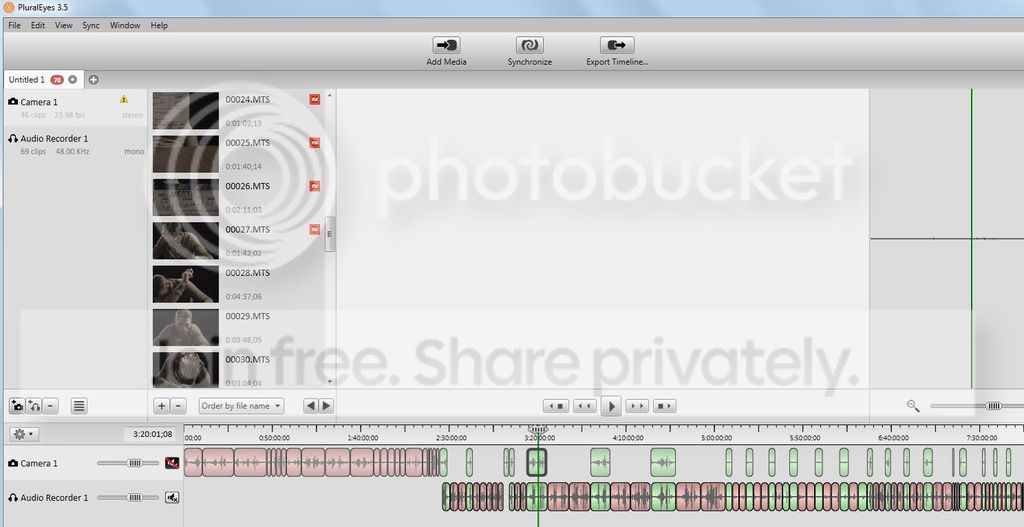
So most of the clips will not sync (and I tried every variation talked about in the tutorials) AND the video will not play.
I’m getting one hell of a headache here. I feel like I felt 5+ years ago when I just started editing and wonder if I have to go back to school to get up to speed. I am really and truly stuck.
-
Matthew Plourde
October 31, 2015 at 3:37 am in reply to: Sound syncing multi-clips in a 20 minute ProRes444 file? Tips please.Jon, I am in China. Was in NYC for many years but I needed some change so i shot my project and came here to edit and work for a while.
Looks like the trail will watermark footage.
I am not finding how to fix my spanned clips problem. The guide says Premiere Pro handles them natiely, etc. etc. I don’t see how to use Pluraleyes to fix the problem.
-
Matthew Plourde
October 31, 2015 at 3:13 am in reply to: Broken up video w/Sony FS700 and Adobe CC PremPro. Really stuck with spanned clip insanity. Need advice.I am downloading the trial version of PluralEyes to see if it can fix this problem.
-
Matthew Plourde
October 31, 2015 at 3:02 am in reply to: Sound syncing multi-clips in a 20 minute ProRes444 file? Tips please.I am going to download the PluralEyes trial version and see what happens. Hopefully the trial software won’t be limiting in what it can do. I don’t want to spend $200 without being absolutely certain this is the solution. I spent everything I had on my little production.
-
Matthew Plourde
October 30, 2015 at 1:08 pm in reply to: Editing a project in Premiere with another person, distantlyThank you for this thread. I am in the exact same scenario. I am on a PC and editing and my editing partner is on the other side of the world on a MAC. We each have a hard drive with the exact same project files.


