Forum Replies Created

Page 1 of 6
  • Matt Chapman

    October 23, 2025 at 1:30 pm in reply to: Camera Controls gone in AE 2025?

    I found it

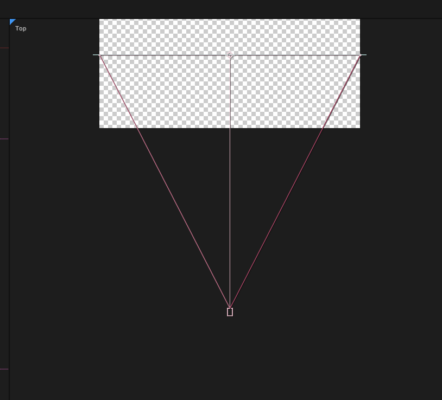
    “3D Transform Gizmos” need to be checked. They’re called “Gizmos” i guess?

  • Matt Chapman

    October 23, 2025 at 1:27 pm in reply to: Camera Controls gone in AE 2025?

    Hey man – really appreciate that! Very helpful!

    Default in 2025 they’ve taken AWAY the X,Y,Z camera controls from the workspace view. How do I put those back?

  • Matt Chapman

    February 11, 2020 at 7:41 pm in reply to: loopOut dropping last frame of sub-comp

    Me too! I don’t know what “Collapse Transformations” means other than “Solves weird problem that is inexplicable otherwise”

    Thanks Maarten!

  • I’m also quite curious as to the behavioral explanation/reasoning behind this.

    I’m experiencing the same issue. Seems like a back-asswards was of using the marker panel.

    Thoughts? Comments?

    Discuss!

    Chapman

  • Matt Chapman

    March 27, 2019 at 5:14 am in reply to: Keyframes in Submixes

    Hmmm.. thanks, though there is still more editing to do.

    Can you NOT control your submix volumes with keyframes on the timeline?

    that’s the main question.

  • Matt Chapman

    June 14, 2018 at 1:57 pm in reply to: AMA linking not available? – IMPORT QUESTIONS

    You GOT IT!!! Thank you!

    Now, does anyone know how to easily handle cell phone (1080 x 1920) footage. When I transcoded it to MXF through AVID, it all stretched.

    And the Frame Flex solution, when I simply “link” to the footage, seems like the Sphynx’s riddle to me. I’ve tried swapping the image size to 1080 x 1920, I’ve tried letterbox and pillarbox options, etc. I can’t seem to make the SCALE of the footage smaller than the frame size.

    I’ve converted the footage to match the frame rate, but it still plays at a wonky size or won’t let me adapt it.

    Thanks!
    Chap

  • Matt Chapman

    June 14, 2018 at 2:01 am in reply to: AMA linking not available? – IMPORT QUESTIONS

    I really appreciate your attention Shane. To answer your first and most obvious question:

    “Why am I doing this in AVID if I have Premiere”

    I have a new gig starting in a month that is on AVID. Its for a network, and I know AVID does work better for networked footage. Also, AVID editing generally pays better than Premiere editing.

    What I am doing now is a freelance project and I am forcing myself to use only AVID, though I do a little “Apples to Apples” comparisons by opening up Premiere. The project has a LOT of mixed media frame rates and footage, so I used Adobe Encoder to recode everything at 23.976, keeping the original size and aspect ratio.

    I don’t get ANY of the options that you get, and I have a lot of codecs installed on this machine from years of Premiere.

    Any advice in that regard would be great, it would be nice to save space and time.

    Chap

  • Matt Chapman

    June 14, 2018 at 12:49 am in reply to: AMA linking not available? – IMPORT QUESTIONS

    Whoops this is the pic of the AVID frame flex…

  • Matt Chapman

    June 14, 2018 at 12:46 am in reply to: AMA linking not available? – IMPORT QUESTIONS

    I appreciate you all bearing with me, I see this is going to be a long night. My AVID friend insisted it is an easy jump, but I’m unconvinced….

    For instance below is an example of easily importing footage into Premiere, which is cell phone footage at 1080 x 1920 (I know, please shoot landscape, but what can i do…). If I scale it down, then i get the whole picture, and can put some version of it on the sides to cover the black.

    When I try to do the same using Frame Flex (which is before I’ve transcoded), I am into the following menu, which I have tried multiple settings at, and none of which seem to be able to give me a frame that is 90degrees rotated, and scaled to include less than the image.

    Is that just how it goes in AVID? You have to convert all the footage first?

  • Matt Chapman

    June 14, 2018 at 12:34 am in reply to: AMA linking not available? – IMPORT QUESTIONS

    I see, but the only options I get are a the three listed in my first picture. Each estimates a file size, and in the smallest example AVID is taking a 167 MB file and creating a 2.81 GB file. And that’s the smallest that I can transcode to.

    Honestly, that seems like a pretty big waste of resources as well… I have a 1TB Thunderbolt SSD that I use for media, and it will run out of space midway through a 1 hour project…

    Do I have to transcode to MXF, and if so is there a better compression ratio? Why expand something when no resolution is gained? ????

    Now, why are you using a 2K project setting if you are cutting with YouTube as your source? is your deliverable 2K?

    Sorry, ???? I took that screen shot while just sort of searching to see how things change if I were to make a new project, as you said that the transcode size was dependant on the project, I was checking to see if there were variables based on a preset that I could quickly check.

    Also, what about different frame sizes? I know that we can only use the same frame rate in a project that the project is set to (so all video has to be transcoded to this)… but I have some cell phone footage that is (for instance) shot in a portrait mode. I’d like to be able to zoom out of it and crop as I see fit, but it seems like AVID has already cropped it… I try using Frame Flex, but it seems neither relevant to the frame nor very flexible… ????????

    Maybe the best thing for me to do is convert everything in Adobe Media Encoder and then edit in AVID just linked footage?

Page 1 of 6

We use anonymous cookies to give you the best experience we can.
Our Privacy policy | GDPR Policy