Forum Replies Created

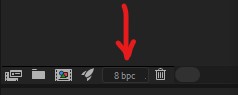
  • I had a similar issue and realized that my AE project was at a color depth of 16 bpc. I switched back to 8 bpc (at the bottom of the Project panel), exported the asset again (Premultiplied) and problem solved.

  • Marc Pelletier

    February 1, 2020 at 3:44 pm in reply to: Wiggle points in a path

    You could also use the “Points Follow Nulls” tool in the “Create Nulls From Paths” script that is built into AE.

    This will create a null for each point of your shape and the points will follow their respective nulls. You can then add a wiggle expression only to the nulls you want to have move in random patterns.

    All the best,

    Marc

  • Hey Matthias,

    thanks for the post, very useful stuff!

    I just noticed a little typo in you EaseInOut function, or it might be an issue with the HTML characters. I believe it should be written as follows :

    EaseInOut = function(power){return function(t){return t < 0.5 ? EaseIn(power)(t*2)/2 : EaseOut(power)(t*2 – 1)/2+0.5}};

    Thanks again!

    EaseInOut = function(power){return function(t){return t &lt; 0.5 ? EaseIn(power)(t*2)/2 : EaseOut(power)(t*2 - 1)/2+0.5}};

We use anonymous cookies to give you the best experience we can.
Our Privacy policy | GDPR Policy