Forum Replies Created

  • Marcin Wiktorowski

    November 11, 2021 at 12:25 am in reply to: Problem with PATH and SHAPES.

    Thanks!

    I’ve used your idea, but you’ve put me on the right path!

    I walked around and could’n see solution. Your one word halped me find it!

    Thanks!!!!

  • Marcin Wiktorowski

    November 11, 2021 at 12:16 am in reply to: Problem with PATH and SHAPES.

    It was not what I mean. But thanks anyway.

  • Marcin Wiktorowski

    November 11, 2021 at 12:14 am in reply to: Problem with PATH and SHAPES.

    I considered that too, but I have already found another way

  • Marcin Wiktorowski

    November 9, 2021 at 1:51 am in reply to: Problem with PATH and SHAPES.

    Please, explain and show me how

  • Marcin Wiktorowski

    December 13, 2020 at 2:09 am in reply to: Dropdown List copy Layer to Comp

    YOU MADE MY DAY !!!

    This is exaclty what I was looking for !

    Thanks a lot !!!!!!!!!!!!!!!

  • Marcin Wiktorowski

    December 6, 2020 at 11:50 pm in reply to: Dropdown List copy Layer to Comp
  • Marcin Wiktorowski

    December 6, 2020 at 11:47 pm in reply to: Dropdown List copy Layer to Comp

    Yes, yes, but NO!

    Yes, I know this tutorial very well – and I used it in my project. But it’s too complicated.

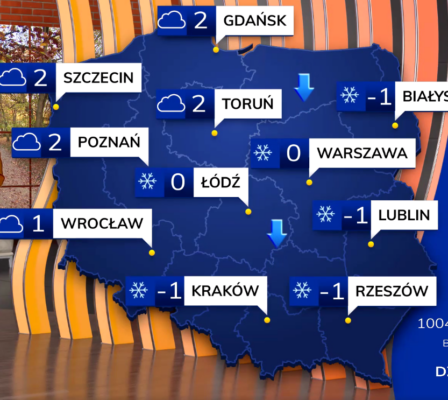
    Take a look at my project below.

    As you can see, there are 11 cities. Following this tutorial, I need to create 11 PreComps with items.

    It wouldn’t be that scary – but what if I decide to add another item?

    Any change I’d like to make, I have to do in each PreComp. (a lot of work)

    So I found a better solution.

    – Create one PreComp_Icons for all icons.

    – Create PreComps for each city.

    – Create a DDmenu for each city

    – When selecting a specific icon for a city – copy the icon from PreComp_Icons to Precomp_City (display).

    In this logic, I can add icons and items, and I won’t have so many complicated Precomps.

    But I do not know how to do it 🙁

    Exactly: I don’t know how to copy a layer from one composition to another after selecting in the DDmenu.

We use anonymous cookies to give you the best experience we can.
Our Privacy policy | GDPR Policy