


Luke Maslen
Forum Replies Created
-

Hi Dan,
I believe the HDMI output of the deck is 8-bit so it makes sense to capture at 8-bit. You’re not going to capture a better image by choosing a 10-bit easy setup as the original 8-bit signal doesn’t change when you capture to a 10-bit timeline. Incidentally, capturing directly from the deck using an Intensity card should lead to the same sharp results as using the DeckLink card plus converter.
Thanks for posting your observations!
Regards,
Luke Maslen
Blackmagic Design -
Hi Chris,
If you are only considering a DeckLink HD Extreme card for monitoring, and not for outputting to a HD-SDI deck, then you really don’t need the DeckLink HD Extreme card. If you are using a Mac Pro, then I would recommend that you check out the inexpensive Intensity or Intensity Pro cards. These cards have HDMI in and out and are perfect for monitoring DVCPRO HD from Final Cut Pro.
The Digital Cinema Desktop feature is designed for use with compressed formats such as DVCPRO HD. You cannot use it for uncompressed video. Intensity can also be used with uncompressed video.
A few years ago, we released the HDLink converter which provided an inexpensive way to monitor SDI video on a DVI-based LCD display. Intensity is a dedicated HDMI capture & playback card which provides the same kind of monitoring as the original HDLink. The reason for mentioning HDLink is that Graeme Nattress uploaded some great comparison shots of the image quality from the Digital Cinema Desktop feature of Final Cut Pro and the uncompressed output from HDLink so this will give you a good idea of what you can expect from an Intensity card. You could use a DeckLink HD Extreme plus a HDLink but you probably don’t need them and the Intensity will achieve what you need at a much lower cost. Here is part of Graeme’s review which you can still find on the Los Angeles Final Cut Pro User Group web site.
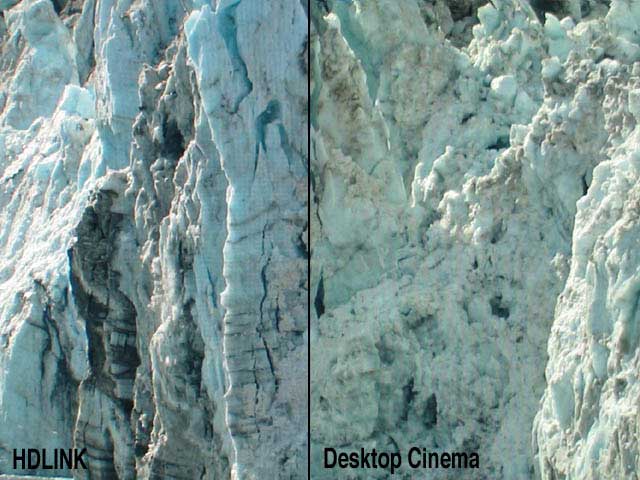
Photographs to try and show the comparison between the HDLink picture and that of the Digital Cinema Desktop Preview. The digital photos were taken with a Canon Powershot G3. The pictures are not a scientific test, but I think you can see the degree of difference in colour and detail between them. The HDLink picture looks visibly superior.Without a CRT HD monitor sitting next to the Cinema Display, it’s hard to judge how accurate the colour representation is, but I can say with some confidence that it’s a lot better than watching HD video on a Cinema Display connected direct to your G5’s graphics card and using the new FCP HD feature of Digital Cinema Desktop Preview. The colours also looked very good when compared with a downconvert to my SD CRT monitor. The image is more dynamic than Digital Cinema Desktop Preview – it literally glows off the screen at you, full of life, with wider range of rich, vibrant colours. White actually looked white! The Digital Cinema Desktop Preview also does not seem to display interlaced video as the HDLink does, perhaps contributing to its soft appearance. One major benefit of using the HDLink for displaying DVCProHD footage is the lack of artifacting that is visible compared to when the footage is viewed inside FCP or via the Digital Cinema Desktop Preview mode. Personally I was quite disappointed at the level of artifacting I saw on Apple’s big screen demos of the new DVCProHD features in FCP HD at it’s NAB launch, especially in shadowy areas of the picture. When viewing via the HDLink I see very little in the way of DVCProHD artifacting, and in particular the 1080i DVCProHD demo footage is stunning to watch via the HDLink. I don’t think that the lack of artifacting has been caused by any softening of the picture though. The picture is supremely sharp and detailed, and normal video noise is visible as a fine grain in the picture, without being exaggerated or softened.

Closeup showing the finer detail of the HDLink and its display of interlacing.

Closeup showing lack of interlace display and lack of the finest of detail on the Desktop Cinema Digital Preview.
The Intensity card is probably all that you need unless you want to capture live video from the component analog outputs of your camera and in which case the Intensity Pro has that added capability.
Regards,
Luke Maslen
Blackmagic Design -
Hi,
We’ll release the new drivers very shortly after Apple release Final Cut Studio 2.
Regards,
Luke Maslen
Blackmagic Design -
Luke Maslen
May 9, 2007 at 12:41 am in reply to: No extended desktop to SD monitor via SDI – Set up for MultibridgeHi Daniel,
When you install Multibridge Pro or Multibridge Extreme, the extended desktop will default to the highest resolution supported by that device. That would be 1920×1080 for Multibridge Pro or 2048×1556 for Multibridge Extreme. Neither of these desktops will be compatible with your standard definition SDI monitor which is why you can’t see the desktop via SDI. To resolve the problem, you need to change your desktop to an SD format by following the steps listed in the support note Can a SD monitor be used with DeckLink HD and Mac OS X?.
Go to the Dock, open the System Preferences and select Displays. Ensure that Show displays in menu bar is enabled.
Click on the Displays menu (near the top right of your computer monitor) and set Number of recent items to 10.
Now click on the Displays menu again and you should see all the resolutions of your DeckLink HD series card. Set the appropriate resolution and Hz rate for your broadcast monitor, eg 720 x 486 and 29 Hz for NTSC, or 720 x 576 and 25 Hz for PAL.
The same note is applicable to your Multibridge. It is often a good idea to set your extended desktop to the same format as the video you are editing in Final Cut Pro so that you can instantly switch between the desktop and Final Cut Pro without having to wait for your external monitors to change formats and this can also avoid an audio “pop” on your speakers.
Regards,
Luke Maslen
Blackmagic Design -
Hi Erik,
That’s great as you’ve determined that the source material is OK so presumably there is an issue with the card or the HDLink box. That could be software or hardware so it will be good to know if you can hear the distortion in the S/PDIF audio to help further narrow down the problem.
Regards,
Luke Maslen
Blackmagic Design -
Hi Rob,
I do hope that you will be able to get the system going but it does sound to me as though the performance of the system may be marginal and right on the edge of what will and won’t work.
If you are trying to monitor via component output, then Yves suggestion should work. When connected to a deck, the DeckLink card has the option to output a stable black signal to the deck so that the deck can just lock on to that and be in sync with the DeckLink card. The alternative is to buy a blackburst generator at extra cost so that’s why we include the (free) black output feature. In your case, disabling the black output feature should help with monitoring via analog output.
Regards,
Luke Maslen
Blackmagic Design -
Hi Erik,
This is not a known issue.
Can you please try monitoring your audio via a different method and then listen for the distortion? For example, if you always monitor your audio via the RCA analog audio outputs of the HDLink box, try using the analog or S/PDIF output of the DeckLink card to monitor audio and let us know if the distortion can be heard.
If you output audio via the Mac’s built-in speaker, can the distortion be heard?
These tests will help to determine if the problem is with the DeckLink card or the HDLink box or something else.
Regards,
Luke Maslen
Blackmagic Design -
Hi Keith,
We have noticed a problem similar to yours after upgrading to Mac OS X 10.4.9 which does not occur with Mac OS X 10.4.8 and below. This problem is currently being investigated and it is hoped it will be resolved in the DeckLink 6.2 drivers.
You mentioned that your problem is seen in NTSC whereas we have only seen this problem in high definition so this might or might not be the same problem.
Are you running Mac OS X 10.4.9?
Regards,
Luke Maslen
Blackmagic Design -
Hi,
It sounds as though your problem is related to capturing from the camera or deck via Firewire. Is that correct?
If so, Intensity should help you as it bypasses Firewire and uses the HDMI output of the deck to capture uncompressed video to a Mac Pro. We have a support note about HDMI capture from the JVC BR-HD50U deck which should be of some help.
The BR-HD50U deck provides an RS-422 device control port so you can use this instead of Firewire for controlling the deck. The support note details how this is done.
I hope this helps.
Regards,
Luke Maslen
Blackmagic Design -
Hi,
It sounds as though your DeckLink Extreme card is configured to capture video from the component analog inputs and this is why you cannot capture from the SDI input of the card. We need to tell the card to use SDI for input.
Please open the System Preferences and then click on DeckLink. Switch the Video Connections for Input and set it to SDI.
Now try capturing in Final Cut Pro. Does this solve the problem?
I would also recommend that you update to Final Cut Pro 5.1.4 and DeckLink 6.1 drivers.
Regards,
Luke Maslen
Blackmagic Design