Kevin Camp
Forum Replies Created
-

It looks like they have at least 3 text layers, 2 for the hex values and a 3rd for the output of the contrast ratio.
The expression above would go into the source text of the 3rd text layer.
-
Choosing Composition > Save Frame As > Photoshop Layers from the menu bar should give you a layered Photoshop file with each layer in the AE Comp as a layer in the PSD and nested comps should show up as a layer group with those comp layers inside.
Text however will not be editable. They easiest way to get editable text from AE to PS is to copy/paste it from AE to PS. Simply double-click the text layer in AE, copy it, then go to PS insert a text layer and paste.
This will preserve the formatting in AE, so usually all you need to do is line it up in PS.
-
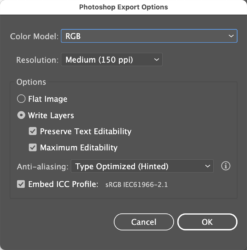
It works on my system as long as I switch the color mode to RGB before trying to export.
I’m currently running Illustrator 25.2.1 on macOS 11.3.1, but I’ve done the same on earlier versions.
-
For me, if I switch the color mode of the file to RGB first from the file menu (File > Document Color Mode > RGB) the editable text is not greyed out when exporting to a PSD.
-
Kevin Camp
May 20, 2021 at 7:28 pm in reply to: Is it possible to LoopOut("cycle") if the layer already has an expression? How?The loopOut() and loopIn() functions only look at key frame data, neither look at expression data, so you kind of have to roll your own loop function to work with the rest of the expression.
-
Kevin Camp
May 20, 2021 at 4:23 pm in reply to: Is it possible to LoopOut("cycle") if the layer already has an expression? How?Assuming that the key framed animation on the foot layer’s rotation loops, this should do it:
r = transform.rotation.valueAtTime(time % key(numKeys).time) + (thisComp.layer("Pedal Root").transform.rotation * -1);
r -
Kevin Camp
May 20, 2021 at 4:14 pm in reply to: Is it possible to LoopOut("cycle") if the layer already has an expression? How?I think you could just use loopOut() on the ‘pedal root’ layer’s rotation… since your expression is looking at that layer’s rotation it should work.
— edit —
sorry, there would still be an issue with the layer’s rotation… we can still make it work, let me take a look.
-
You can also change the color from CMYK to RGB in Illustrator (file > document color mode > RGB), then export to PSD (choosing the editable text option) and then import the PSD as a comp in AE and make the text layers editable.
-
I don’t believe you can change the font to more than one font within a single text layer using expressions.
You might be able to use the expression on two text layers, split the text and show the first split on one text layer and the second split on the other.
The use sourceRectAtTime() to have the second layer follow the right edge of the first.
-
Kevin Camp
May 14, 2021 at 5:01 pm in reply to: Jitter, skipping and green frames when playing back mov filesBoth Handbrake and MPEG StreamClip are free.
Transcoding is just re-encoding the the file… normally it would to encode it to another codec (like H.264, or ProRes 422) or container (like MP4, AVI, MOV), but in this case you can re-encode to the same, or very similar codec and container (probably H.264 in an MP4 container).