Forum Replies Created

Page 20 of 21
  • Kevin Camin

    March 19, 2011 at 7:42 pm in reply to: Newb Color Setting Question

    Thanks, Todd!

    This was the explanation I was looking for.

    I’m familiar with color management and work with a calibrated display and a color managed workflow with Photoshop work. I just wanted to find out what AE was going to do by default and the monitor profile makes perfect sense.

  • Kevin Camin

    March 19, 2011 at 7:16 pm in reply to: Newb Color Setting Question

    Thanks, Todd. I’ll be sure to enable color management.

    But I know some people who never enable color management. When they output a movie, what color space is the unmanaged project in?

    Thanks.

  • Kevin Camin

    March 19, 2011 at 3:14 pm in reply to: Newb Color Setting Question

    Thanks so much for the info and links!

    When Color Management is turned off and no profile is assigned, what space is AE working in?

  • Kevin Camin

    March 19, 2011 at 7:50 am in reply to: Combining SWF, MP4, FLV, and F4V

    Can you transcode everything to the same codec?

  • Kevin Camin

    March 18, 2011 at 9:01 pm in reply to: terrrrrrible rendering

    You can do it, but you’re not going to get as clean of a key due to the chroma subsampling compression. Professional video cameras have three CCDs, one for each color, or a camera like the RED has no chroma subsampling. I personally love HDSLR, but would never shoot green screen with one.

  • Kevin Camin

    March 18, 2011 at 4:52 pm in reply to: Color grading in AE via PS

    Nice to run into you on here Dennis. We swapped a few messages on the ASMP listserve.

    Dennis I like your idea about saving the preset in PS and just loading it inside AE within the matching filter.

    I think a dedicated color grading program like DaVinci, Apple Color, etc. is the way to go for professional color corrections and mandatory if you are doing broadcast work. But there are more and more things solely going to web and often a formal colorist is not a part of the pipeline. The color corrections might land in the lap of the editor or mographer, and they might not have the skill sets of working with color grading software. So they end up using the color correction tools inside After Effects. They suck!!! They are ridiculously difficult to manipulate and you have almost no immediate feedback to what you are doing.

    Here is a screen shot comparing the ‘Curves’ control.
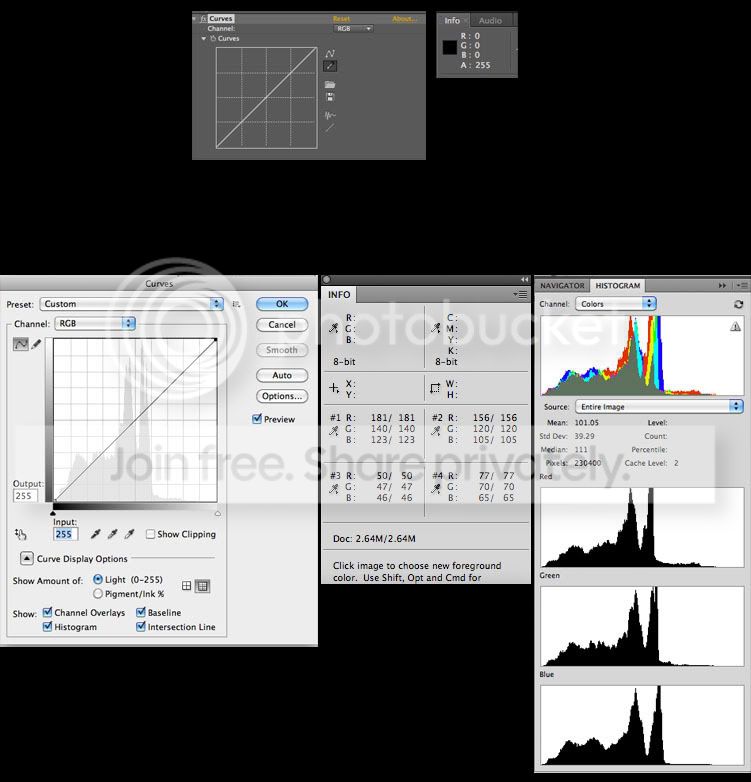
    With PS, you can lay down up to four sample points on your image and monitor the RGB values while you color correct. You can click directly on parts of the image in PS to laydown points on the curves. The list goes on and on.

    PS is currently the end all for “color grading” photography.

    I think if you are stuck using AE for color correcting, it might be worthwhile to find your filter settings inside PS. You can tell exactly what is happening to the entire frame.

    My 2 cents.

  • Kevin Camin

    March 18, 2011 at 4:28 pm in reply to: Create a mask from a color channel?

    Thanks, Dave. Works perfectly!

  • I’m running AE off a new iMac that has i7 processors, 4 cores and 8GB of RAM, and it runs really well.

    A tower will be my next purchase, but I’m just saying that the top of the iMac line gets more bang for it’s buck than compared to Mac Pros which are twice as expensive.

  • Kevin Camin

    March 18, 2011 at 4:15 pm in reply to: After effects Render settings

    I think you could get that sucker down to 300Mb and have it look great.

    I would export from AE at: half resolution and leave all the other settings alone except ‘export audio’ and the Time Span is set correctly.

    I would then open it inside Quicktime Pro and make it into a Quicktime h.264. Set your frame rate to 30. Set keyframe to automatic. Limit your data rate to 2400, Audio to AAC.

    From my experience, Quicktime Pro does a much better job of creating Quicktime h.264 compressions than Adobe Media Converter.

  • Kevin Camin

    March 18, 2011 at 3:56 pm in reply to: Create a mask from a color channel?

    Sort of.

    I want a filter to turn my image into a gray scale image based on a color channel; like in Photoshop when you view only one color channel. My plan is to then further work on that gray scale image with levels and then use it for a luma matte.

Page 20 of 21

We use anonymous cookies to give you the best experience we can.
Our Privacy policy | GDPR Policy