

Activity › Forums › Adobe After Effects › Newb Color Setting Question
-
Newb Color Setting Question
Posted by Kevin Camin on March 19, 2011 at 2:24 pm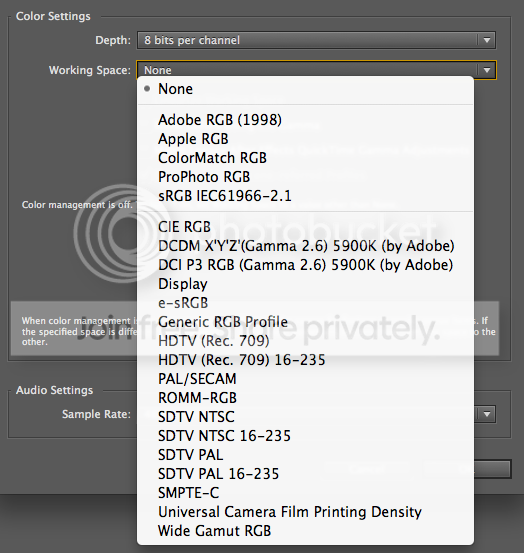
What would be the appropriate color working spaces for the following? My guesses are in parenthesis.
1. Standard Def DVD (SDTV NTSC?)
2. Blu-ray (HDTV (Rec 7.09)?)
3. Web (sRGB?)4. Some profiles have the ’16-235′ property and I understand that is bringing the luma values into legality. Is it crushing the white and black point into those values or is it smoothly squeezing the gamut into that range?
Thanks so much.
Andreas Urra replied 15 years, 4 months ago 4 Members · 15 Replies -
15 Replies

-

Todd Kopriva
March 19, 2011 at 2:52 pmThe choice of the project’s working color space isn’t quite as crucial as other choices. As long as you choose a working color space with a large enough gamut that you’re not restricting yourself, you’ll be OK. If you’re creating one composition that will be output to all three of the formats that you mentioned, working in the Rec. 709 HDTV color space would be good, since it is wide enough to accommodate the SD and web colors. (Such looseness is not at all appropriate for interpreting footage or choosing an output color profile.)
For details about color management, see After Effects Help.
One of the documents that After Effects Help points to is this one, which is a step-by-step guide to color management for HDTV, web, and digital cinema. I strongly recommend that you work your way through it:
“Color management workflow in Adobe After Effects”———————————————————————————————————
Todd Kopriva, Adobe Systems Incorporated
Technical Support for professional video software
After Effects Help & Support
Premiere Pro Help & Support
——————————————————————————————————— -

Kevin Camin
March 19, 2011 at 3:14 pmThanks so much for the info and links!
When Color Management is turned off and no profile is assigned, what space is AE working in?
-
Todd Kopriva
March 19, 2011 at 3:19 pm> When Color Management is turned off and no profile is assigned, what space is AE working in?
That question misses an important point.
The project’s working color space is the color space into which all input colors are converted when color management is enabled. When you have color management turned off (no project working color space assigned), no conversions occur.
———————————————————————————————————
Todd Kopriva, Adobe Systems Incorporated
Technical Support for professional video software
After Effects Help & Support
Premiere Pro Help & Support
——————————————————————————————————— -
Kevin Camin
March 19, 2011 at 7:16 pmThanks, Todd. I’ll be sure to enable color management.
But I know some people who never enable color management. When they output a movie, what color space is the unmanaged project in?
Thanks.
-
Todd Kopriva
March 19, 2011 at 7:27 pm> But I know some people who never enable color management. When they output a movie, what color space is the unmanaged project in?
The technical answer to that question is “the color space defined by the monitor used for creating the content”, but the practical answer is really more like “none” or “that question misses the point”.
The whole idea behind color management is that the numbers that define colors in different formats and from different devices mean different things—i.e., they’re in different color spaces. What colro management does is bring them all into one color space. When you don’t have color management turned on, you are _not_ bringing them into one color space; you’re basically saying “screw it, I don’t care”. But, back to the technically precise answer: You end up fiddling with these colors so that they look right on your monitor, which effectively makes your monitor color space the “working” color space. Because everyone has their monitor set up differently, and in different lighting conditions, this is utterly useless, so the answer is really “none” or “who knows?”
———————————————————————————————————
Todd Kopriva, Adobe Systems Incorporated
Technical Support for professional video software
After Effects Help & Support
Premiere Pro Help & Support
——————————————————————————————————— -
Kevin Camin
March 19, 2011 at 7:42 pmThanks, Todd!
This was the explanation I was looking for.
I’m familiar with color management and work with a calibrated display and a color managed workflow with Photoshop work. I just wanted to find out what AE was going to do by default and the monitor profile makes perfect sense.
-

Walter Soyka
March 19, 2011 at 8:28 pm[Kevin Camin] “I just wanted to find out what AE was going to do by default and the monitor profile makes perfect sense.”
I think that saying “monitor profile” still suggests color management. Without color management enabled, AE will do nothing to translate imported media to your monitor’s profile. It will just use the raw RGB numbers without any color conversion whatsoever.
This means that if you bring in multiple assets with different color profiles and leave color management off, you’ll get a mish-mash of meaningless color in your output.
I think the most accurate thing to say is that by default, After Effects does not manage color.
Walter Soyka
Principal & Designer at Keen Live
Motion Graphics, Widescreen Events, Presentation Design, and Consulting
RenderBreak Blog – What I’m thinking when my workstation’s thinking
Creative Cow Forum Host: Live & Stage Events -
Todd Kopriva
March 19, 2011 at 8:42 pmWalter’s interpretation matches what I intended with my answer.
Kevin took what I said and mistakenly applied the word ‘profile’ to it. A profile is a set of conversion data—and there are no conversions happening in the non-color-managed case. Yes, the colors exist in some unknown color space, but we have no idea what that space is.
Kevin’s question is similar to “How many angels can dance on the head of a pin?”: It can keep you busy arguing for hours, but it’s meaningless.
———————————————————————————————————
Todd Kopriva, Adobe Systems Incorporated
Technical Support for professional video software
After Effects Help & Support
Premiere Pro Help & Support
——————————————————————————————————— -
Kevin Camin
March 19, 2011 at 9:41 pmI’m confusing myself too. What I meant was color space rather than profile.
-
Kevin Camin
March 19, 2011 at 9:42 pmWith all due respect I don’t think my question is meaningless Todd. I can’t believe you are a representative of Adobe on this popular forum and kind of have a snide edge to some of your comments.
I understand color management. I understand my monitor needs to be calibrated in order to produce accurate color representation of whatever color space I am working in.
I was just curious as to what was happening if someone doesn’t work from a color managed work flow. You would be amazed at how many post houses don’t. I’m sure the colorist somewhere down the pipeline gets to sort things out. If you work in an unmanaged project you are using your monitor’s profile–it is a profile even if it is straight and crappy from the factory. But the program is interpreting the RGB values into something and it is going through a profile. I just didn’t know if the program would default to Adobe RGB or something like that.
Thanks for your time.
Sorry if my questions bother you.
Reply to this Discussion! Login or Sign Up