John Shand
Forum Replies Created
-

These could be the problems but i have had this same problem on 4 different Macs. A MBP, MacPro, and 2 Imac’s (one last year model, one this year) 3 using final cut pro 6 one on final cut 7.
It almost seems like ‘Export to a quicktime movie’ renders too quickly. So it misses out key information.
Its incredibly strange. Am I doing anything wrong when i click Export to a quicktime movie. The settings should all be the same as my timeline surely?
Any help and advice would be appreciated.
-
Hi guys. Thanks for all the help. I have bought UV filter removers and they didnt work. They are plastic and dont seem to grip enough on the metal UV.
I can’t find any of those gloves, if your talking about those latex ones dentists use i tried and it didnt work.
Supposedly there is a solution around to slightly dissolve metal…this sounds even more risky than hacking it off, anyone heard of it?
I am thinking about using an ultra fine saw and slowly…very slowly sawing it off.
Unless there is any other methods before i do this.
Thanks -
Thanks for all your advice guys, i will have to buy those UV wrenches they look perfect.
I will update, its been an on going problem for over a month now. -
What a great idea, its for a doc too. Im going to give it a go. Thanks
-
Yes luckily it is inside a house and the subject is not saying any dialog. I will have a go in reverse and keep trying and trying!
Thanks a lot guys. -
The set up we are trying to achieve is our subject is in a cinema watching a film (the film he is watching is an earlier film we made of him living on the streets.) It starts wide (we have asked him to focus on a point that we know will keep his eyes in the same position in the next shot) We slow zoom into his eyes and we are hoping to achieve a smooth transition from that close up to the close up we shot in the park, which then zooms back out to show where he was living on a park bench.
The only reason i don’t feel we will need green screen because on the close up all we can see is his face. No background. We have also measured out the shots now.
The main problem i am having is blending the two skin tone colors from the dark room to the light day lit park. Is there anything artificially that can be done in after effects?
-
Dave i know where you are coming from, i might have to re-address the shot.
p.s. All documentary is fake, using other creative devices to enhance a documentary is typical. No documentary film maker can afford to ignore the impact of CGI and special effects in documentary, it creates new ways to tell stories.
-
I agree it seems green screen would be the best solution but as i am zoomed right into the face you cant see any background, does this make things easier?
What is the best way to cross the two different skin tone colors, is there anything more effective that a cross fade (we haven’t used a lighting set up because we are shooting a documentary)
-
Sorry to be vague, i cant explain it too well.
“the window opening effect” … im looking for a transition effect that looks like the one in this vid at 7-8 seconds but looks more 3d (kind of like a pair of doors opening or windows etc.) https://www.youtube.com/watch?v=xwJ7w-l74Ng
Some contents or functionalities here are not available due to your cookie preferences!This happens because the functionality/content marked as “Google Youtube” uses cookies that you choosed to keep disabled. In order to view this content or use this functionality, please enable cookies: click here to open your cookie preferences.
-
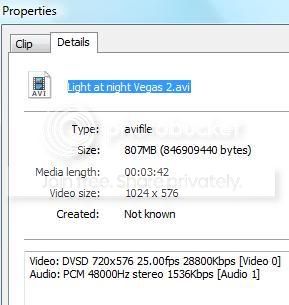
Dont know if this will help, this is on the properties when i right click on the media player for Picture 1.