


John Pilgrim
Forum Replies Created
-

John Pilgrim
October 7, 2014 at 6:48 am in reply to: convert left-handed camera position and rotation keyframes to right-handedWould that it were so easy!
The maths seem to be rather more complex than that:
https://answers.unity3d.com/storage/attachments/12048-lefthandedtorighthanded.pdf -
The XYZ color space (and it’s non-linear gamma-encoded cousin X’Y’Z’) encompasses color values that don’t even exist in the visible spectrum. “Imaginary” as well as actual visible colors. As such, it’s a better space for long term storage of color information, because display technology is rapidly progressing to reproduce more of the range of visible colors. By encoding in XYZ now, future displays that have gamuts larger than DCI-P3 or Rec2020 or what-have-you will not be limited by the color space limitations of the data being fed to them. The limitations of whatever acquisition tools were used will still be present, but XYZ provides the maximal gamut to allow future displays to reproduce as much color info as possible from that source. It’s a wide color pipe.
-
Indeed.
This is raw, unedited footage, which I have sync’ed up with the on-set logging data into a FCP7 bin XML.
I’m trying to understand Premiere’s metadata framework and how Premiere populates its metadata fields with the various FCP7 Master Comment etc fields when importing a FCP7 XML file containing clips in a bin.
I see this at https://helpx.adobe.com/premiere-pro/using/importing-xml-project-files-final.html#final_cut_pro_clip_data :
Clip data in the Description, Scene, ShotTake, and LogNote fields in Final Cut Pro appear in the clip metadata fields with the same names in Premiere Pro.
So I’m provisionally concluding that entries in the FCP7 Master Comment and Clip Comment fields are not imported, but I’d love for someone to prove this wrong.
—John
-
The Asus P9X79E-WS would seem to be a great mobo. I would have thought the BMD certified P9X79-Pro would still be available, but I’ll take your word that it’s not. The P9X79E-WS has PCIe switches that should help a lot with the 40-lane constraints of non-Dual-Xeon systems.
EDIT: What troubles were Resolve users having with the prior P9X79-WS?
EDIT2:
OK, I see the thread from 2012 https://forums.creativecow.net/thread/364/537The P9X79E-WS is quite different from the older P9X79-WS.
The older P9X79-WS only had the ability to provide one 16-lane PCIe slot.

The newer P9X79E-WS has a couple PLX-8747 PCIe switch chips that share the 16-lanes between two slots.
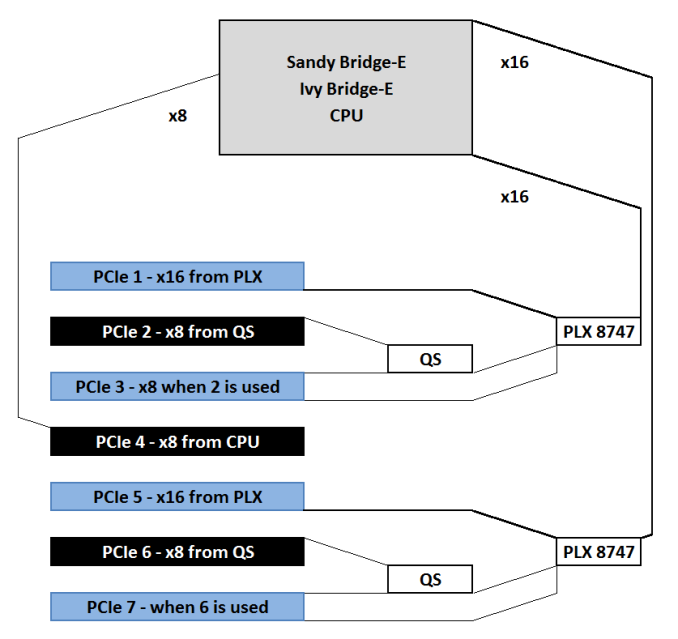
I have to admit I haven’t run Resolve on a P9X79E-WS system with this switching, but it stands to reason that it should be a significant improvement over the P9X79-WS. -
Quadro 4000 in Slot 1
GTX580 (actually now a Tesla 2070) in Slot 5
Per the manual, this gives 16-lanes for each slot.A Decklink Mini Monitor is in Slot 4, getting the remaining 8-lanes.
Asus P9X79-Pro:

A second GTX580 could go in Slot 3 (albeit with the removal of the Decklink Mini Monitor from Slot 4), but that would give both GTX580s only 8-lanes each—the 3card scenario in the graphic above.
I had meant to see what impact this would have on Standard Candle tests, but never got around to it.
My next system build will be a P9X79E-WS motherboard, which uses a PCIe switch chip to switch 16-lanes alternately between the two slots. Still not as good as a dual Xeon mobo which has enough PCIe lanes to dedicate 16 to each slot, but better than the P9X79-Pro situation. -
I just made a test project with two 4K Red clips in a 1920×1080 sequence.
The first clip I scaled with the PPro Motion effect.
The second clip I scaled with Scale to Frame Size.
The FXP XML export had a standard FCP xmeml XML “Basic Motion” effect for the clip with the Motion effect scaling where it belongs at XPATH
/xmeml/project[1]/children[1]/bin[7]/children[1]/sequence[1]/media[1]/video[1]/track[1]/clipitem[2]/filter[1]/effect[1]The clip with Scale to Frame Size had no “Basic Motion” effect in the FCP XML.
I will continue looking but on first perusal I couldn’t find anything in the FCP XML export that would indicate that the Scale to Frame Size clip should be scaled, which would make writing a scripting solution difficult/impossible.
EDIT: The Premiere prproj XML has an “ScaleToFramePolicy” attribute at XPATH
/PremiereData/VideoClip[572]/ScaleToFramePolicy[1]
that is set to 1 for the second clip. Interesting, but not much help for the FCP XML. -
I’m curious what Premiere is doing.
Having looked at the XML that Premiere produces with the Export FCP XML (“xmeml”) as well as the XML inside a Premiere prproj file (“PremiereData”)
I suspect they may be applying a XSLT transform to generate the FCP XML from Premiere’s own internal XML.
Matt, I’d love to look at the FCP XML that Premiere is exporting for you and see if there was a way to recover the lost transforms.
Let me know.
John -
John Pilgrim
June 14, 2013 at 6:07 am in reply to: prores clips with not extansion – Can’t read in Resolve“A Better Finder Rename” is another great mac utility that would make very very quick work of renaming the files. I’ve used it for years and it’s super helpful! There’s a windows version with a similar name as well.
-
John Pilgrim
June 11, 2013 at 9:09 pm in reply to: Best Process to export r3d trims from Premiere CS6First off, Premiere would seem to export the entire Premiere project in the XML, not a selected sequence.
Running the XML through FCP7 would be one solution to cleaning and extracting the sequence XML to send on to RedCine.
Another option would be to open the Premiere XML in a text editor and delete all the extra bins and irrelevant sequences. Takes a bit of understanding of XML but isn’t that hard.
Have you tried exporting an EDL of the sequence from Premiere and taking that into RedCine? -
Got it, problem solved!
Thank you Kyra!
John