Forum Replies Created

Page 7 of 38
  • John Bolton

    September 16, 2020 at 4:13 pm in reply to: Page turn effect

    Had another play…

    https://www.youtube.com/watch?v=x5E_G0yeKbg

    Think this may be a better way to do it..

    Some contents or functionalities here are not available due to your cookie preferences!

    This happens because the functionality/content marked as “Google Youtube” uses cookies that you choosed to keep disabled. In order to view this content or use this functionality, please enable cookies: click here to open your cookie preferences.

  • John Bolton

    September 15, 2020 at 7:59 am in reply to: Page turn effect

    Hi Francois

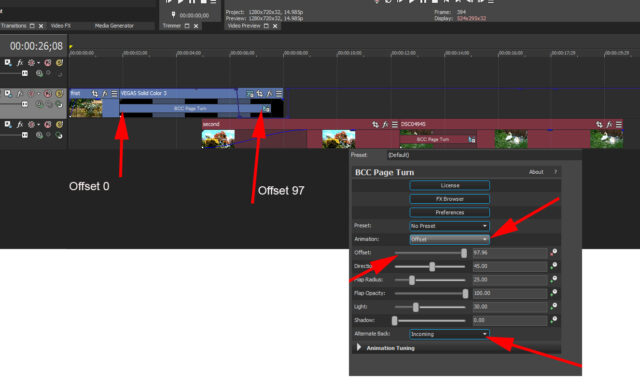
    After much experimenting, I then found out that the “Standard Page Turn FX” cannot work in Vegas as within a normal effect it cannot access secondary layers unless you can add it as a Custom Compositing Mode, but it does not appear if you click on custom.

    So the only way is to add it as a “Transition” and make your selection in there. So just drop the “Page Turn Transition” effect where each Media joins and then make the relevant adjustments.

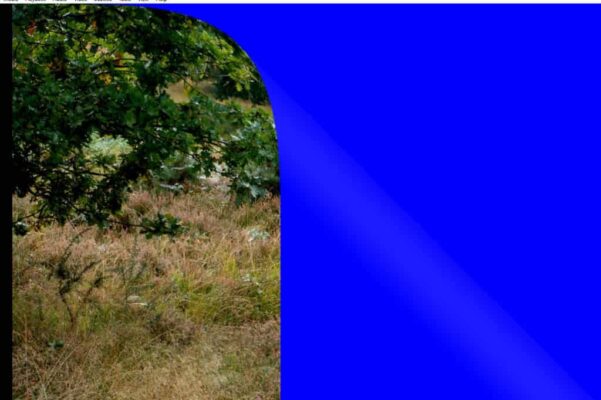
    You have to Change the “Animation” control from “Auto to Offset” else the Offset slider will be greyed out and then change the “Alternate back” to “incoming” which means that it will add the following image to the back of the previous one. If you select” Outgoing” you get the first Image on the reverse.

    Hope some of this makes sense 🙂

    I only did a quick experiment, so with more time no doubt it could be drastically improved.

    Hope the Picture helps,

    Regards

  • John Bolton

    September 14, 2020 at 4:20 pm in reply to: Page turn effect

    Sorry about the spelly DCC should of been BCC 🙁

  • John Bolton

    September 14, 2020 at 4:19 pm in reply to: Page turn effect

    Well here goes. Jono asked the question and like others looked into the issue with DCC page roll

    I am not sure if this is what he was looking for but this is the best I have discovered so far.

    If it is not what’s wanted then NP.

    If it is what is wanted that I will produce a Tut or it.

    There are 2 variants in this video as it plays…..

    Let me know

    <font face=”inherit” style=”font-family: inherit; font-size: inherit;”>I am hoping that the Youtube </font>Link<font face=”inherit” style=”font-family: inherit; font-size: inherit;”> works</font>

    https://www.youtube.com/watch?v=CiC0NeLADVE

    John

    Some contents or functionalities here are not available due to your cookie preferences!

    This happens because the functionality/content marked as “Google Youtube” uses cookies that you choosed to keep disabled. In order to view this content or use this functionality, please enable cookies: click here to open your cookie preferences.

  • John Bolton

    September 14, 2020 at 7:19 am in reply to: Page turn effect

    Can you add a Youtube Link?

  • John Bolton

    September 13, 2020 at 4:50 pm in reply to: Page turn effect

    Made a bit of progress. I have a video of how it is done,,,

    Cant see to how a Video Demo// Can’t you add Video on this New Creative Cow Version?

  • John Bolton

    September 12, 2020 at 5:22 pm in reply to: Page turn effect

    Can’t even find a tutorial on it. Have tried clicking Source and then the timeline under the one with the actual Page turn..and then click none and all the other permutations..

    Can’t be that difficult….. 🙁 but not sure what other permutations to try.

    It says Select the LAYER in the source timeline, but does not say which time line or what a LAYER is…

  • John Bolton

    September 12, 2020 at 10:39 am in reply to: Page turn effect

    Don’t know why it all went a bit weird

    Another try

    There is an Option in BBC Page Turn ( Roll ) that says…..The Alternate Back menu allows you to choose a layer in the timeline to apply to the back of the page turn. None applies the source layer to both sides of the page.

    If I click on the ALTERNATE BACK is says “Source”, but can’t find a way to select the (the New back ) from the timeline.. Guess I am missing something somewhere.. Any ideas?

  • John Bolton

    September 12, 2020 at 10:16 am in reply to: Page turn effect

    There is an Option in BBC Page Turn ( Roll ) that says…..The <strong style=”font-family: inherit; font-size: inherit;”>Alternate <strong style=”font-family: inherit; font-size: inherit;”>Back menu allows you to choose a layer in the timeline to apply to the back of the page turn. <em style=”font-family: inherit; font-size: inherit;”>None applies the source layer to both sides of the page.

    <font face=”inherit”>If I click on the ALTERNATE BACK </font>option<font face=”inherit”> is says “Source”, but can’t find a way to select the </font>source<font face=”inherit”> (the New back ) from the timeline.. Guess I am missing something somewhere.. Any ideas?</font>

  • John Bolton

    June 1, 2020 at 7:47 am in reply to: Unable to render vertical videos for Instagram

    HI, it looks like MainConcept AVC/ACC is disable in the Internal Preferences.

    So go to the Option settings at the top of the screen and the Hold Down the SHIFT key and select Preferences. You will now see an Additional tab called Internal. In the search box at the bottom type MAIN and then when you see that in the list change FALSE to TRUE

    You will now see that Option in the MainConcept render selection

Page 7 of 38

We use anonymous cookies to give you the best experience we can.
Our Privacy policy | GDPR Policy