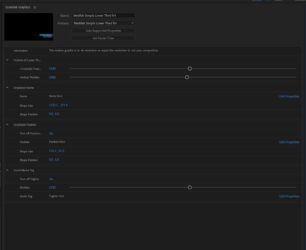
Hey Walter. Sorry about the delay in replying and the screenshot not coming thru.
Here is a new screenshot.
Basically the issue is that the ‘Edit Range’ text that is usually to the right of the slider in the Essential Graphics panel is completely missing. I have tried dragging the panel wider as you suggest but it makes no difference… it simply isn’t there! I have seen screenshots of other peoples Essential Graphics panels that shows the “Edit Range” option beside it but mine just doesn’t have it there!
Do you think this is a bug with After Effects?