Harold Batista
Forum Replies Created
-

Harold Batista
June 17, 2022 at 9:52 pm in reply to: Select Forward (Y) only grabbing selected layerTHANK YOU. If I turn on Auto Track Selector everything works as I’d hoped on the tracks that its toggled on. I still can’t select V1 and get a red box as I used to, but now sure what that was doing anyway. This will help me work the way I used to, many many thanks!
-
Harold Batista
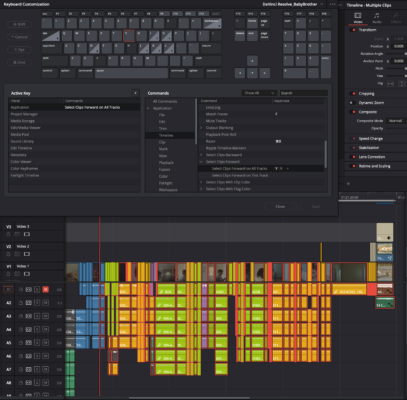
June 17, 2022 at 6:25 pm in reply to: Select Forward (Y) only grabbing selected layerI had tried all the modifiers and alt was not working (I assume because I am using a PC Kinesis keyboard on a Mac and the mapping is off), however I did go into Keyboard Customization and just assign the function to the Y key without modifiers and you can see that it is only selected clips on layer V1, and at that, only clips with linked audio. I don’t think this is a beta bug because it only selected linked clips in v17 as well. Any other ideas? See picture below:

-
Harold Batista
January 23, 2018 at 3:58 am in reply to: Strange Premiere artifacts with TIFFs and JPEGsFigured it out! Its fixed by opening the image in Photoshop and changing its Image Mode from Indexed Color to RGB 🙂
-
Harold Batista
January 23, 2018 at 1:40 am in reply to: Strange Premiere artifacts with TIFFs and JPEGsAny idea what it could be?
-
Harold Batista
January 19, 2018 at 6:17 pm in reply to: Strange Premiere artifacts with TIFFs and JPEGsThat’s what I thought at first. But if it were the sequence settings you would normally expect it to apply to all of the TIFFs and JPEGs right?
Here is the sequence settings, it shows that its set to square pixels. What do you think?

-
OK! That makes perfect sense; I thought both values stood for distance from the side of origin, as designated with the small arrows on the top left corner where you can choose what side of the composition to wipe from.
My guess as to why it worked on some clips is that I must have added the wipe to the beginning of some clips, and to the ending of others, thereby effectively reversing it by pulling it backwards over the clip.
Thank you so much for this help!
-
Well perhaps I misunderstood, but I thought that the way RAID systems worked is that when a file is written to one drive it is simultaneously written to another drive in case the first fails. Unless I’m missing something crucial, I do not understand why my question is misplaced.
-
Thanks was perfect, thanks!
-
Rafael,
If I understand correctly, all of the clips should be OK to go in one sequence except for the 1080i50 and 1080i60, both of which have strategies explained above for how to deal with, right?
I can send them all through ProRes (HQ) in compressor to edit then.
Thank you all!
-
I’m having some problems with the ProRes convert of the 25p, the image is pretty blurry and I’m getting glitches where the movement ‘sticks.’ Is there another way? Also, since I’m conforming to 23.98 in Cinema Tools, am I converting to ProRes just for the scaling?
I’m delivering on a Panasonic Projector (PT-AE4000)
The specs on the web read that its HDTV compatibility supports:
720 (750)/60p, 1,080 (1,125)/24p, 1,080 (1,125)/50i, 1,080 (1,125)/50p, 1,080 (1,125)/60i, 1,080 (1,125)/60pand another out is a Panasonic HDTV (TC-P46G10)
Which only lists that it supports TV scan lines up to 1080p, but no fps specs.